USE AND MAINTENANCE MANUAL
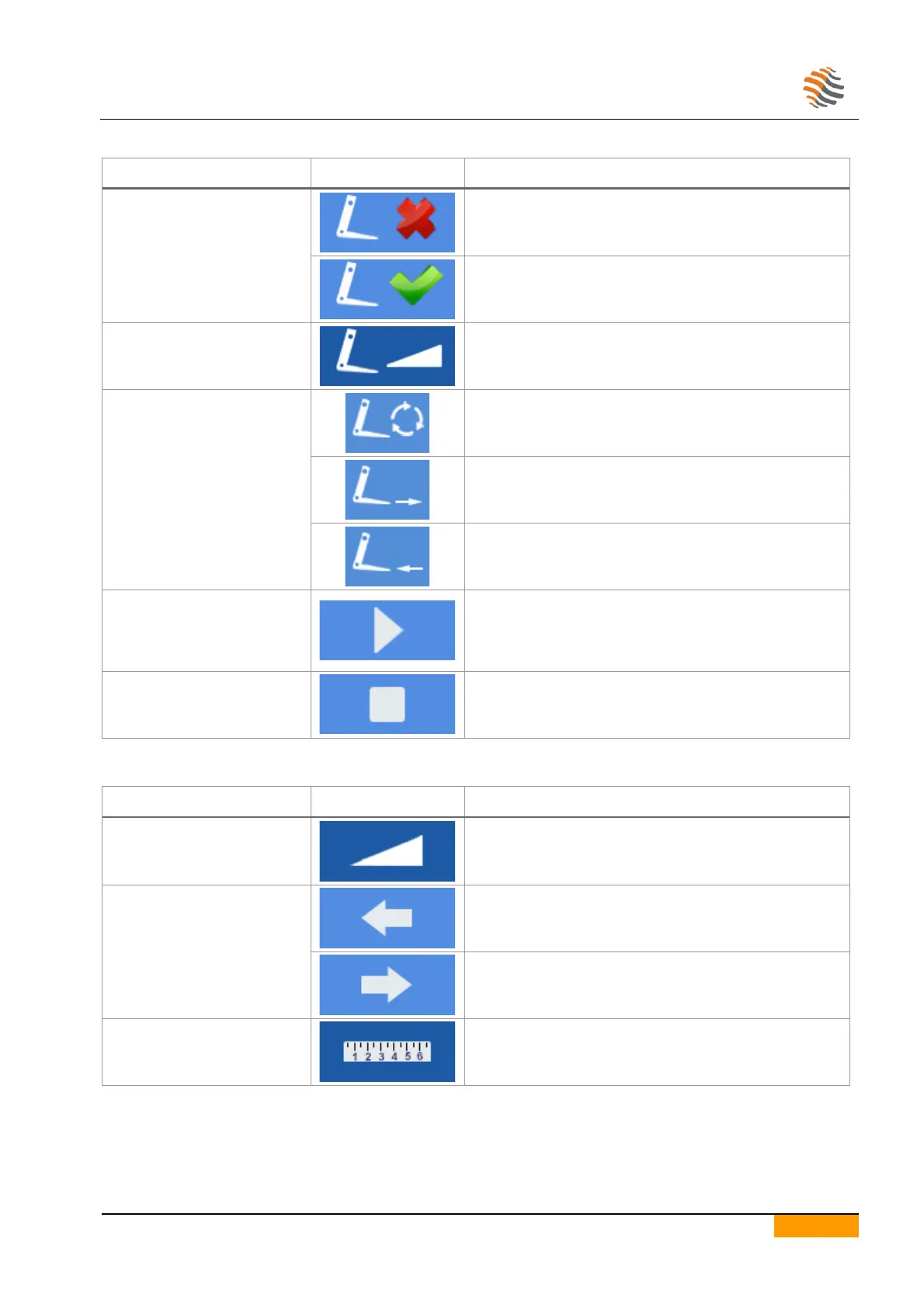
6.11.3. WIRE-CUTTING CONTROL ICONS
Enabling wire-cutting
commands
If selected, disables manual controls for wire-cutting.
The machine must not be in the start state.
If selected, enables the possibility of using manual
controls for wire cutting.
The machine must not be in the start state.
Speed of wire-cutting system
Wire-cutting operating
mode
Wire-cutting movement continuously until the start
command is pressed.
Wire-cutting stop forward.
Starts the wire-cut movement. Depending on the
operating mode chosen, it performs a complete cycle or
movement occurs as long as the button is pressed.
The machine in start state is required.
Stops the movement of the wire-cut.
6.11.4. TRAY ADVANCE CONTROL ICONS
Conveyor advancement speed.
As long as the button is pressed, the conveyor moves
forward.
The machine in start state is required.
As long as the button is pressed, the conveyor moves
backwards.
The machine in start state is required.
Indicates the position of the belt expressed in mm.


 To Next Page