EasyManua.ls Logo

Minelab GPX-4500 - User Manual

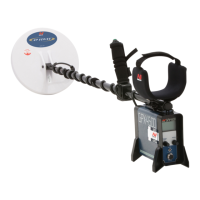
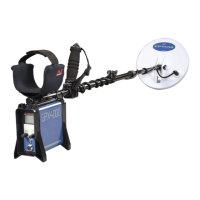
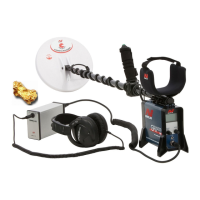
Minelab GPX-4500
55 pages
Print Icon
To Next Page IconTo Next Page
Loading...
Instruction Manual
Quick Start
Set the front panel switches to the following positions:
Threshold
Auto Tune
Ground
Balance
Tracking
Fixed
Threshold
On/Off
Hold for FP
Push and release the On/Off switch on the rear
control panel (pg. 25).
Turn the Threshold (pg. 34) control clockwise until a hum
is audible through the headphones.
Raise the coil off the ground and Press the Auto Tune
(pg. 33) button to reduce electrical interference. The
tuning process takes approximately 60 seconds. Do not
move the coil or pass metal objects near the coil during
the tuning process.
Whilst lowering and raising the coil between 25mm and
100mm (1" and 4") from the ground, change the Ground
Balance switch to Tracking (pg. 40). Any variations in the
Threshold will smooth out within 3–5 seconds.
Adjust the Threshold (pg. 34) to a very faint but still
audible level. It should be smooth with only minor
fluctuations.
You are now ready to start searching!

Search
Mode
Soil /
Timings
Ground
Balance
Coil /
Rx
CancelTrackingSpecialDeep
Custom Enhance Fixed Double D
MNG

Table of Contents

Questions and Answers

  • S
    Shannon JensenJul 26, 2025
    Why won't my Minelab GPX-4500 Metal Detector battery charge?
    • B
      Bryan ColonJul 26, 2025
      If your Minelab Metal Detector battery won't charge, check that the accessories socket is receiving power using a vehicle charger. Also, inspect the fuse in the 12V charger plug (M205–5A).
  • K
    Kim FisherJul 31, 2025
    How to fix no sound on my Minelab GPX-4500 Metal Detector?
    • S
      smarquezJul 31, 2025
      If your Minelab Metal Detector has no sound, first ensure the detector is powered on by checking the battery, power cable, connections, and LCD. Then, turn the Threshold control fully clockwise and set the Volume Limit to the maximum (40). Verify that the headphones are correctly plugged in. If the issue persists, try a different set of headphones or battery.
  • K
    Katelyn KeyAug 5, 2025
    What to do if 'Coil Overcurrent' screen appears on Minelab Metal Detector?
    • W
      William PughAug 5, 2025
      If your Minelab Metal Detector displays a 'Coil Overcurrent' screen, turn the detector off. Wait a few seconds, and then turn it back on again.
  • H
    heididunnAug 10, 2025
    How to stop random noise on Minelab GPX-4500?
    • I
      Ian BennettAug 11, 2025
      If your Minelab Metal Detector is producing random noise, try to Ground Balance again. If the issue continues, re-tune using the Auto Tune button. Set the Coil/Rx switch to Cancel, and reduce the Gain. Also, move away from other detectors working nearby or thunderstorm build-up.
  • M
    Megan RobertsonAug 16, 2025
    What to do if Minelab GPX-4500 Metal Detector battery is not holding charge?
    • A
      afordAug 16, 2025
      If the battery on your Minelab Metal Detector is not holding a charge, try using an alternative charger adapter. If the problem persists, consider replacing the battery.
  • S
    sotoannAug 20, 2025
    Why is my Minelab Metal Detector giving threshold but no target signal?
    • L
      lbrownAug 20, 2025
      If you are getting a threshold sound but no target signal on your Minelab Metal Detector, try testing different coils with a known target.

Summary

Quick Start Guide

Introducing the GPX-4500

Functions Overview

Details the various functions and features of the GPX-4500 metal detector.

List of Parts

Detector Assembly

Attaching the Coil to the Lower Shaft

Instructions for connecting the search coil to the lower shaft of the detector.

Attaching the Lower Shaft to the Upper Shaft

Steps for connecting the lower and upper shaft sections of the detector.

Attaching the Handle to the Upper Shaft

Procedure for mounting the detector handle onto the upper shaft.

Attaching the Armrest to the Upper Shaft

Guide for attaching the armrest components to the detector's upper shaft.

Attaching the Armrest Strap to the Armrest

Instructions on how to attach the armrest straps for comfort and stability.

Connecting the Control Box to the Upper Shaft

Steps for securely mounting the control box onto the detector's upper shaft.

Connecting the Coil Cable

Procedure for connecting the search coil cable to the control box.

Connecting the Battery Pack

Guide on how to connect the detector's battery pack.

Adjusting Detector for Comfortable Use

Charging the Battery

Taking Care of Your Battery

Detecting Basics

Detector Sounds Explained

Understanding the different sounds produced by the detector during operation.

Front Control Panel Overview

Rear Control Panel Overview

Search Mode Selection

Tune Function

Auto Tune Procedure

Step-by-step guide for performing an automatic tune to find the quietest channel.

Threshold Adjustment

Soil;Timings Optimization

Optimizing for Soil and Target Types

How to use Soil/Timings to improve performance based on ground and target.

Ground Balance

Ground Balance Procedure for Tracking

Ground Balance Procedure for Fixed

Coil;Rx Settings

Changing Transmit and Receive Fields

How to adjust coil transmit and receive fields for optimal performance.

Resetting Factory Presets

Volume Limit

Ground Balance Type Selection

Ground Balance Procedure for Specific

Special Soil;Timings

Manual Tune for Interference Reduction

Changing Search Modes

Motion Settings

Rx Gain Adjustment

Audio Type Selection

Audio Tone Adjustment

Stabilizer Function

Target Volume Control

Response Setting

Tracking Speed

Iron Reject Function

Rejecting Ferrous Targets

How to use Iron Reject to discriminate against ferrous (iron) targets.

Pinpointing Targets

Locating the Target Accurately

Techniques for precisely locating buried targets to minimize excavation.

Recovering Buried Targets

Choosing the Right Coil

Troubleshooting Guide

Taking Care of Your Detector

Technical Specifications

Warranty Information

Service Repair Form

Minelab GPX-4500 Specifications

General IconGeneral
Search ModesGeneral, Deep, Custom
Battery LifeUp to 12 hours
Ground BalanceAutomatic and Manual
DisplayLCD
TechnologyMPS, DVT, SETA
Coil11" Double-D Coil
Audio OutputInternal speaker, headphone jack
BatteryLithium-ion
WaterproofCoil is waterproof
Warranty3 years

Related product manuals