- 9 -
MINGDA TECHNOLOGY CO.,LTD
www.md-3d.com
Cura Overview
Take the version Cura_15.02.1 and Windows 7 as an example to illustrate the Cura software settings.
1. Add new machine
1) Start Cura
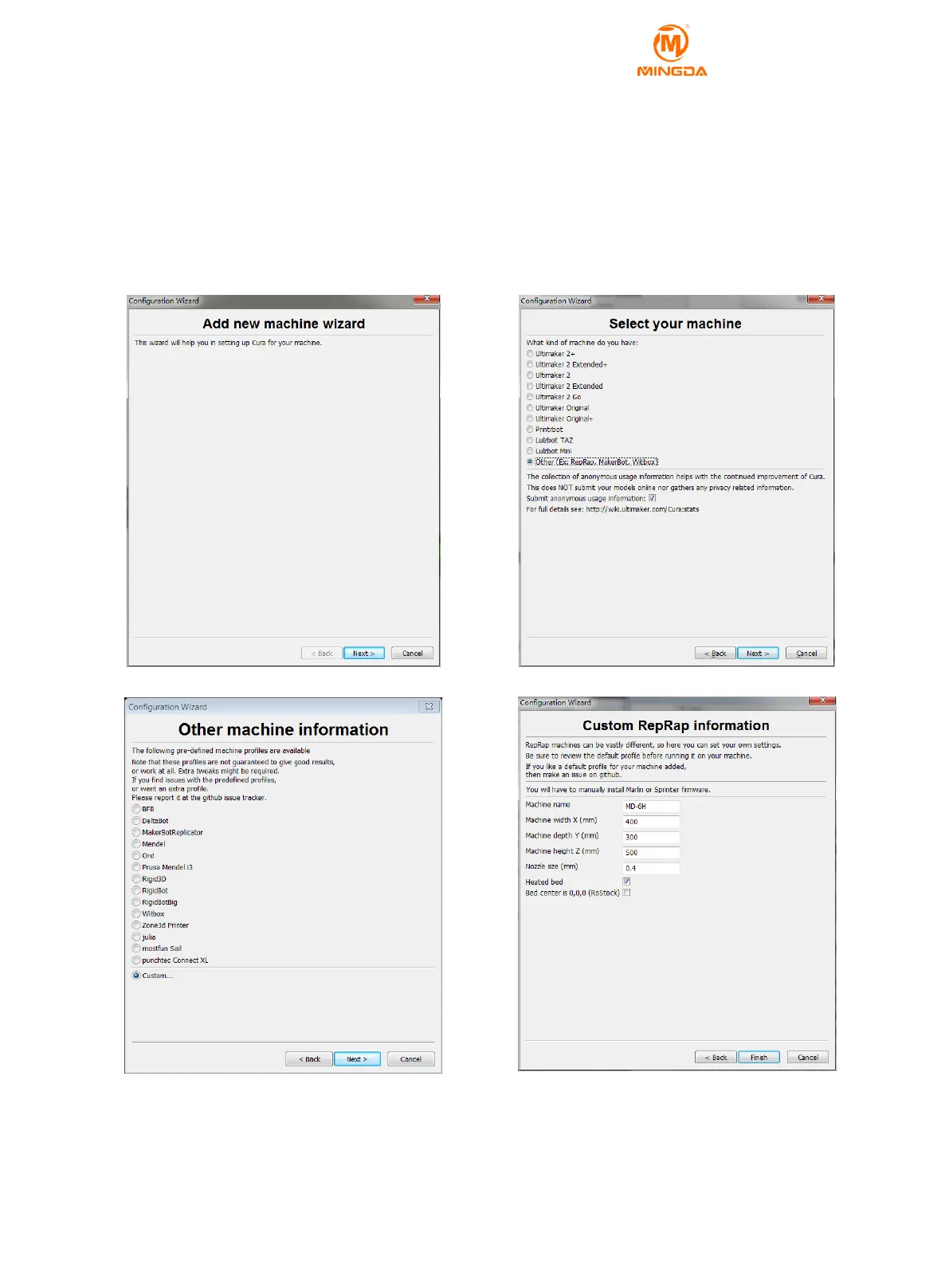
2) Click on "machine" - "add new machine."
3) Take “MD-6H” as an example, set as follows. The "model name" can be arbitrarily set, for example, set to
"MD-6H", the width is set to 400 mm, the depth is set to 300 mm, and the height is set to 500 mm. The nozzle size
is set to 0.4mm, select the hot bed, do not select the platform center.
2. Basic Set up
1) Layer height: The height of each layer is the important parameter that determines the quality of side and
printing time. The setting range is 0.05-0.3, the high quality setting is 0.1, and the medium quality setting is 0.2.
2) Shell Thickness: The thickness of the outer wall of the side of the model is set to an integral multiple of the



 To Next Page