User Manual
Models: SC40T, SC40TNF, SC60T, and SC60TNF
2023 Page 5
Temperature Regulation
• The operating temperature of the SmartCube is subject to many factors: the correct and level
installation, proper ventilation, the internal product load, etc.
• The temperature control box is factory set for optimum performance for the SmartCube.
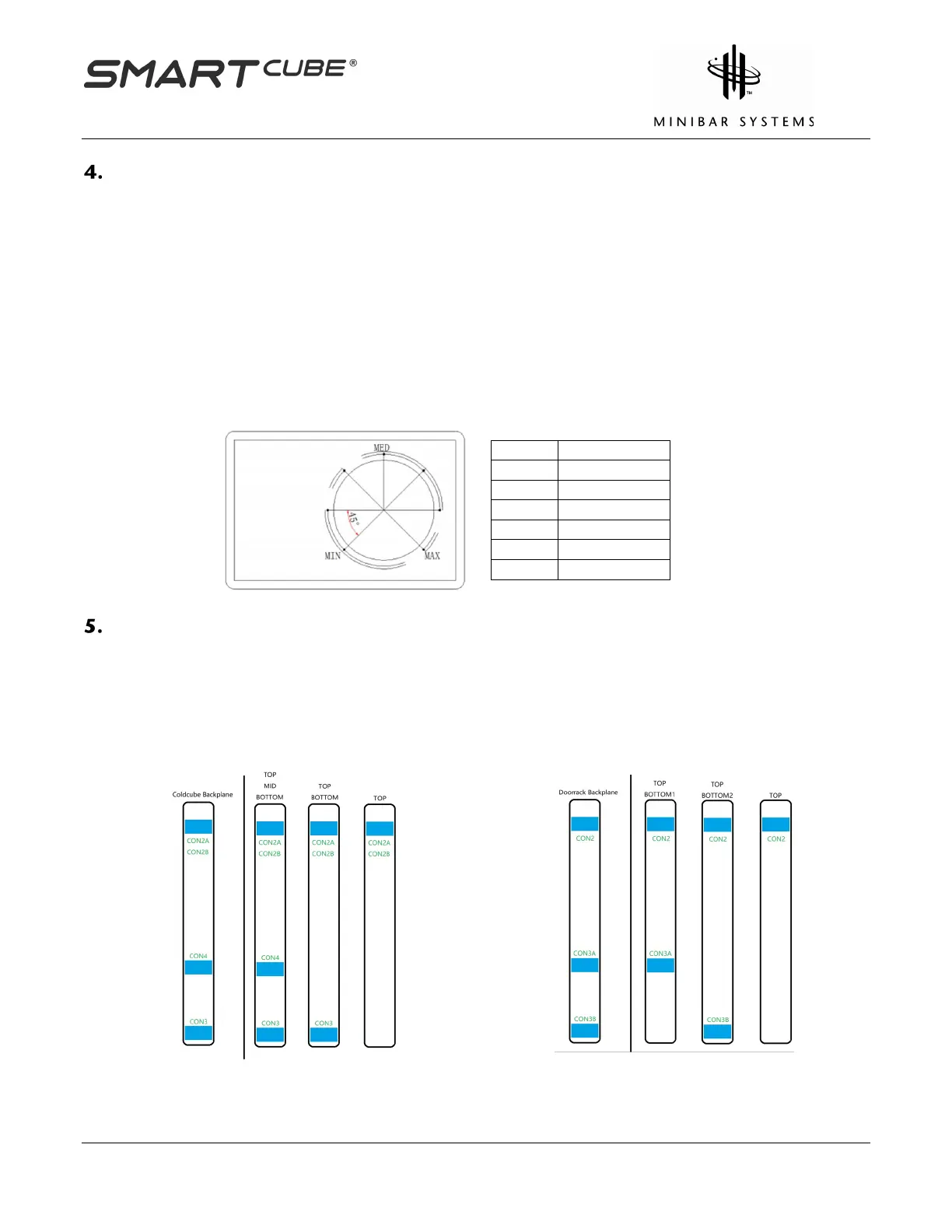
• For cooling adjustment, the temperature control box can be reset by moving the dial on the
unit – see the Temperature Adjustment Diagram below.
• The box is positioned on the back of the SmartCube.
• The cooling cycle has automatic defrost every 24 hours.
Temperature Adjustment Diagram
The factory setting can be adjusted by rotating the dial.
MAX is for maximum cooling.
SmartCube Sensor Shelf Configuration
SmartCube has interior sensor shelves for both the coldcube backplane and the door rack
backplane. There are three possible shelf configurations for both the coldcube and the door rack
backplanes. Please note that a sensor shelf is required in the top locations of the door and cold
cube.
Coldcube Shelf Configurations
Door rack Shelf Configurations
1.
2. TOP - BOTTOM
1.
2. TOP - BOTTOM2



 To Next Page