OPERATION
§4.3 Installation & Operation for MIG Welding
§4.3.1 Set up installation for MIG Welding- Gas shielded wire
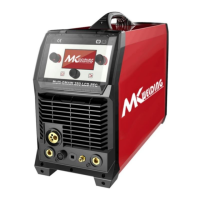
(1) Insert the earth cable plug into the negative socket on the front of the machine and
tighten it.
(2) Plug the welding torch into the MIG torch connection socket on the front panel and
tighten it.
IMPORTANT : When connecting the torch be sure to tighten the connection. A loose
connection can result in the connector arcing and damaging the machine and gun connector.
(3) Connect the water inlet and outlet pipe of MIG Gun to the water inlet and outlet
connectors on the front of the cooling water .
(4) Connect the MIG power connection lead to the positive welding power output socket.
Note if this connection is not made, there will be no electrical connection to the welding torch!
(5) Connect the control cable of cooling water with the aero socket on the rear panel.
(6) Connect the gas regulator to the Gas Cylinder and connect the gas line to the Gas
Regulator. Check for Leaks!
(7) Connect the gas line to gas connector on the rear panel. Check for Leaks!
(8) Connect the power cable of welding machine with the output switch in electric box on
site.
NOTE: Air cooling mode without cooling device,and the water pipe is not needed for the
air cooling mode.
(9) Place the Wire Spool onto the Spool Holder. Snip the wire from the spool being sure to
10k ohm (maximum) connection to 10k ohm remote control
potentiometer
Zero ohm (minimum) connection to 10k ohm remote control
potentiometer
Wiper arm connection to 10k ohm remote control potentiometer



 To Next Page