Operating the unit
38 Operating instructions
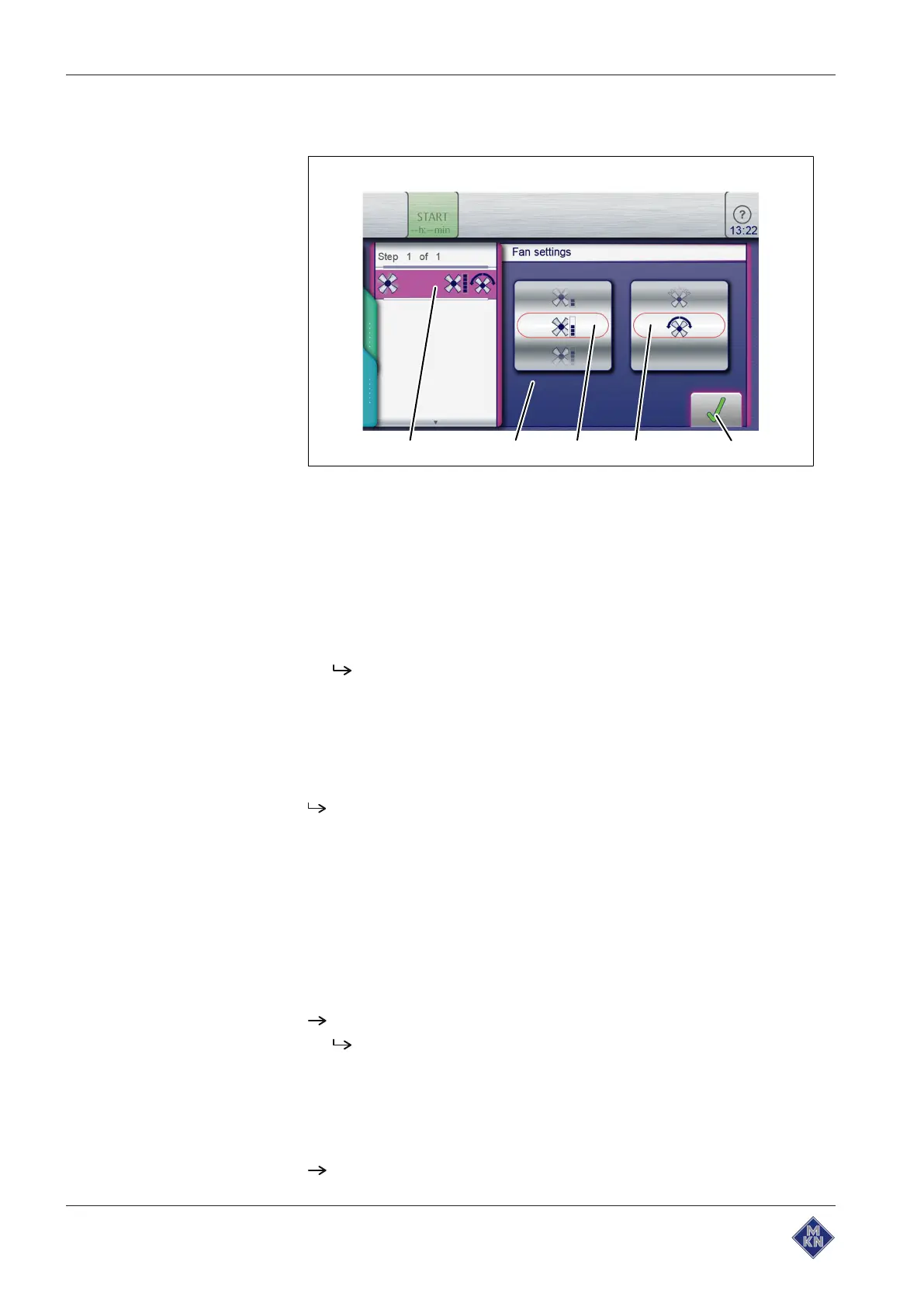
5.6.4 Setting the fan speed and direction of rotation
Image: Setting the fan speed and direction of rotation
a
Fan setting
field d
Fan rotation direction
roller
b
Setting
window e
Confirm
button
c
Fan speed
roller
Requirement
Cooking program selected
1. Tap the
Fan setting
field.
The Setting window opens.
2. Using a wiping gesture, set the
Fan speed
roller to the desired
value.
3. Using a wiping gesture, set the
Fan rotation direction
roller to the
desired value.
4. Tap the
Confirm
button.
The fan speed and fan rotation direction are set.
5.6.5 Inserting and removing a USB flash drive
Inserting a USB flash drive
Requirement
USB flash drive with a minimum of 2 GB and maximum of 32 GB
available storage capacity (not included with delivery)
USB flash drive not write-protected
Insert the USB flash drive.
The USB flash drive is ready after at most 20 seconds.
Removing the USB flash drive
Requirement
Exporting or importing of data completed
Remove the USB flash drive.
10015160-0ABBE--



 To Next Page