IG7600 Administration Manual
Copyright 2013 Tecom, Co. LTD. All rights reserved Page 72 of 72
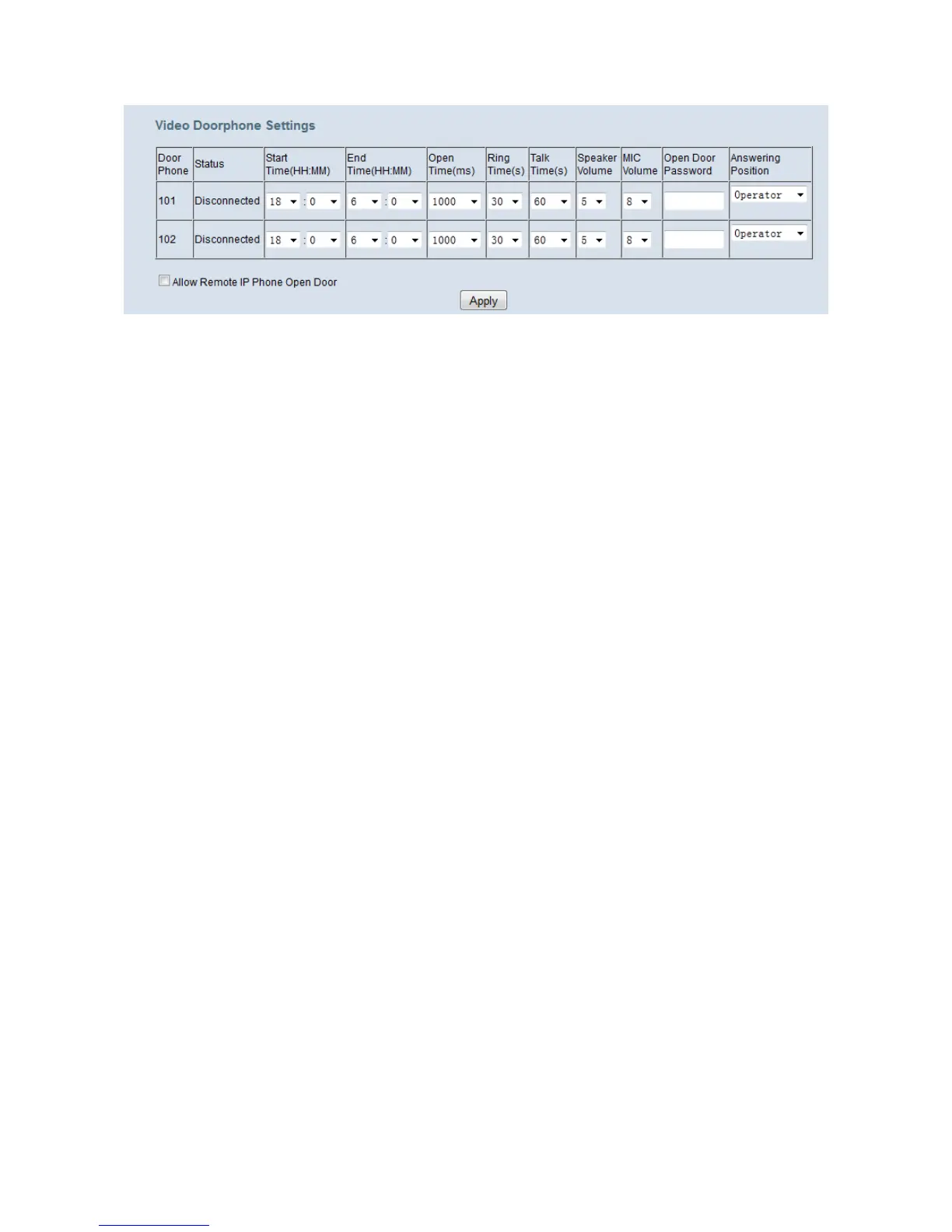
Figure 6-47. Voice – Phone – Door Settings
Door Phone: Door Phone Numbers.
Status: Door Phone Status(Disconnected/Closed/Opened)
Start Time/ End Time: During this period Door Phone should turn on its LED light.
Open Time: This is the time that door phone delays before open the door when receiving
an open door request.
Ring Time: When a call is not answered after this time. The ringing will stop
automatically.
Talk Time: When a call is answered and is last for 60(Default value) seconds. The call
will be cut off by the IG.
Speaker/ MIC Volume: Volume of door phone’s speaker and microphone can be
modified here.
Open Door Password: This password is used when user wanted to open door.
Answer Position: Here is to set the answer position of a door phone call, any call from
this door phone will be answered by the destination you’ve set.
Allow Remote IP Phone Open Door: If you want to open door on remote IPP you
should enable the function first which is disabled by default, this checkbox is for you to
enable it.



 To Next Page