16
Version 1.0
11/14/2023
STF-Multi axis Series Hardware Manual
400-820-9661
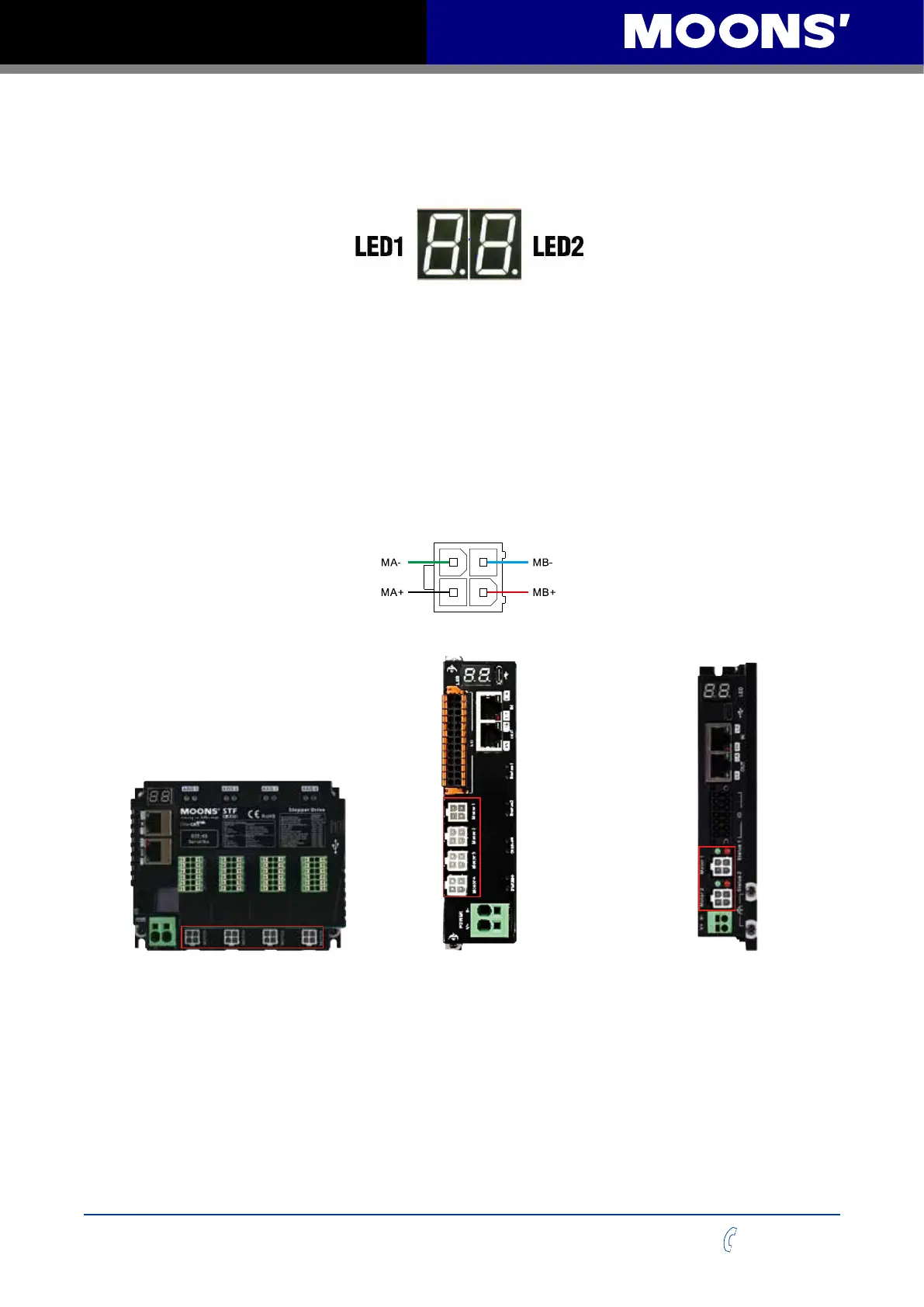
2.6 LED panel display
The STF multi-axis series drives have two 7-segment digital tubes, LED1 and LED2, for displaying
the EtherCAT address.
When the drive is operating normally, the 7-segment digital tube displays the drive EtherCAT
address (Physical Address or EtherCAT ID).
2.7 Connect to the motor
Connect the motor outlet to the motor connector of the driver.
Note: Do not damage or pull the motor outlet line, and do not make the outlet line bear too much
force (such as pulling the line to carry the motor), placed under a heavy object or caught.
If you use MOONS’ Step motor, please connect the black, green, red and blue wires to MA+, MA-,
MB+, MB- of the driver in turn.
11
2
33
4
Motor connector on the driver
Motor connector on the driver*4 Motor connector on the driver*4 Motor connector on the driver*2
STF05/10-4X-ECX
STF05/10-4X-ECX-S
STF05/10-4XU-ECX
STF05/10-4XU-ECX-S
STF05/10-2XU-ECX
STF05/10-2XU-ECX-S
If you are using a stepper motor other than MOONS’, please refer to the wiring information in their
motor specication book to connect the motor to the drive.



 To Next Page