16
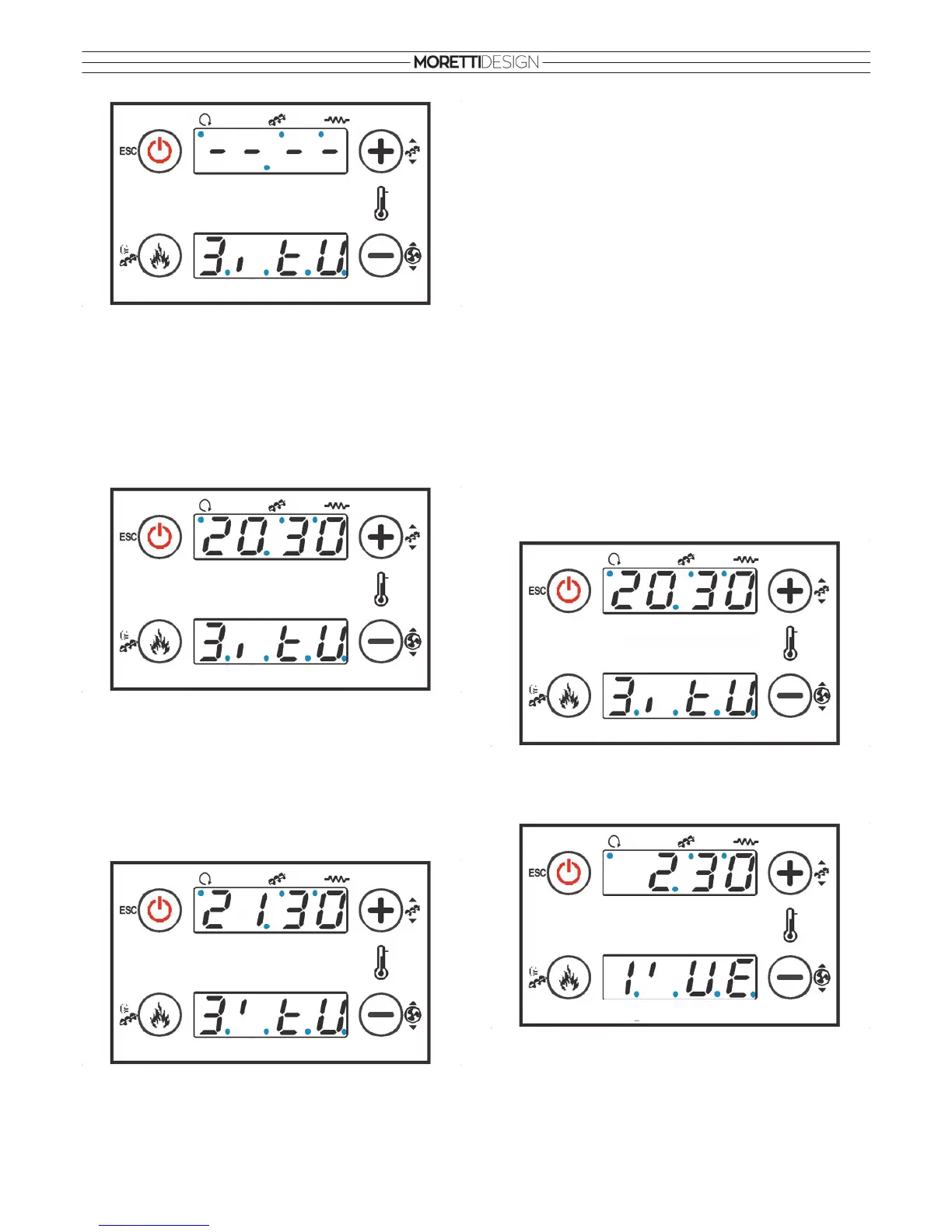
Example: 3 (third time frame),
I
(starting time), tU (tuesday)
To set the time frame it is necessary to select a time frame like the
example above with the starting time
I
: Press and hold P1 until 00.00
appears on the top display. Press the P3 button so that the first two 00
start flashing and select the hour with P2/P4. Press again P3 so that the
last 00 start flashing and select the minutes with P2/P4. Press P3 to
confirm. To exit/go back press the P1 button.
The starting time now has been set and the top display shows (example:
20:30):
In order to complete the procedure it is necessary to select the next time
frame with the stop time
I
just like the example below: Press and hold the
P1 button unilt 00.00 appears on the top display. Press the P3 button so
that the first two 00 start flashing and select the hour with P2/P4.
Press again P3 so that the last 00 start flashing and select the
minutes with P2/P4. Press P3 to confirm. To exit/go back press the P1
button.
The turn off time now has been set and the top display shows (example:
21:30):
To deactivate the time frame, press and hold P1 so that - - - - appears on
the top display.
In the Daily program it is possible to set 3 time frames for every single
day of the week: Mo (monday), tU (tuesday), WE (wednesday), tH
(thursday), Fr (friday), SA (saturday), Su (sunday).
Make sure that in Modality (ModE) the item Gior (Daily) has been
selected.
Weekly
Select SEtt and press the P3 button to enter. With the P2/P4 buttons it is
possible to select one of the programmed time frames. The procedure to
set and program the time frames is the same as the Daily one. In the
Weekly program it is possible to set 3 time frames that repeat
themselves for all days of the week MS (from monday to sunday).
Make sure that in Modality (ModE) the item SEtt (Weekly) has been
selected.
Week End
Select FiSE and press the P3 button to enter. With the P2/P4 buttons it
is possible to select one of the programmed time frames. The procedure
to set and program the time frames is the same as the Daily one. In the
Week End program it is possible to set 3 time frames that repeat
themselves for all days of the two selectable group of days MF (from
monday to friday) or SS (from saturday to sunday).
Make sure that in Modality (ModE) the item FiSE (Week End) has been
selected.
Programming through the Midnight
Set the desired starting time of the previous day (Example: 20:30).
Set the turn off time for the previous day at 23:59. Set the starting time of
the next day at 00:00. Set the desired turn off time for the next day
(Example: 2:30).
The stove will turn on at 20:30 of the tuesday and turn off at 2:30 the
next wednesday.
THE EMERGENCY CONTROL PANEL SHOULD BE CONSIDERED
AS AN EMERGENCY DEVICE AND ITS USE IS RECOMMENDED
ONLY IN CASE THE DISPLAY RADIO MALFUNCTIONS OR HAS A
FLAT BATTERY.
DEACTIVATED TIME FRAME
START DAY
FRAME
SET TIME
START DAY
FRAME
SET TIME
FRAME DAY
STOP
SET TIME
START DAY
FRAME
SET TIME
FRAME DAY
STOP



 To Next Page