Page29SYSTEM
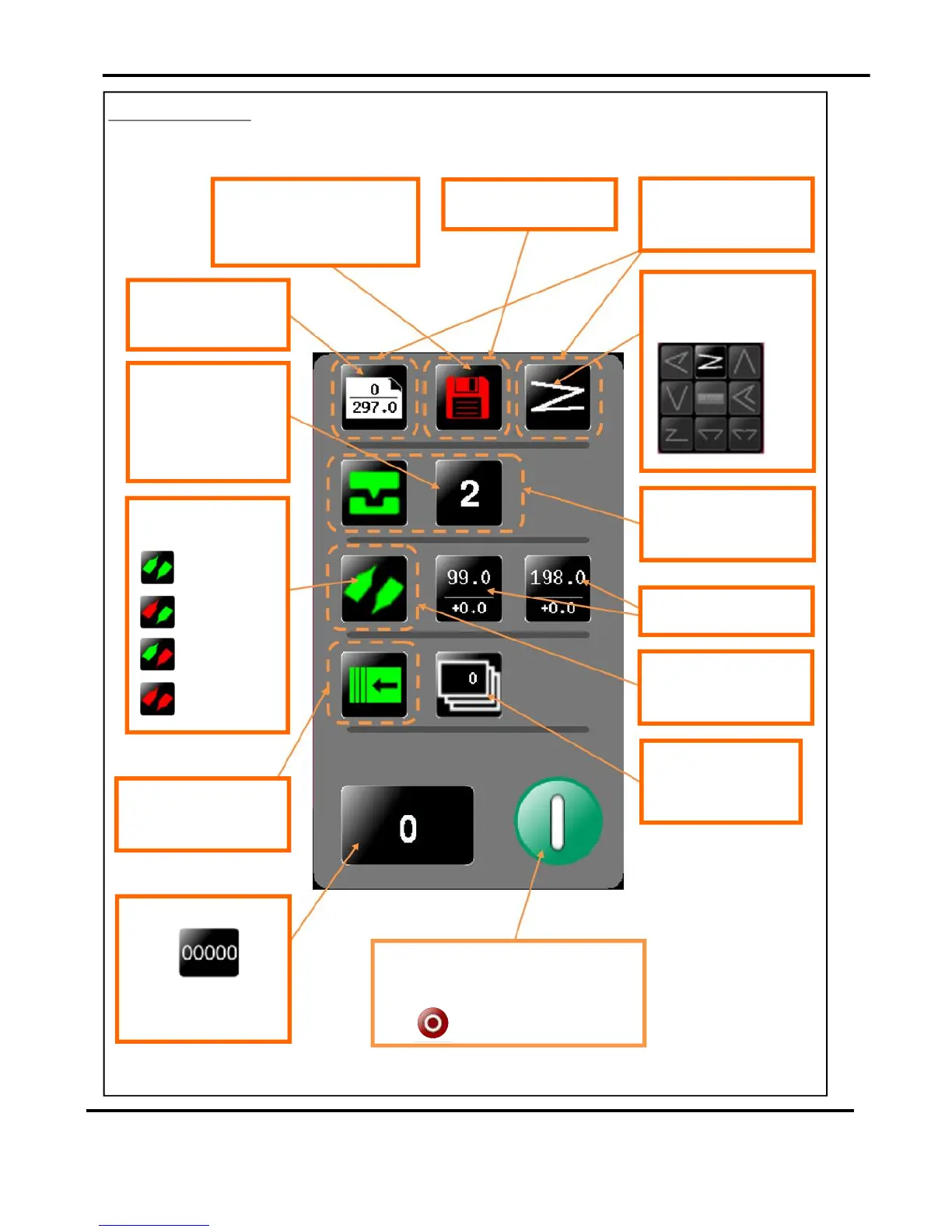
StatusScreen.
Currentlyselectedfoldtype
-canbeoneofthe
following.
Clickinginthisareawilltake
youtothecreasesetting
page.
Clickinginthisareawilltake
youtothestorepage
Clickinginthisareawilltake
youtothepapersetting
page.
Greeniconindicatessettingsare
saved-arediconwouldshowthat
settingshavechangedbut
thejobhasnotbeensaved.
Paperlength&Paper
Type-inputfromthe
papersettingscreen.
Numberofcreases-this
mayalterautomaticallyif
apre-definedfoldis
selected.Adjustments
maybemadeinthe
creasesettingscreen.
Indicatorforstatusof
knives.
K1&K2On.
K1Off&K2On
K1On&K2Off
K1&K2Off
Clickinginthisareawilltake
youtothedeliverysetting
page.
Clickinginthisareawilltake
youtotheFoldsetting
page.
FoldPositions&Trim
settings
Batchquantity-thisis
inputfromthebatch
calculatoronthepaper
settingscreen-max.999
Currentjobcount-clickto
zero
Ascreenwillappearto
confirmthatyouwantto
resetthecount.
Clicktostartmachinewithsettingscurrently
shown-youwillreceiveanotificationif
systemswitchisnoton.Pressagaintostop
Job
DigiFoldPro
OperatingtheDigiFoldPro



 To Next Page