Chapter 3
Getting Started
This chapter provides instructions on how to prepare your radio for use.
3.1
Charging the Battery
Your radio is powered by a Lithium-Ion (Li-Ion) battery.
Prerequisites: Turn off your radio when charging.
Procedure:
● To comply with warranty terms and avoid damages, charge the battery using an authorized charger.
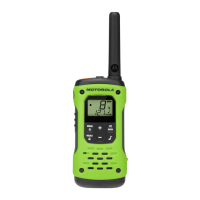
Figure 2: Charging through Single-Unit Charger (SUC)
Figure 3: Charging through USB-C Connector
MN010576A01-AA
Chapter 3: Getting Started
12







 To Next Page