9
Getting started
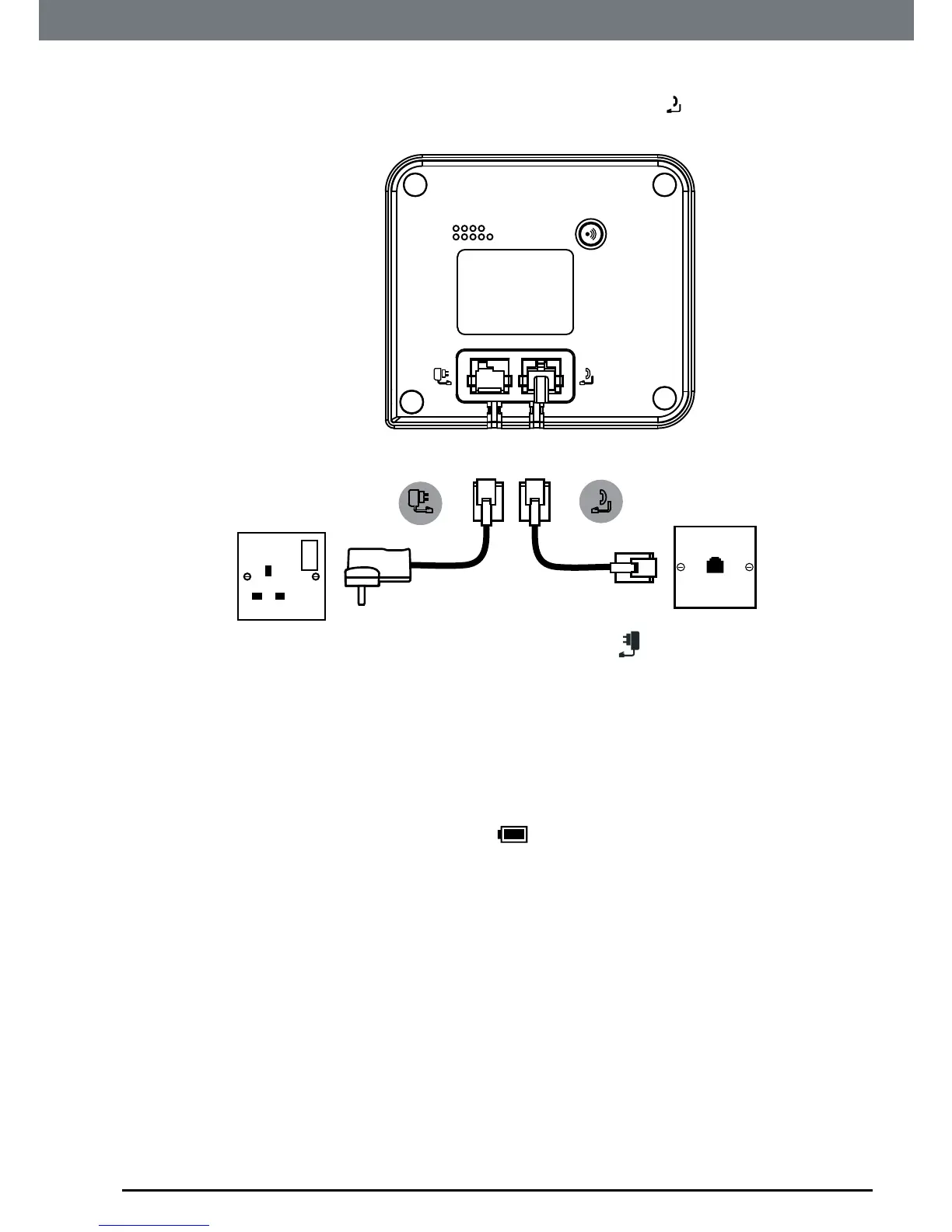
Connecting the base
1. Plugthetelephonelinecordintothesocketmarked ontheunderside
ofthebase.
2. Plugthepoweradaptorintothesocketmarked
ontheundersideof
thebaseandplugtheotherendintothemainspowerwallsocket.Switch
onthemainspower.
Charging the handset
1. Ifyouarechargingthebatteryforthersttime,placethehandsetonthe
basetochargeforatleast24hourscontinuously.
2. Whenthehandsetisfullycharged,
iconwillappearsteadyonthe
display.Plugtheotherendofthetelephonelinecord(makesurethatone
endisalreadypluggedintothebase)intothetelephonewallsocket.
NOTE
You cannot access the battery in the handset. Do not attempt to remove the
battery, as you may damage the phone. If you need to replace the battery,
contact customer service helpline found in this user guide.


 To Next Page
 Loading...








