CUEMIX FX
43
THE MIXES TAB
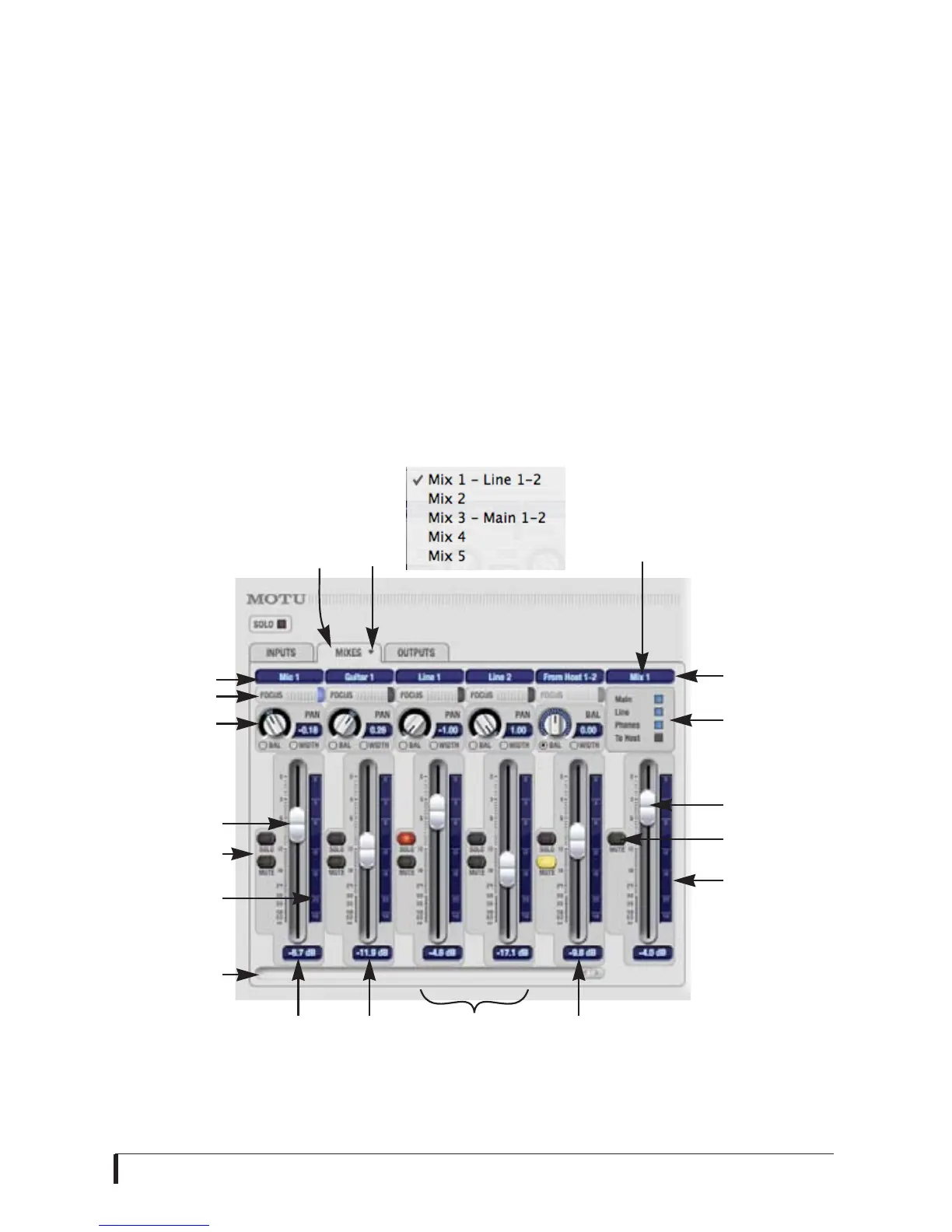
Click the Mixes tab (Figure 7-3) to gain
access to the MicroBook’s five stereo mix
busses. The Mixes tab displays one mix
bus at a time: choose each mix from the
Mix bus menu in the tab itself. Each fader
represents an input to the mix, except the
fader on the right, which is the master
fader for the mix. To assign each mix to a
MicroBook output, visit the Outputs tab.
From Host 1-2
Inputs consist of physical inputs on the
MicroBook interface (mic, guitar, etc.),
but there is also a stereo input channel for
From Host 1-2. This is the audio playing
from your host audio software. By
bringing up this fader, you can combine
live inputs (mic, guitar, and line 1-2) with
any audio from the computer.
Stereo grouping
The input channel strips in the Mixes tab
can represent either a mono input
channel or a stereo pair. This is controlled
by their grouping in the Inputs tab. So if
you want to change the configuration
from mono to stereo, or vice versa, do so
using the Mono/Stereo buttons in the
Inputs tab (Figure 7-2).
Figure 7-3: The Mixes tab.
Mix bus 1
master
fader
Mic
input
Line inputs 3-4
(ungrouped
as mono inputs)
Mixes
tab
Input name
Channel focus
Input pan
section
Input fader
Scroll bar for
input channels
Bus name
Bus fader
Bus mute
Bus level meter
Input
mute/solo
Input level
meter
Mix
bus
menu
Guitar
input
Host
computer
audio
Currently
assigned outs














 To Next Page