CHAPTER
7
Quick Reference: CueMix FX
Launch CueMix FX (in your Mac Applications folder or in the Windows Start menu
under Programs>MOTU>CueMix FX) to control the MicroBook. This chapter gives
you a quick overview. For further details, see chapter 7, “CueMix FX” (page 39).
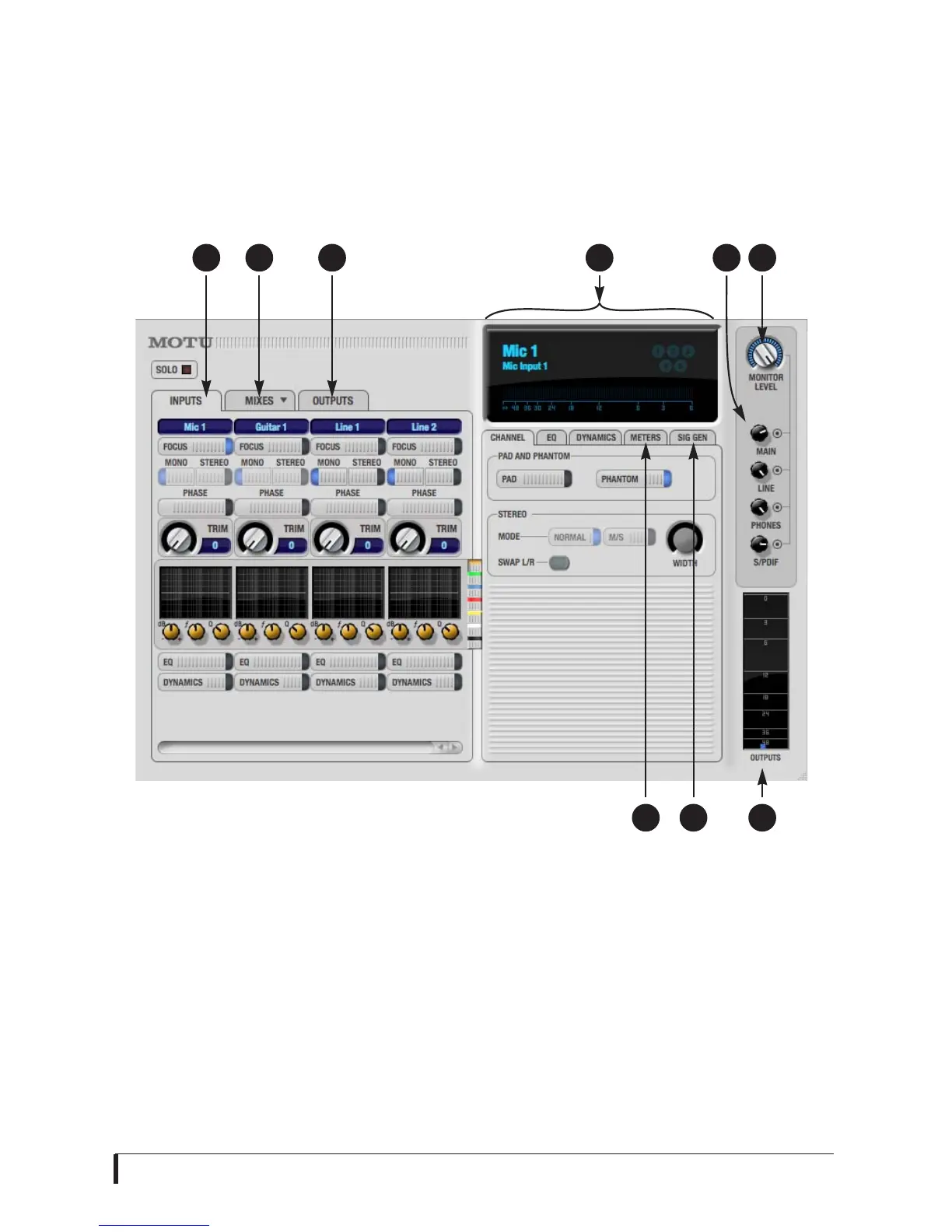
1. Input settings include trim
level, mono/stereo toggle, EQ
and dynamics. For more input
settings (pad, phantom power,
etc.) click the Focus button and
go to the Channel tab.
2. The MicroBook provides five
different stereo mix busses.
Use the Mix tab to mix sources
(inputs, host computer audio,
etc.) for each mix bus. See
“The Mixes tab” on page 43.
3. Output settings include
choosing what you will hear
on each output (a mix bus,
inputs, host computer audio,
or a signal generator
), EQ, and dynamics. See the
next page, or “The Outputs
tab” on page 44 for more info.
4. Click a focus button (in the
Inputs, Outputs, or Mixes tabs)
to view individual channel
settings here in the Channel,
EQ and D
namics tabs.
5. Control the volume of the
MicroBook’s outputs here.
6. Assign outputs to the Monitor
group (via the buttons) and
control them all here.
7. Monitor Group metering.
8. Signal Generator tab provides
settings for white/pink noise
and a sine wave generator.
9. Meters for all ins/outs/busses.
651 32 4
789














 To Next Page