WINDOWS AUDIO SOFTWARE
37
Other audio settings in SONAR
There are a few other settings in SONAR
that impact MicroBook operation:
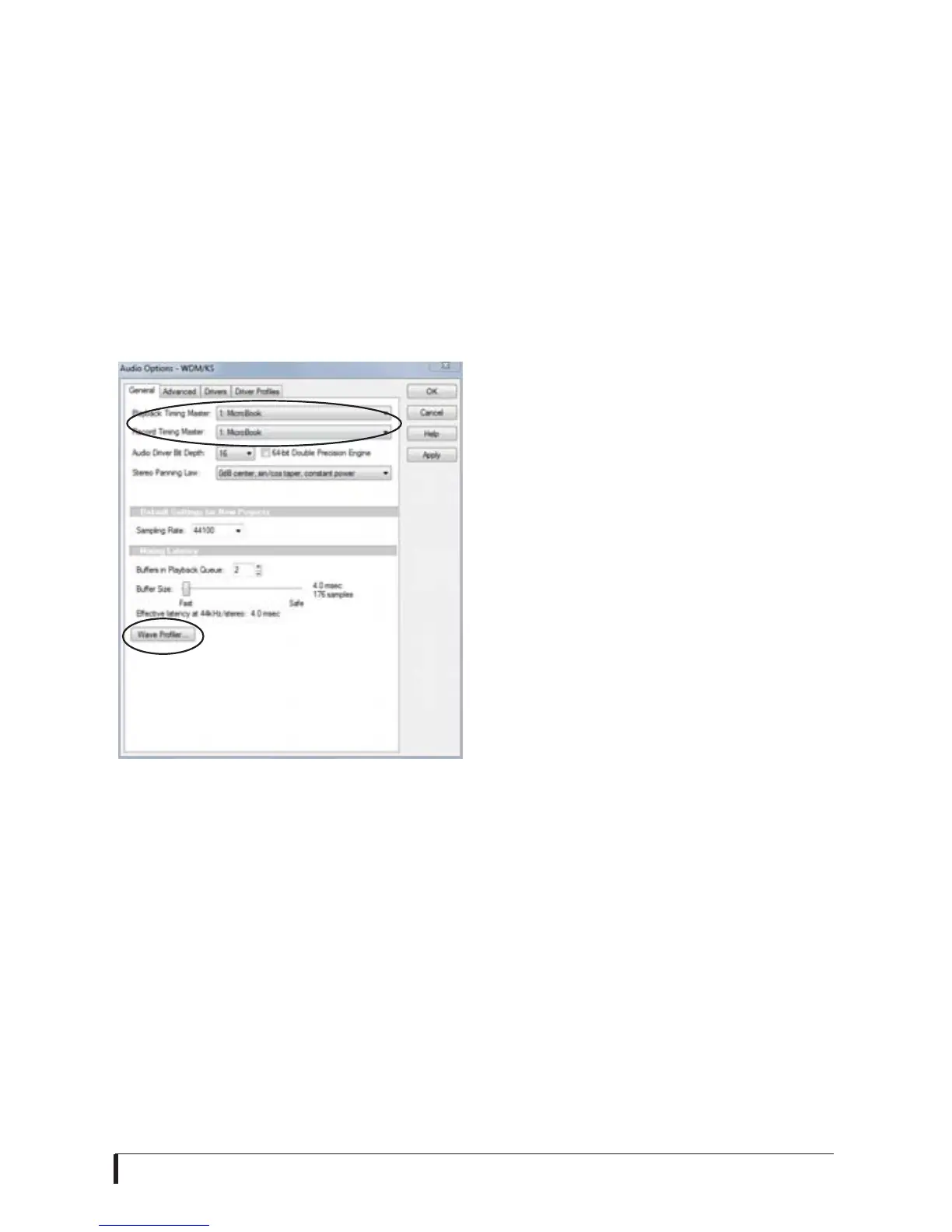
1 In the Audio Options window, click the
General tab.
2 Choose a MicroBook input and output
for recording and playback timing as
shown below in Figure 6-8. It doesn’t
matter which input or output you choose.
Figure 6-8: Make sure you have chosen a
MicroBook input and output for the
playback and recording timing master
settings.
If you are using the WDM/KS driver, go
to the General tab and click the Wave
Profiler button to run the Wave Profiler.
This process chooses the optimum
settings for the MicroBook hardware.
SAMPLE RATE
Choose the desired overall sample rate
for the MicroBook system in your host
audio software. Newly recorded audio
will have this sample rate.
CLOCK SOURCE
Some host software may have a “clock
source” setting. For the MicroBook, there
is only one choice for clock source:
Internal.
INPUTS AND OUTPUTS
Once you’ve enabled the MicroBook’s
driver, MicroBook audio inputs and
outputs will appear in your host software
wherever audio inputs and outputs are
listed.
WORKING WITH CUEMIX FX MIXING
AND EFFECTS
The MicroBook provides powerful
external mixing, EQ and compression,
which you can operate hand-in-hand
with your host software’s complete
mixing environment. For example, the
MicroBook can serve as a monitor mixer
routing channels to musicians, or it can
serve as an integrated extension of your
digital audio workstation’s mixing
environment. If you program a
MicroBook mixing and processing
configuration that goes hand in hand
with your digital audio workstation’s
project, be sure to use the file save
features in CueMix FX to save the
MicroBook settings as a file in the same
folder as your digital audio workstation’s
project file for instant recall of all settings.
See chapter 7, “CueMix FX” (page 39) for
complete details.














 To Next Page