WINDOWS AUDIO SOFTWARE
36
SONAR
ASIO driver activation
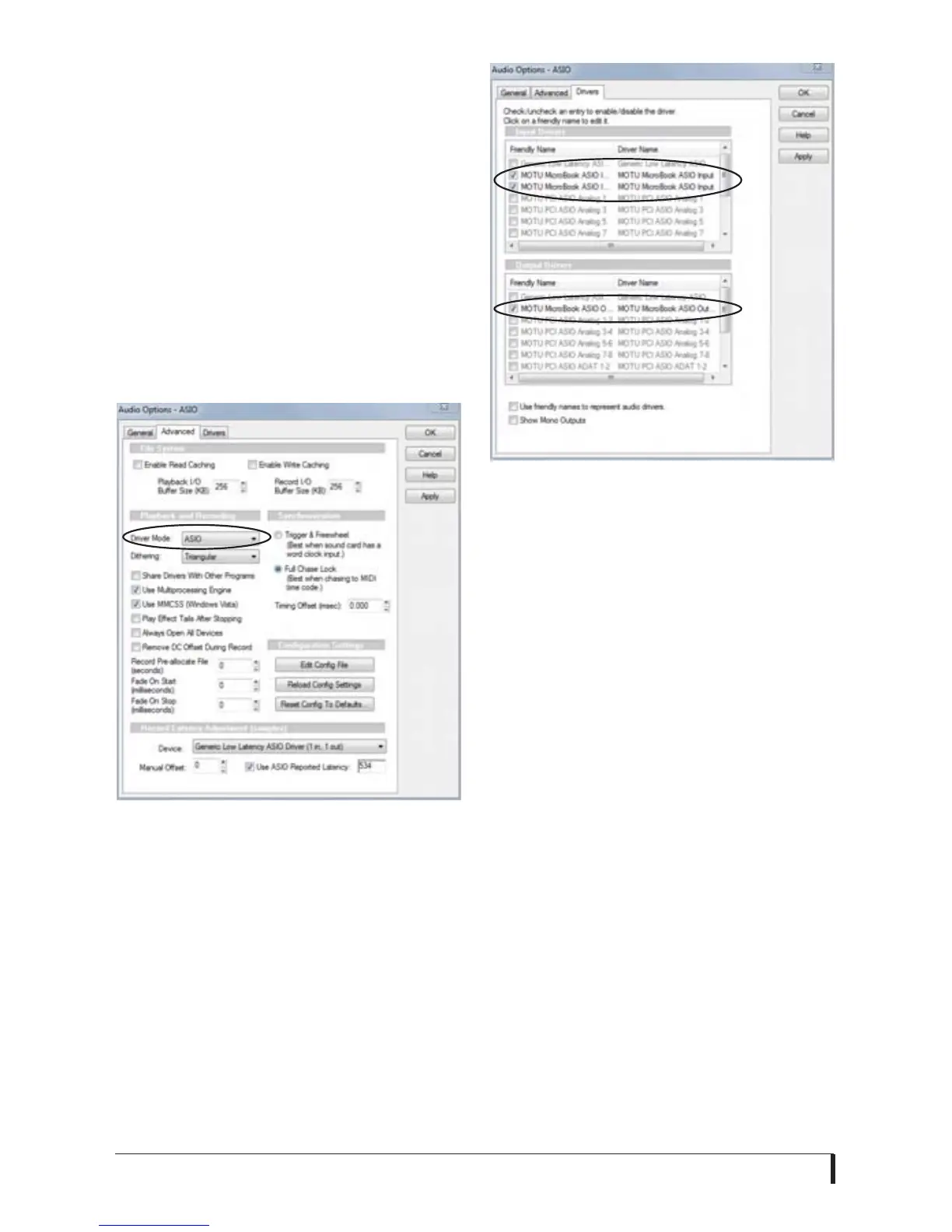
Go to Options menu > Audio and select
the Advanced tab. Choose ASIO from the
Driver Mode menu:
1 Choose Audio from the Options menu.
2 Click the General tab.
3 Choose ASIO from the Driver Mode
menu, as shown in Figure 6-6.
Figure 6-6: Enabling the ASIO driver in
SONAR.
4 Click the Drivers tab.
5 Check the MicroBook inputs and
outputs that you wish to use, and
uncheck the ones you don’t, as shown in
Figure 6-7.
Figure 6-7: Activating the MOTU audio ASIO
driver in SONAR by highlighting MicroBook
inputs and outputs.
☛ You can only use one audio interface
at a time under ASIO. To use multiple
audio interfaces, use the Windows
multimedia driver as described below.
Windows multimedia driver activation
As an alternative to the MicroBook’s
ASIO driver, you can use the MicroBook’s
Windows multimedia driver.
To a c t i v ate t h e M i c ro B o o k Wind ow s
multimedia driver in SONAR choose
WDM/KS instead of ASIO from the
Driver Mode menu, as shown in
Figure 6-6.














 To Next Page