Push the lever in
+ / − directions to select Add to List, and press the lever to add the selected items to My List.
●
The icon of the selected file will be changed to ( → ).
●
Check the file set in MY LIST folder in navigation mode.
Setting My List
26 27
Press the FUNC button after moving to the file you want in navigation mode.
●
A pop up menu will appear.
1
2
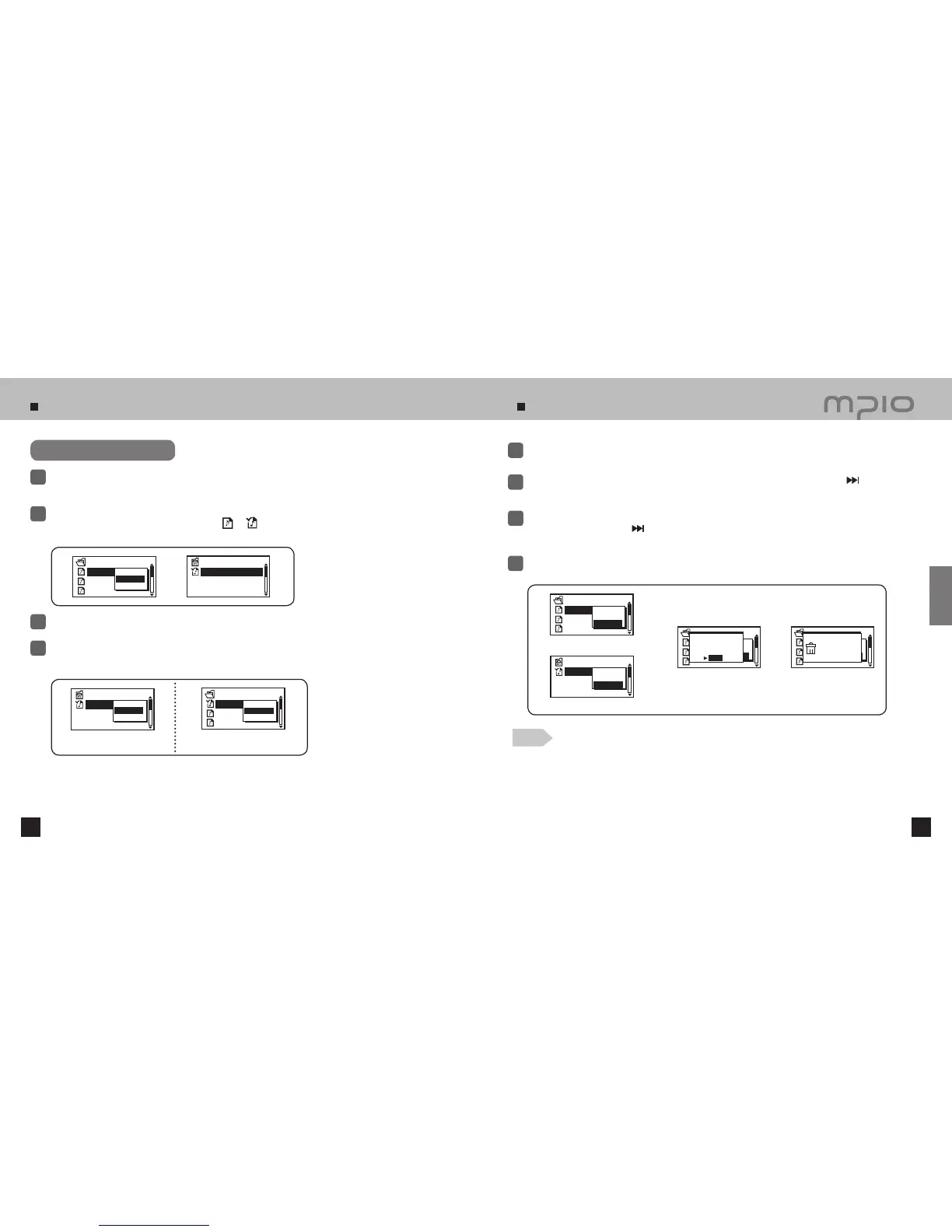
Press FUNC button after moving to the file you want to delete in navigation mode.
●
A pop up menu will appear.
1
Push the lever toward
+ / −
direction to select Delete and then, push the lever toward
direction or
press the lever down toward vertical direction.
2
●
Release navigation mode to cancel delete.
●
If there is a music file in MY LIST, it is deleted as well in case the music file is deleted in navigation mode.
●
If a music file in MY LIST is deleted, the music file is not deleted in navigation mode.
The file selected is deleted.
4
WESTLIFE-MY LO
MUSIC002.mp3
MUSIC003.mp3
MY SONG
Play Now
Add to List
Delete
WESTLIFE-MY LO
MUSIC002.mp3
MUSIC003.mp3
MY SONG
Play Now
Add to List
Delete
WESTLIFE-MY LO
MUSIC002.mp3
MUSIC003.mp3
MY SONG
Play Now
Add to List
Delete
Deleting
WESTLIFE-MY LO
MY LIST
WESTLIFE-MY LO
MY LIST
Play Now
Off the List
Delete
The display released in MY LIST.
WESTLIFE-MY LO
MUSIC002.mp3
MUSIC003.mp3
MY SONG
Play Now
Off the List
Delete
The display released in
navigation mode.
WESTLIFE-MY LO
MY LIST
Play Now
Off the List
Delete
The delete screen in MY LIST mode
The delete screen in navigation mode
Deleting File
WESTLIFE-MY LO
MUSIC002.mp3
MUSIC003.mp3
MY SONG
Play Now
Add to List
Delete
DELETE THE FILE
ARE YOU SURE?
NO
YES
Push the lever toward
+ / −
direction to select YES in DELETE THE FILE ARE YOU SURE? window and
then, push the lever toward
direction or press down toward vertical direction to execute deleting.
●
Select NO to cancel delete.
3
Setting My List
To deselect the files from My List, use the Navigation Mode to select the file to remove.
Then, press the FUNC button and select Off the List.
4
Enter My List in Navigation Mode and play the selected files.
3
Note
Usage



 To Next Page