EasyManua.ls Logo

Mpio FY 600 - Menu Structure

Mpio FY 600
37 pages
Print Icon
To Next Page IconTo Next Page
To Previous Page IconTo Previous Page
Loading...
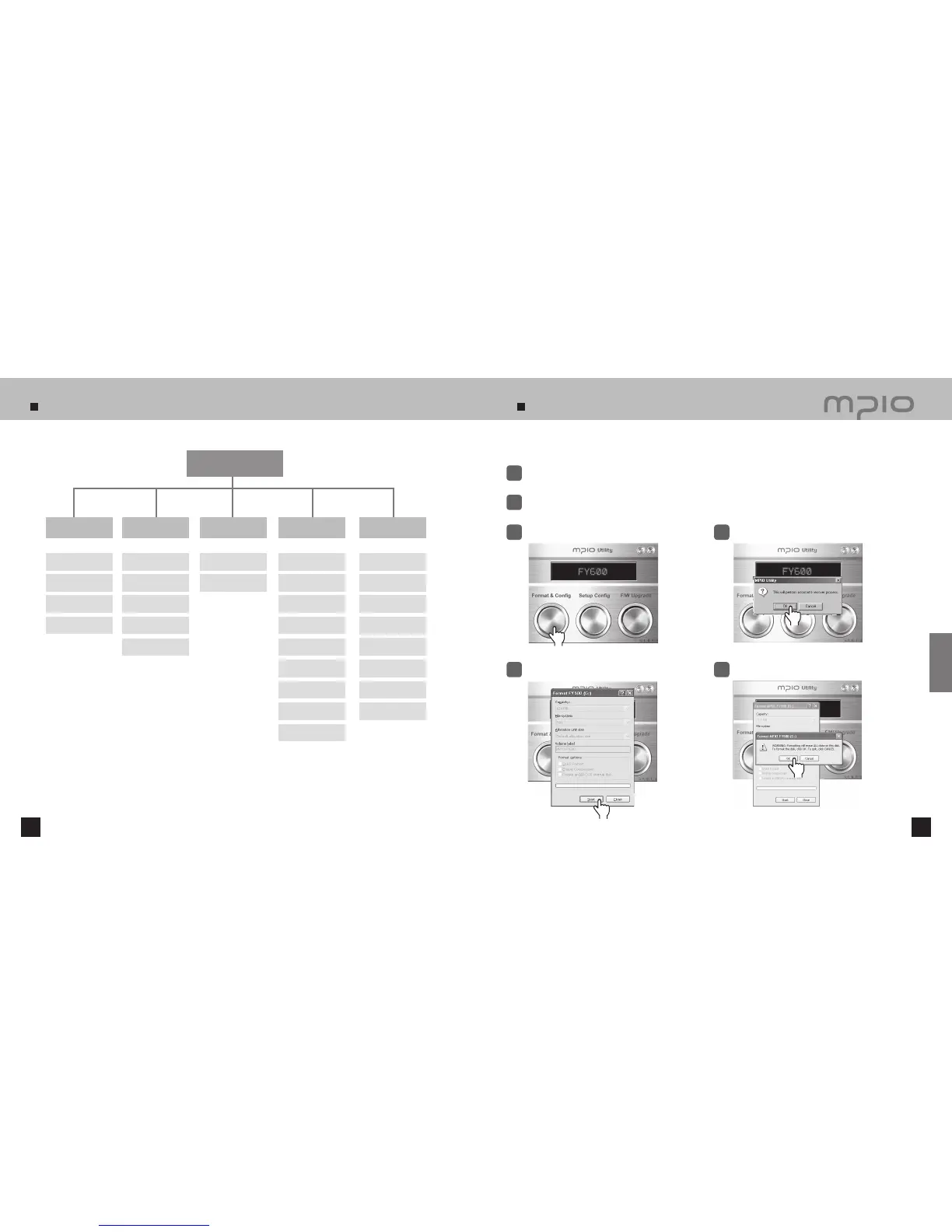
Menu Structure
62 63
Formatting
Main Menu
Audio
EQ
User EQ
Live 3D Effect
Repeat
FM Radio
Save Channel
FM Band
FM Sound
Auto Preset
Seek Step
Recording
Voice-Quality
FM-Quality
Display
Visualization
Language
File Info
Playing Time
Scroll Speed
Backlight Time
Contrast
Controls
Lyrics
System
Auto Play
Resume
Fade In
Information
Sleep
Auto Power Off
Initial Setting
Speed Control
You can format FY600 from a Windows PC using MPIO Utility.
Click
Turn the power of FY600 ON and connect it to a computer using a USB cable.
1
Double-click MPIO Utility icon in your desktop.
2
Click the [Format & Config] button.
3
Click the [ OK ] button.
4
Click the [ Start ] button.
5
Click the [ OK ] button.
6
Click
Click
Click
Customer Support

Table of Contents

Related product manuals