MY SONG
WESTLIFE - MY LOVE
00:00:30
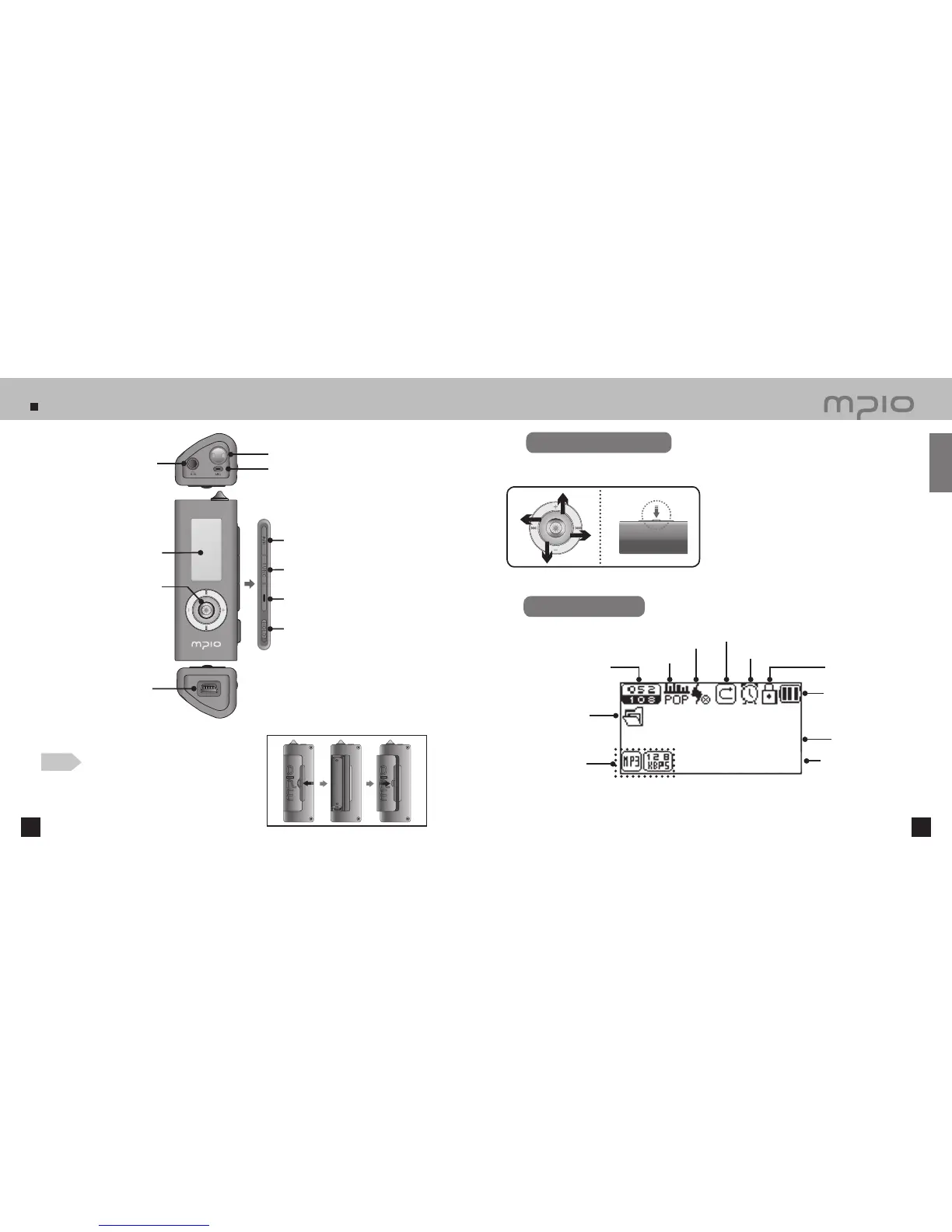
Name of the Parts
10 11
Battery Indicator
Display of music
information
Playback timer
Sleep Indicator
Hold
Current Track /
Total Tracks
EQ Indicator
3D Sound Indicator
Repeat Indicator
Folder Name
Visualization
Note
●
Do not apply excessive force to the cover.
It can break down.
Using the Lever
Pressing the Lever: Press the lever down or press and hold it.
Pushing Up : Push the lever or push and hold it up.
Pushing Down: Push the lever or push and hold it down.
Pushing to Left: Push the lever or push and hold it to left.
Pushing to Right: Push the lever or push and hold it to right.
Functioning by pushing the lever up, down, left, right direction and pressing it.
LCD Screen
Getting Started
Power / Play / Pause Button
Neck String Hole
USB Connector
Earphone Jack
LCD Screen
Menu, Navigation Setting /
Changing Track / Rewind & Fast
Forward / Volume Control Lever
Function Button
Record Button
Hold Switch
Inserting a Battery
1. Slide the battery cover towards the arrow
direction and then, lift up the cover.
2. Insert the battery with correct polarity (+/-) and
push down the battery down. Then, close the
battery cover towards the arrow direction.
(1 AAA battery)
Microphone



 To Next Page