Formatting
64 65
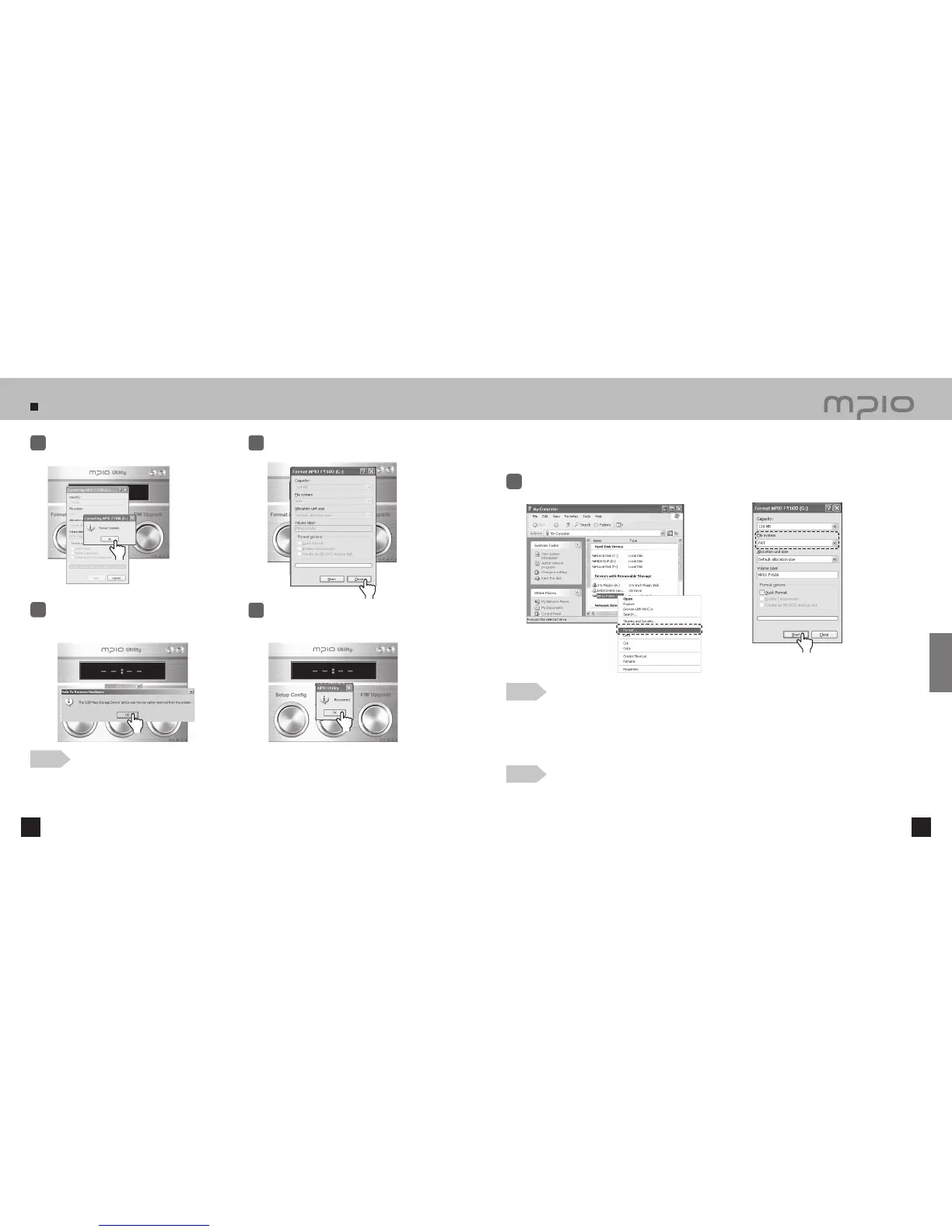
Follow the instructions when formatting FY600 using a Windows PC without MPIO Utility.
Using MPIO Utility is recommended for formatting the device.
Click
When formatting is complete, click
the [ OK ] button.
7
Click the [ Close ] button.
8
Click the [ OK ] button after the “Safely
Remove Hardware” message appears as
shown.
9
After clicking the [ OK ] button, Format & Config
(Default Setting Restoration) is complete. You
may separate the device from the PC.
10
●
The captured screens of MPIO Utility may vary for the user’s PC environment.
●
MPIO Utility cannot be run under MAC OS.
●
For information regarding MPIO Utility installation, refer to [Installing the software] on page 13.
Note
Select the Removable Disc icon. Click your right mouse button and select FORMAT.
Click the [Start] button.
1
Note
●
When formatting the device using the Windows FORMAT Command, it must be formatted in FAT or FAT16.
To use the device after it has been formatted, the default settings must be restored using MPIO Utility.
Refer to page 66 [Storing Default Settings] for more information.
●
The captured screens of MPIO Utility may vary for the user’s PC environment.
Caution
●
The files in FY600 WILL BE LOST after formatting.
Click
Click
Click
Click
Customer Support



 To Next Page