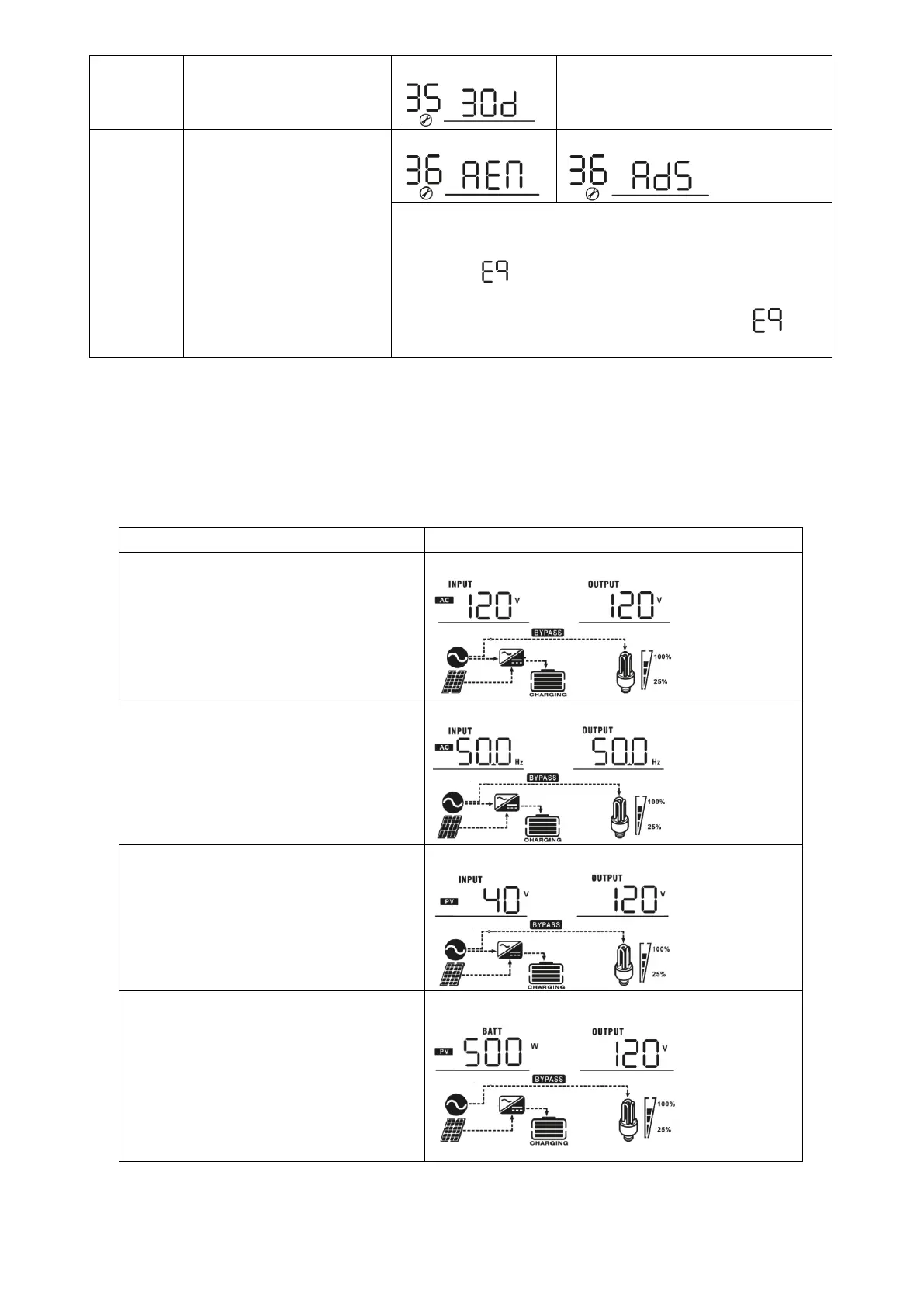
Setting range is from 0 to 90 days.
Increment of each click is 1 day
Equalization activated
immediately
If equalization function is enabled in program 30, this program
can be set up. If “Enable” is selected in this program, it’s to
activate battery equalization immediately and LCD main page
will shows “ ”. If “Disable” is selected, it will cancel
equalization function until next activated equalization time
arrives based on program 35 setting. At this time, “ ” will
not be shown in LCD main page.
Display Setting
The LCD display information will be switched in turns by pressing “SELECT” key. The selectable information is
switched to display in order as below: input voltage/output voltage, input frequency, PV voltage, total
charging power, solar charging power, battery voltage/output frequency, main CPU Version and second
CPU Version.
Input voltage/Output voltage
(Default Display Screen)
Input Voltage=120V, output voltage=120V
Input frequency/Output frequency
Input frequency=50Hz, output frequency =50Hz
PV voltage/Output voltage
PV voltage=40V, output voltage=120V
Solar charging power/Output voltage
Solar charging power=500W, output voltage=120V




 To Next Page