EasyManua.ls Logo

MPP Solar RS485 - 3-2. RS485 Resistance Configuration; 3-3. SW1 Reset

MPP Solar RS485
8 pages
Print Icon
To Next Page IconTo Next Page
To Previous Page IconTo Previous Page
Loading...
4
BMS RS-485 Card/Box Quick Guide
V.1.3
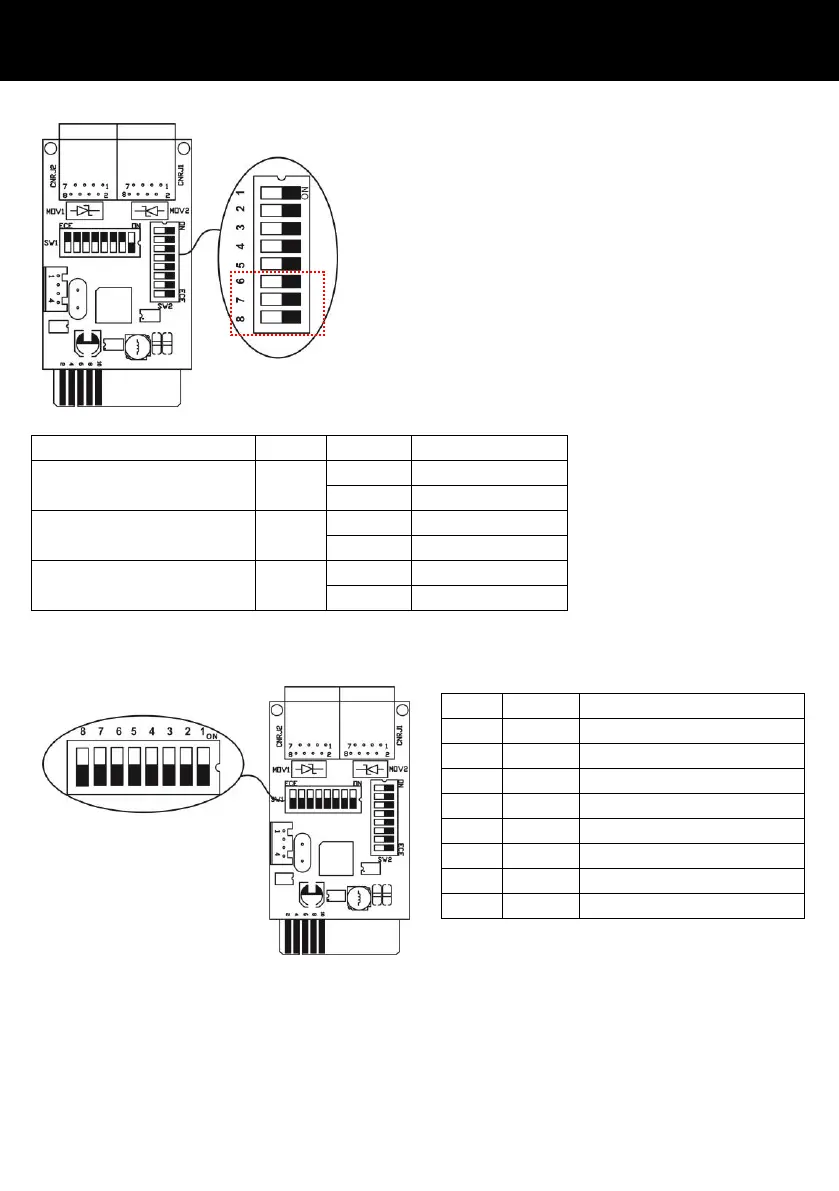
3-2. RS485 resistance configuration
Function
Setting
Meaning
Push up resistance
ON
Enable (Default)
OFF
Disable
Push down resistance
ON
Enable (Default)
OFF
Disable
Terminate resistance
ON
Enable (Default)
OFF
Disable
3-3. SW1 Reset
All of dip switches in SW1 should be switched to “OFF” status.
Bit #
Setting
Meaning
# 1
OFF
Disable(Default)
# 2
OFF
Disable(Default)
# 3
OFF
Disable(Default)
# 4
OFF
Disable(Default)
# 5
OFF
Disable(Default)
# 6
OFF
Disable(Default)
# 7
OFF
Disable(Default)
# 8
OFF
Disable(Default)
There are three bits to configure the RS485
resistance. Use the bit #6, #7 and #8 of SW2 to
set RS485 Resistance. From top to bottom, it’s 1
to 8 as shown left. When the switch is pushed
down, the bit is set to OFF. Otherwise, the bit
is set as ON.

Related product manuals