EasyManua.ls Logo

MPP Solar RS485 - Interface Configuration; 4. Installation and Operation

MPP Solar RS485
8 pages
Print Icon
To Next Page IconTo Next Page
To Previous Page IconTo Previous Page
Loading...
6
BMS RS-485 Card/Box Quick Guide
V.1.3
3-5. Interface Configuration
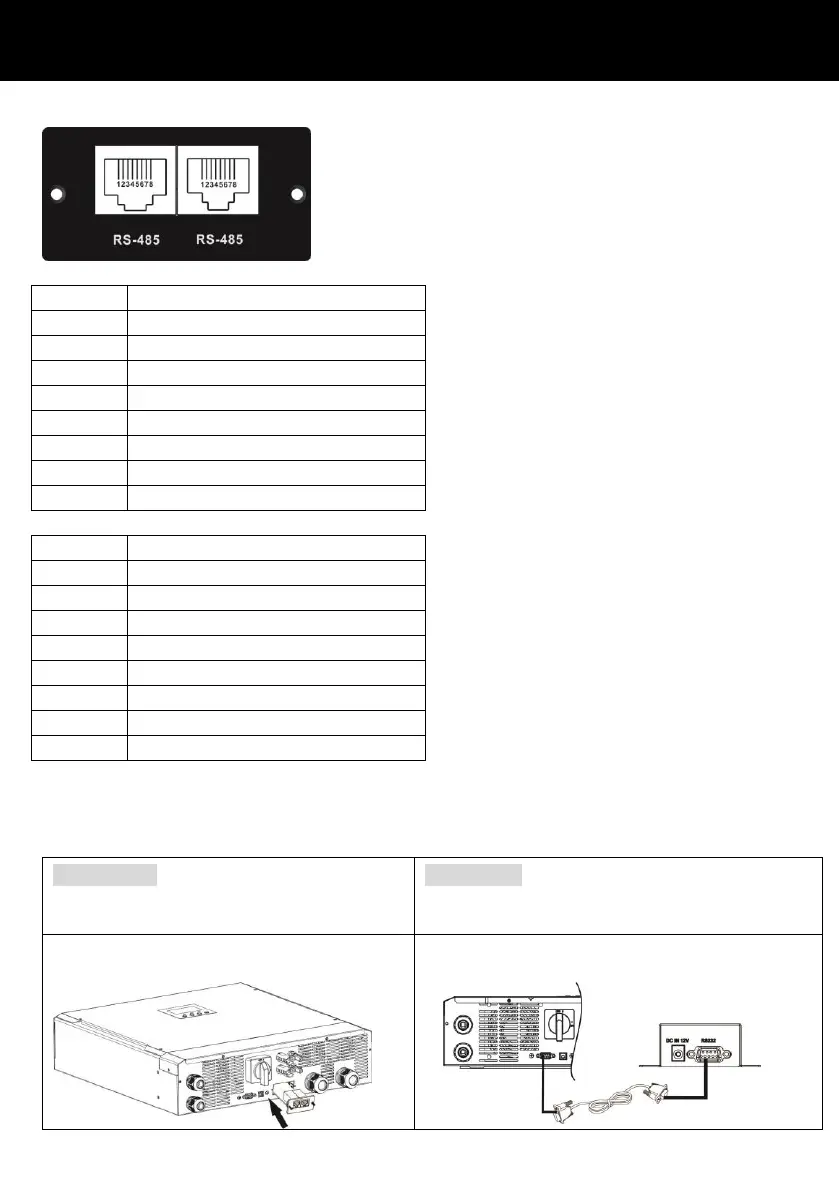
RS-485 pin configuration on BMS RS485 Card/Box:
Pin
Function
1
2
3
4
RS-485 - B
5
RS-485 - A
6
7
8
GND
RS-485 pin configuration on Lithium battery:
Pin
Function
1
RS-485 - B
2
RS-485 - A
3
GND
4
5
6
GND
7
RS-485 - A
8
RS-485 - B
4. Installation and Operation
After configuration, please install this card/box with inverter and Lithium battery by following
below steps.
RS485 card
Follow below steps to install and use this
RS485 card:
RS485 box
Follow below steps to install and use this RS485
box.
(1) Insert this RS485 card into intelligent
slot of the inverter.
(1) Use supplied RS232 cable to connect RS485
box and the inverter.

Related product manuals