51
Control Module
G1 SCBA 2018 Edition
US
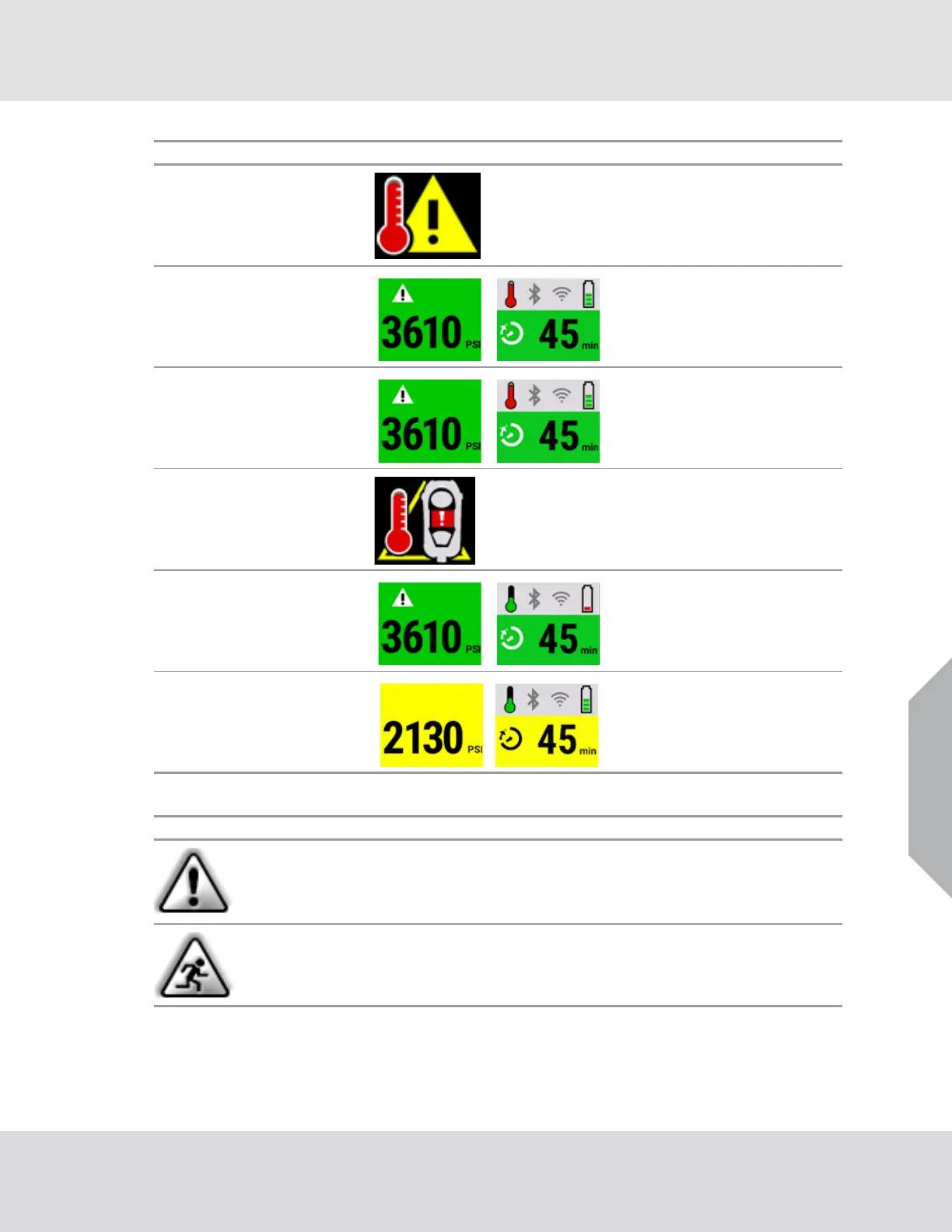
9.3 Secondary Alarms
The buddy light status is based on the pressure status for secondary alarms.
Thermal alarm
primary
(optional)
Red atten-
tion, flashing
Red Optional sound
Thermal alarm
secondary
(optional)
Blue atten-
tion, flashing
Based on pres-
sure
Optional sound
Thermal alarm
confirm
(primary)
Red atten-
tion, solid
Red None
LCD Temp
alarm
Blue atten-
tion, flashing
Based on pres-
sure
None
Low battery
Yellow battery
flashing
Based on pres-
sure
Beep every
10 seconds
Medium pres-
sure alarm
None Yellow Optional sound
Alarm Type HUD Control Module Buddy Lights Sound
Icon Description
The attention icon flashes for active and new warnings, or shows steady for warnings
that have been viewed.
The evacuation alarm (running man icon) shows on the primary screen if the evacuation
has been confirmed.



 To Next Page