36
G1 Heads-Up Display (HUD) (Version with Integrated Electronics only)
GB
G1 Integrated SCBA System
8.2 G1 HUD Alarm Status
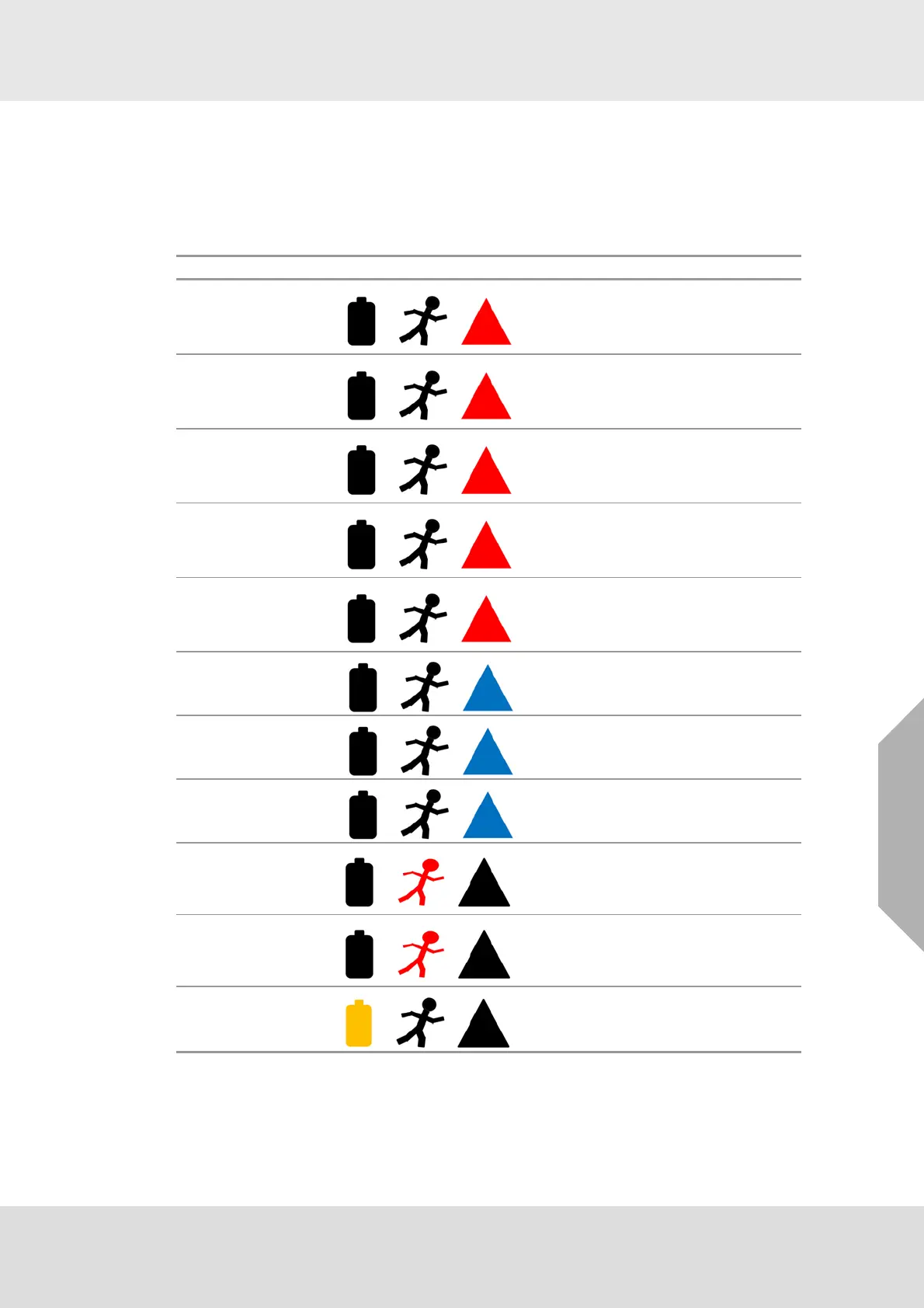
The status LEDs let the user know about primary and secondary alarms on the SCBA. These
status LEDs use the following three icons:
• Battery icon
• Running man icon
• Caution triangle
* Check control module for more information
NOTE: For optional alarms, refer to the MSA alphaCONTROL 2 Software to configure these
alarms.
Alarm Illuminated Icon Icon shown
Motion Pre-Alarm Red Flashing*
Motion Full Alarm Red Solid
Manual Alarm Red Solid
Electronics Failure Red Flashing*
Primary Thermal Alarm
(Optional)
Red Flashing*
Secondary Thermal
Alarm (Optional)
Blue Flashing*
LCD Thermal Alarm Blue Flashing*
Pressure Drop Alarm
(Optional)
Blue Flashing*
Evacuate (with telem-
etry option only)
Red Flashing*
Evacuate Confirmed
(with telemetry option
only)
Red Solid*
Low Battery Alarm Yellow Flashing*



 To Next Page