23
Expansion Slots
Expansion Slots
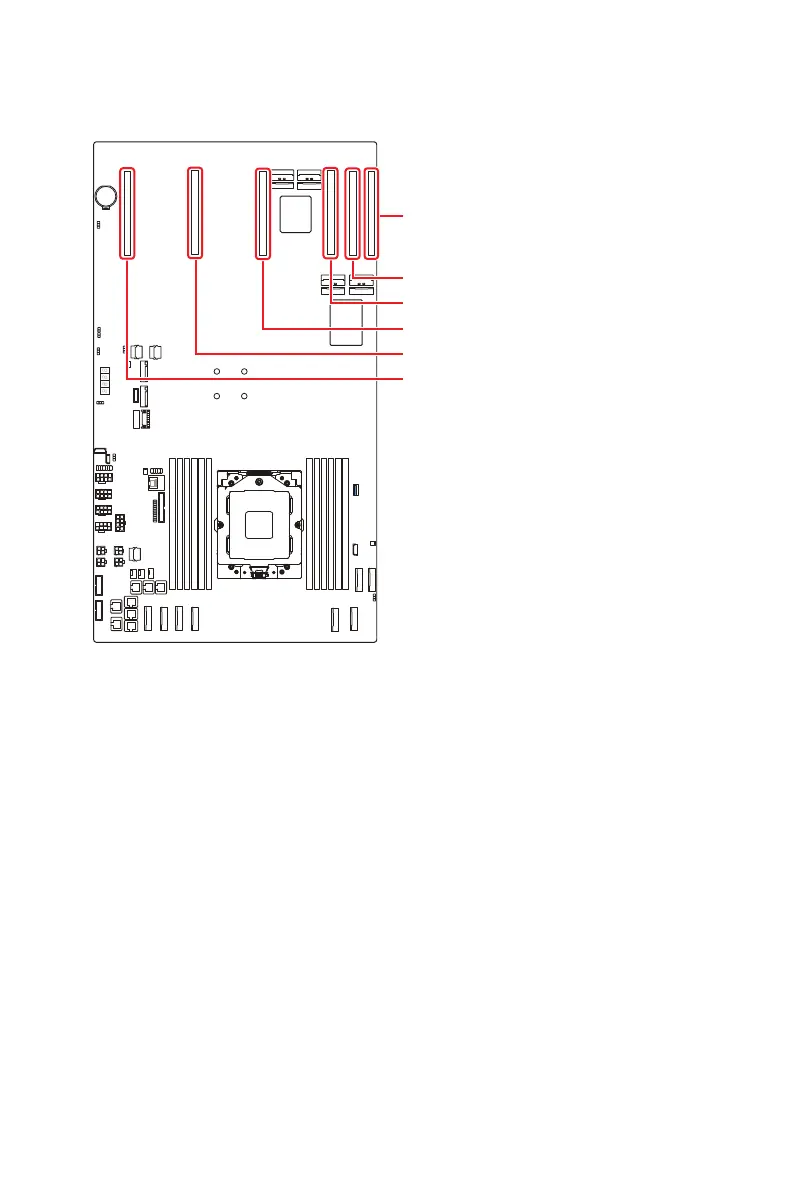
PCIE_SLOT6: PCIe 4.0 x 16 slot (Gen 4 x8 signal)
PCIE_SLOT5: PCIe 4.0 x 16 slot (Gen 4 x8 signal)
PCIE_SLOT4: PCIe 5.0 x 16 slot (Gen 5 x16 signal)
PCIE_SLOT3: PCIe 5.0 x 16 slot (Gen 5 x16 signal)
PCIE_SLOT2: PCIe 5.0 x 16 slot (Gen 5 x16 signal)
PCIE_SLOT1: PCIe 5.0 x 16 slot (Gen 5 x16 signal)
PCIE_SLOT1~6: PCIe Expansion Slots
The PCI Express(Peripheral Component Interconnect Express) slots support PCIe
interface expansion cards.
⚠
Important
When adding or removing expansion cards, make sure that you unplug the power
supply first. Meanwhile, read the documentation for the expansion card to configure
any necessary hardware or software settings for the expansion card, such as jumpers,
switches or BIOS configuration.




 To Next Page