4-10
Hyper-Threading Technology
The processor uses Hyper-Threading technology to increase transaction rates
and reduces end-user response times. The technology treats the two cores
inside the processor as two logical processors that can execute instructions
simultaneously. In this way, the system performance is highly improved. If you
disable the function, the processor will use only one core to execute the
instructions. Please disable this item if your operating system doesn’t support
HT Function, or unreliability and instability may occur.
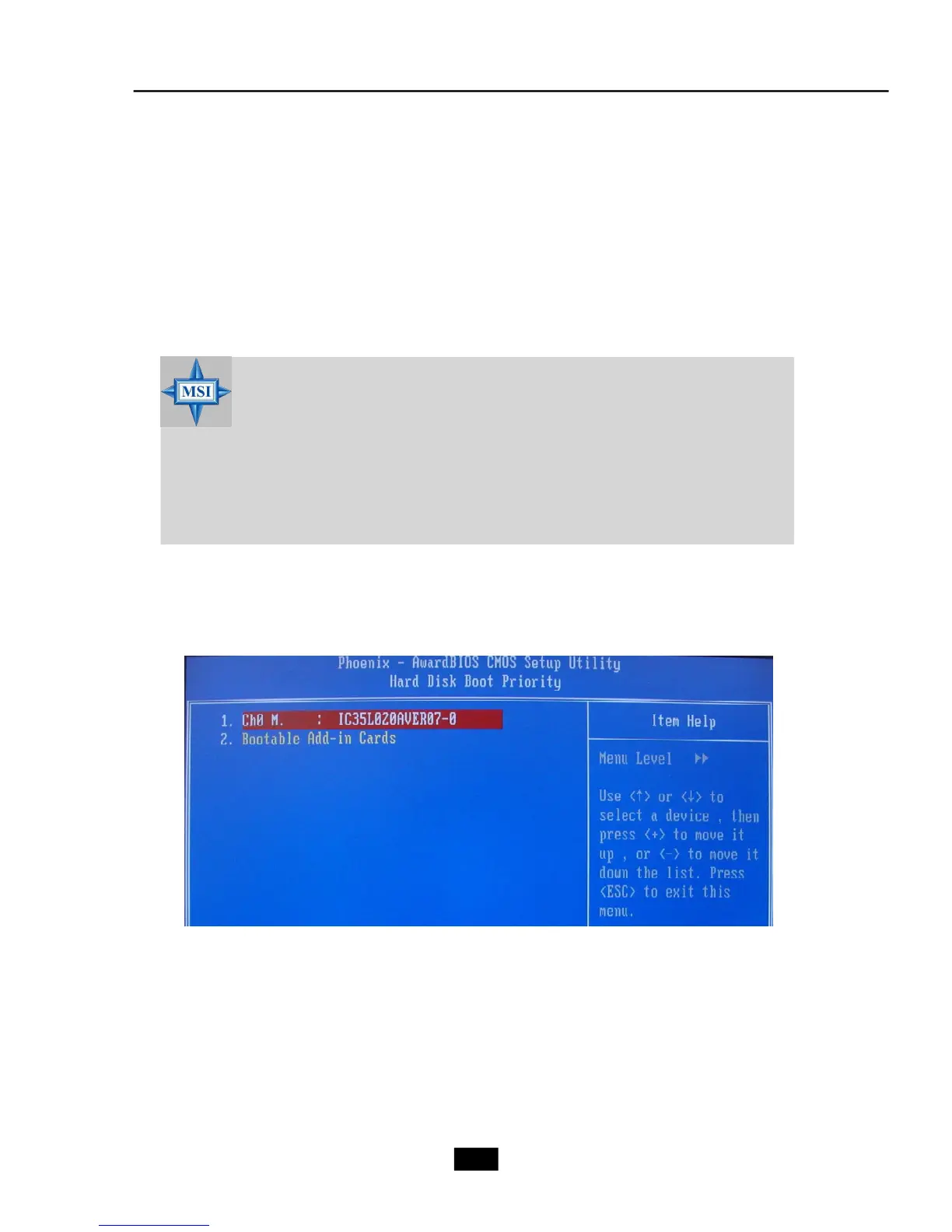
Hard Disk Boot Priority
Press [Enter] to enter a sub menu which shows every current hard drive installed.
Use [PageUp] or [PageDown] key to select the first boot hard disk.
MSI Reminds You...
Enabling the functionality of Hyper-Threading Technology for your com-
puter system requires ALL of the following platform Components:
CPU An Intel
®
Pentium
®
4 Processor with HT Technology;
Chipset An Intel
®
Chipset that supports HT Technology;
BIOS A BIOS that supports HT Technology and has it enabled;
OS An operating system that supports HT Technology.
For more information on Hyper-threading Technology, go to: www.intel.
com/info/hyperthreading












 To Next Page