Chapter 5 - Introduction to Realtek ALC 888
5-7
Pop-screen check list
2CH Speakers configutaion - check the Front Speaker Out anyway.
4CH Speakers configuration - check the Front Speaker Out & Rear Speaker
Out anyway.
6CH Speakers configuraion - check the Front Speaker Out / Rear Speaker
Out & Center/ Subwoofer Speaker out
anyway.
8CH Speakers configuraion - check the Front Speaker Out / Rear Speaker
Out / Center/Subwoofer Speaker out & Side
Speaker Out anyway.
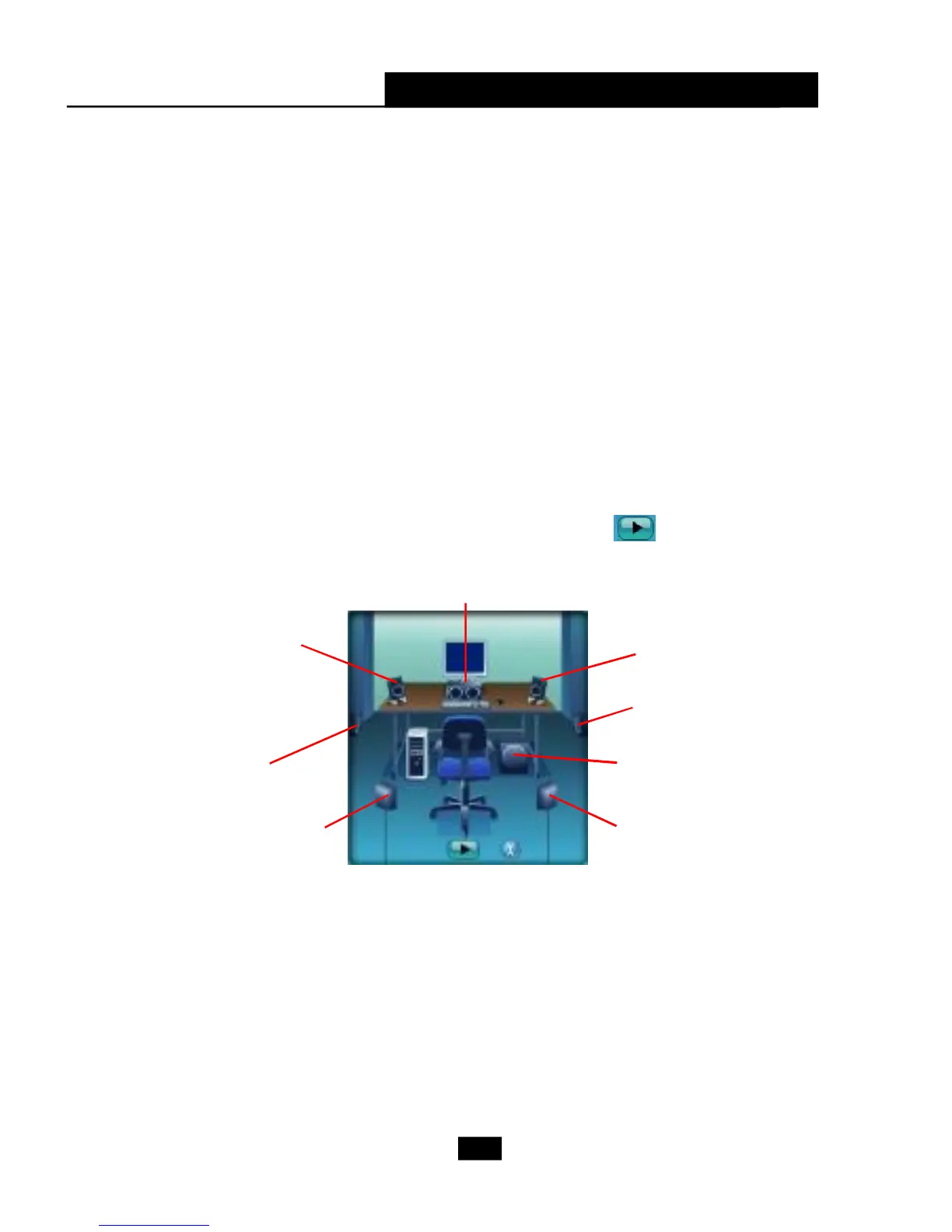
Test Speakers
You can select the speaker by clicking it to test its functionality. The one you
select will light up and make testing sound. If any speaker fails to make sound, then
check whether the cable is inserted firmly to the connector or replace the bad
speakers with good ones. Or you may click the auto test button to test the
sounds of each speaker automatically.
Subwoofer
Front Right
Rear Right
Center
Front Left
Rear Left
Side Left
Side Right












 To Next Page