Hardware Setup
2-5
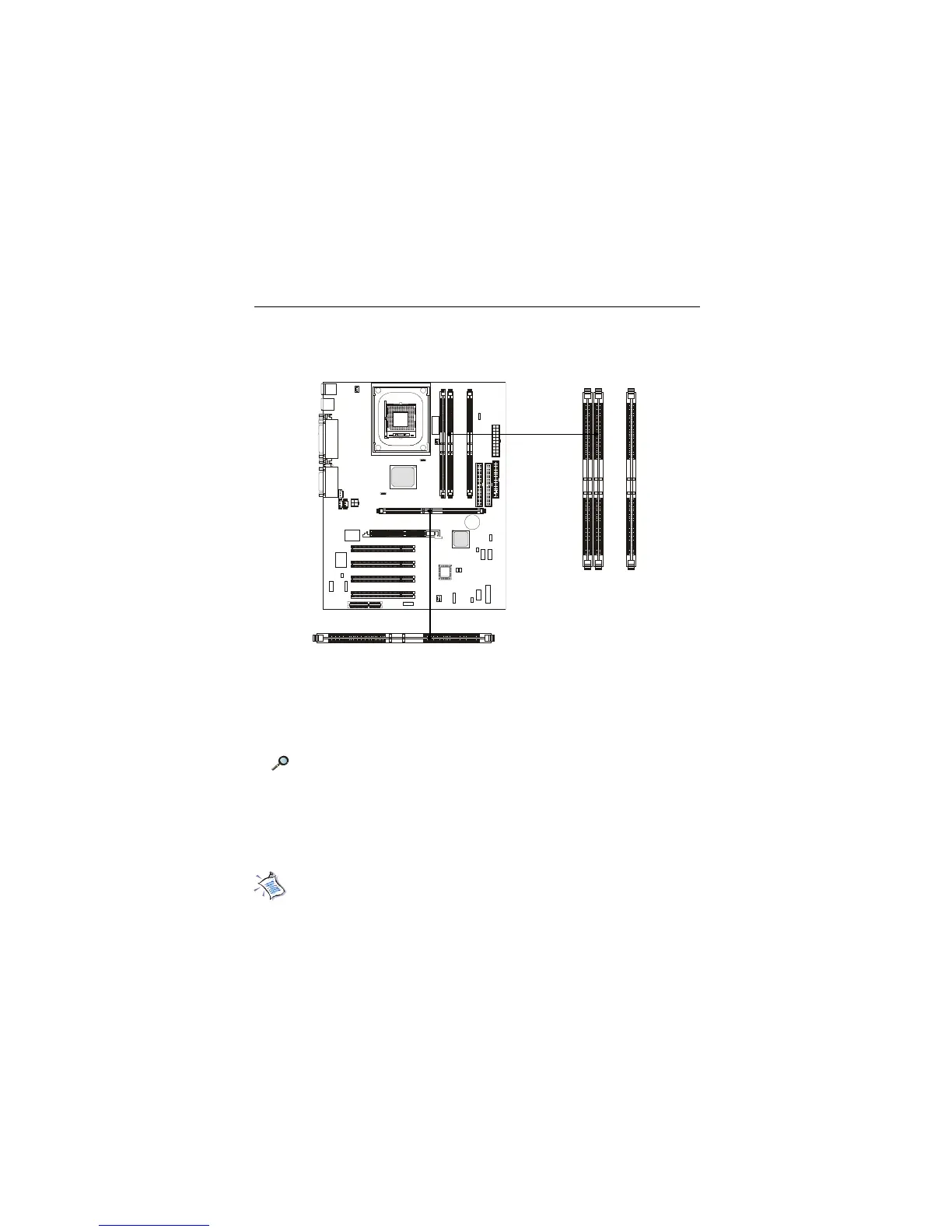
The mainboard provides 4 gold-lead sockets for 184-pin RIMM modules.
To operate properly, at least two RIMM modules must be installed. The
mainboard supports the memory size up to 2 GB.
Memory Installation
About RIMM Module
RIMM module is a module integrated with RDRAM chips. It is similar to
a DIMM package but uses different pin settings. Rambus trademarked the term
RIMM as an entire word for a module using Rambus technology.
Memory Population Rules
z Support RIMM only.
z To operate properly, make sure that the RIMM banks are using the same
type and equal size density memory.
z Support FSB 100MHz: PC600/PC800 RIMM.
Note: PC700 will run at PC600 specification.
z Support up to 32 Direct Rambus Device.
z Support ECC Single bit Correction and Multiple bit error detection
(Setting in BIOS).
z Install two RIMM modules either on “RIMM 1and RIMM 2” or on
“RIMM3 and RIMM4” slots.
R
I
M
M
2
R
I
M
M
3
R
I
M
M
4
RIMM Slots
(RIMM 1~4)
RIMM1


 To Next Page