Chapter 3
3-26
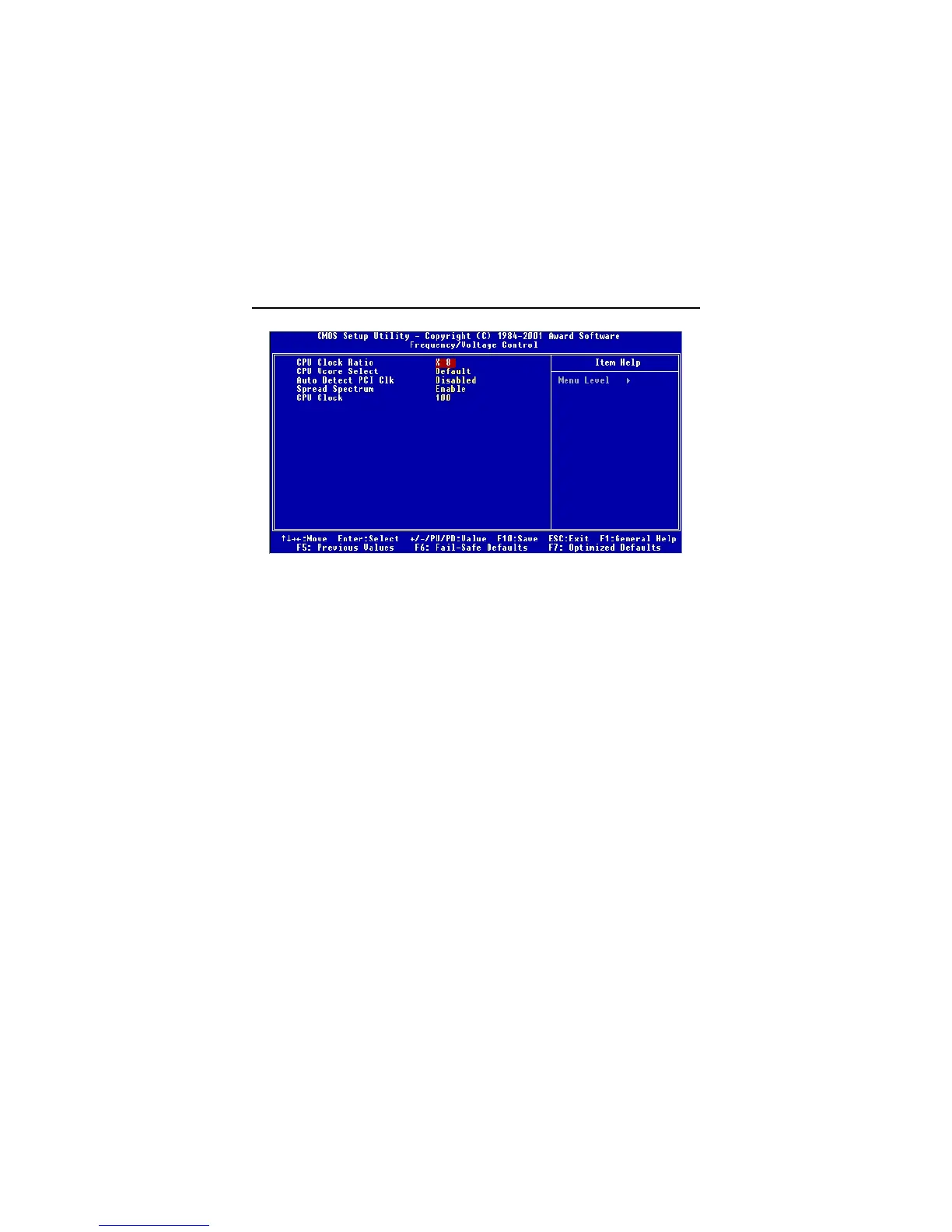
Frequency/Voltage Control
CPU Clock Ratio
This setting controls the multiplier that is used to determine the internal clock
speed of the processor relative to the external or motherboard clock speed.
CPU Vcore Select
This setting allows you to set the CPU core voltage. Setting options: Default,
+25mV, +50mV, +75mV, +100mV.
Auto Detect PCI Clk
To reduce the occurrence of electromagnetic interference (EMI), the BIOS de-
tects the presence or absence of components in PCI slots and turns off system
clock generator pulses to empty slots. The settings are: Enabled, Disabled.
Spread Spectrum
When the motherboard’s clock generator pulses, the extreme values (spikes)
of the pulses creates EMI (Electromagnetic Interference). The Spread Spec-
trum function reduces the EMI generated by modulating the pulses so that the
spikes of the pulses are reduced to flatter curves. If you do not have any EMI
problem, leave the setting at Disabled for optimal system stability and
performance. But if you are plagued by EMI, setting to Enabled for EMI
reduction. Remember to disable Spread Spectrum if you are overclocking be-
cause even a slight jitter can introduce a temporary boost in clockspeed of


 To Next Page