3-6
MS-7173 M-ATX Mainboard
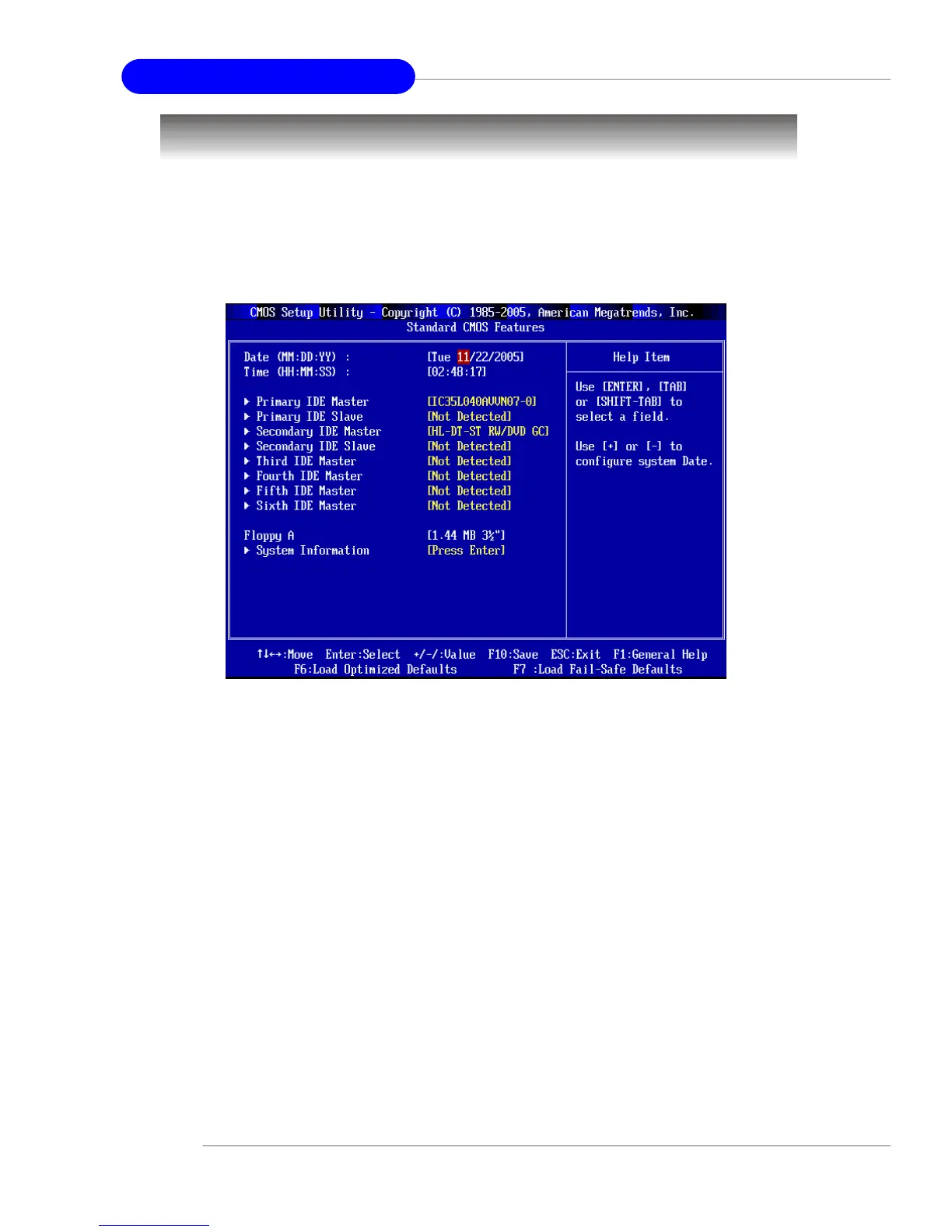
Standard CMOS Features
Date
This allows you to set the system to the date that you want (usually the current date).
The format is <day><month> <date> <year>.
day Day of the week, from Sun to Sat, determined by
BIOS. Read-only.
month The month from Jan. through Dec.
date The date from 1 to 31 can be keyed by numeric function keys.
year The year can be adjusted by users.
Time
This allows you to set the system time that you want (usually the current time). The
time format is <hour> <minute> <second>.
Primary IDE Master/Slave, Secondary IDE Master/Slave, Third/Fourth/Fifth/
Sixth IDE Master
Press PgUp/<+> or PgDn/<-> to select [Manual], [None] or [Auto] type. Note that the
specifications of your drive must match with the drive table. The hard disk will not
work properly if you enter improper information for this category. If your hard disk
The items in Standard CMOS Features Menu are divided into several categories.
Each category includes no, one or more than one setup items. Use the arrow keys to
highlight the item and then use the <PgUp> or <PgDn> keys to select the value you
want in each item.


 To Next Page