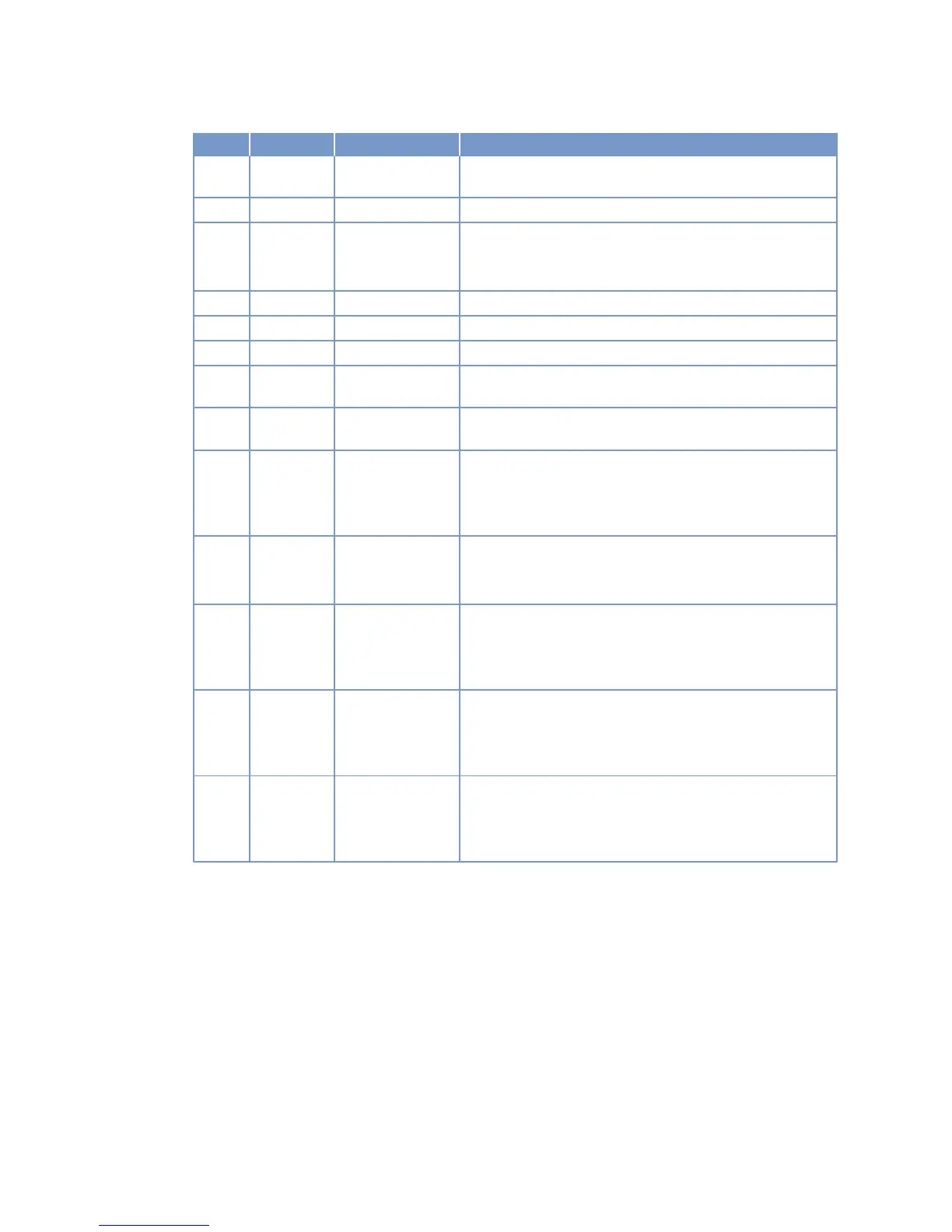
Item Color Lettering Meaning / Function
8 White DIMMER ↓ Holding down the key decreases LCD background illumina‐
tion.
9 White LAMP TEST Pressing the button initiates lamp test.
10 Red TEST OVER‐
SPEED
Pressing the button initiates overspeed test.
LED (spot) lights up as long as the overspeed test is run‐
ning.
11 Green (none) (none)
12 Green (none) (none)
13 Green (none) (none)
14 White ENGINE SPEED
INCREASE
Engine speed is increased as long as the button is held
down.
15 White ENGINE SPEED
DECREASE
Engine speed is decreased as long as the button is held
down.
16 Green READY FOR OP‐
ERATION
Pressing the switch causes changeover between “Not ready
for operation” and “Ready for operation” status.
LED (spot) lights up at "Ready for operation" switch posi‐
tion.
17 Green LOCAL OPERA‐
TION
Pressing the switch activates changeover between local
and remote control mode.
LED (spot) lights up when local mode is active.
18 White START Pressing the pushbutton initiates the automatic engine start
sequence.
LED (spot) lights up as long as the starting procedure is
running.
19 White STOP Pressing the button initiates automatic engine stopping pro‐
cedure.
Spot LED lit when stop signal is applied (also from remote
control system).
20 Red EMERGENCY
STOP
Pressing the pushbutton initiates an immediate emergency
engine stop.
LED (spot) flashes once the emergency stop has been trip‐
ped and until the alarm has been acknowledged.
86 | Operation | MS150031/03E 2011-10
TIM-ID: 0000008856 - 003



 To Next Page