INSTALLING AND USING THE DEVICE
MultiConnect
®
Cell MTC-MNK1 User Guide 13
Chapter 3 – Installing and Using the Device
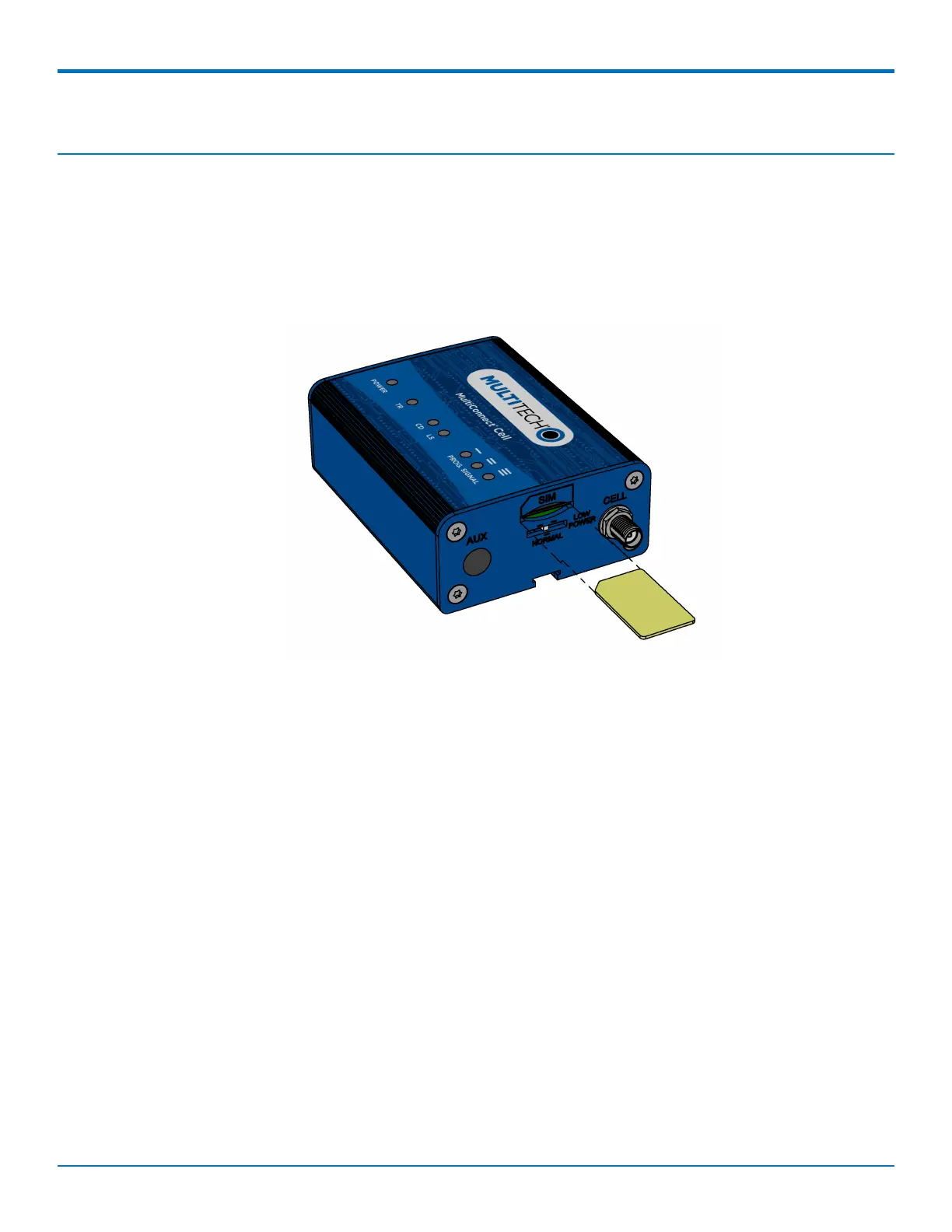
Installing a SIM Card
This model requires a SIM card, which is supplied by your service provider. To install the SIM card:
1. Locate the SIM card slot on the side of the modem. The slot is labeled SIM.
2. Slide the SIM card into the SIM card slot with the contact side facing down as shown. When the SIM card
is installed, it locks into place.
Removing a SIM Card
To remove the SIM card, push the SIM card in. The device ejects the SIM card.
Installing the Device
1. Connect suitable antenna(s) to the antenna connector(s).
2. If your device is the serial version:
Connect the DE9 male connector (9-pin) of the RS-232 cable to the RS-232 connector on the device, then
connect the other end to the serial port on the other desired device.
Screw-on the power lead from the power supply module into the power connection on the device.
Plug the power supply into your power source.
3. If your device is the USB version:
For information about the USB cable that helps power your device, see the section "USB Cable
Recommendations."
The USB cable uses power from the USB power line. Connect one end of the USB cable to your computer
or other USB high power device, such as a hub.
Connect the other end to the device's USB connector.
4. The POWER LED lights after the device powers up.














 To Next Page