Using TWAIN in Photoshop CS5 and CS4
• If you are a MAC OS user using Photoshop CS5 or CS4:
1. Download the Photoshop CS5 Optional Plugins (for CS5) or Adobe
Photoshop CS4 Optional plug-ins and ReadMe English, Spanish and
French (for CS4) from Adobe website as below:
CS5: http://www.adobe.com/support/downloads/detail.
jsp?ftpID=4687
CS4: http://www.adobe.com/support/downloads/detail.
jsp?ftpID=4047
2.Extractthedownloadedleandnd"TWAIN.plugin"le.
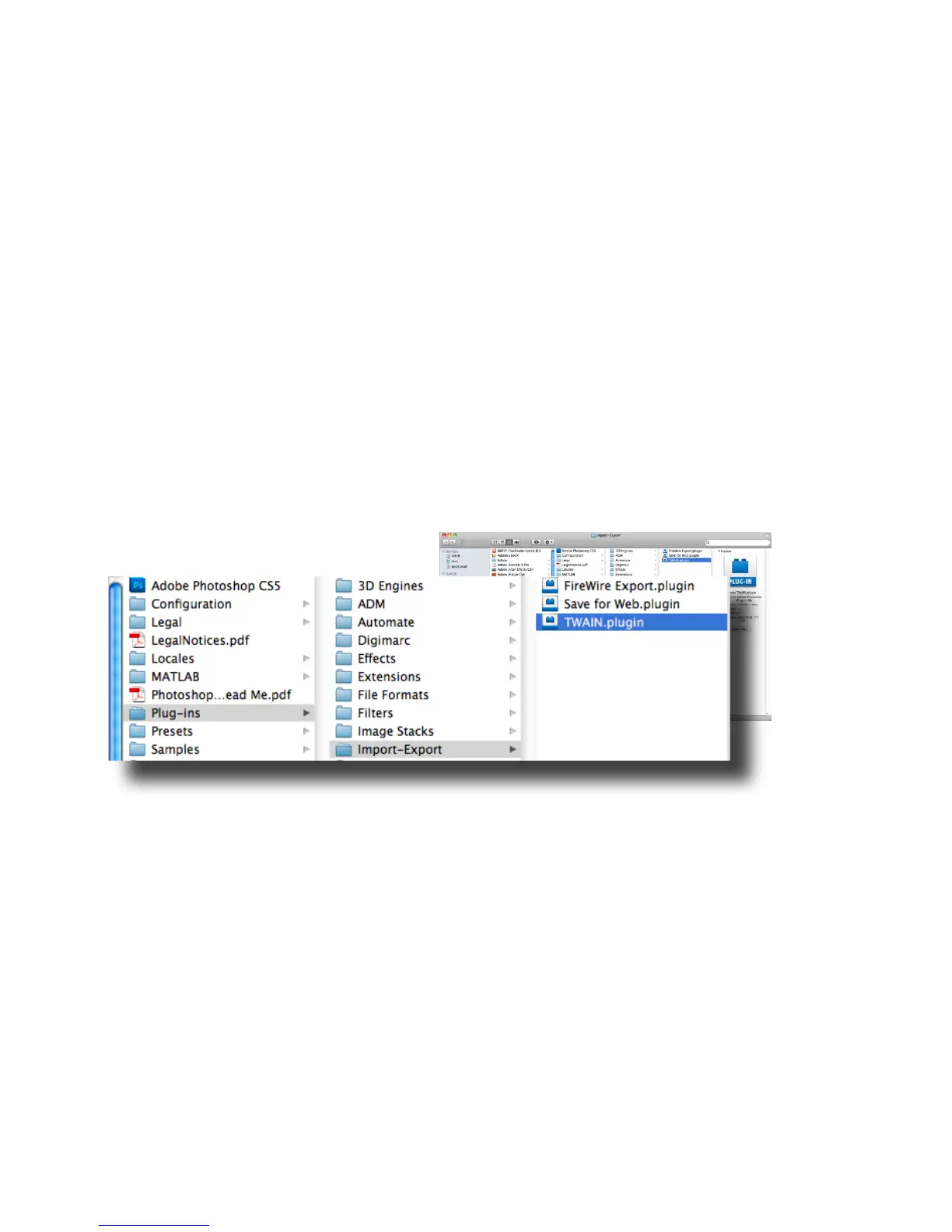
3. Quit Photoshop, and place "TWAIN.plugin" in the CS5/CS4 plug in
directory: Applications\Adobe Photoshop CS5(CS4)\Plug-Ins\Import-
Export\
4. Restart Photoshop to enable the plug-in.
• If you are a Windows OS user using Photoshop CS5, you must
manually install the TWAIN plug-in following below steps:
1. Download the Photoshop CS5 Optional Plugins from Adobe website
as below:
http://www.adobe.com/support/downloads/detail.jsp?ftpID=4688
2.Extractthedownloadedleandnd"Twain_32.8BA"leinthe
Win32 or Win64 folder depending on your operating system (32-bit
or 64-bit).













 To Next Page