RJ-901C/RJ-900C Maintenance Manual 4 Parts Replacement
4-55
4.8 Replacement of Ink Supply Section Components
Four Ink Holder (I/H) assemblies are installed in this product. The replacement procedures for one of these
I/H assemblies are explained in this section.
NOTE
Before replacing parts in the I/H assembly, remove the following covers.
• R side cover: "4.2.1 Removing R Side Cover" p.4-6
•I/H cover: "4.2.4 Removing Ink Holder (I/H) Cover" p.4-11
4.8.1 Replacing Ink Holder (I/H) Assembly
1. Perform ink discharge operation to discharge ink entirely from the ink paths.
TIP
"5.5.13 Head Cleaning Menu" p.5-45
2. Remove the ink sensor assembly connector (4 pieces) from the main board assembly.
TIP
"4.3.2 Removing Board Bracket" p.4-18
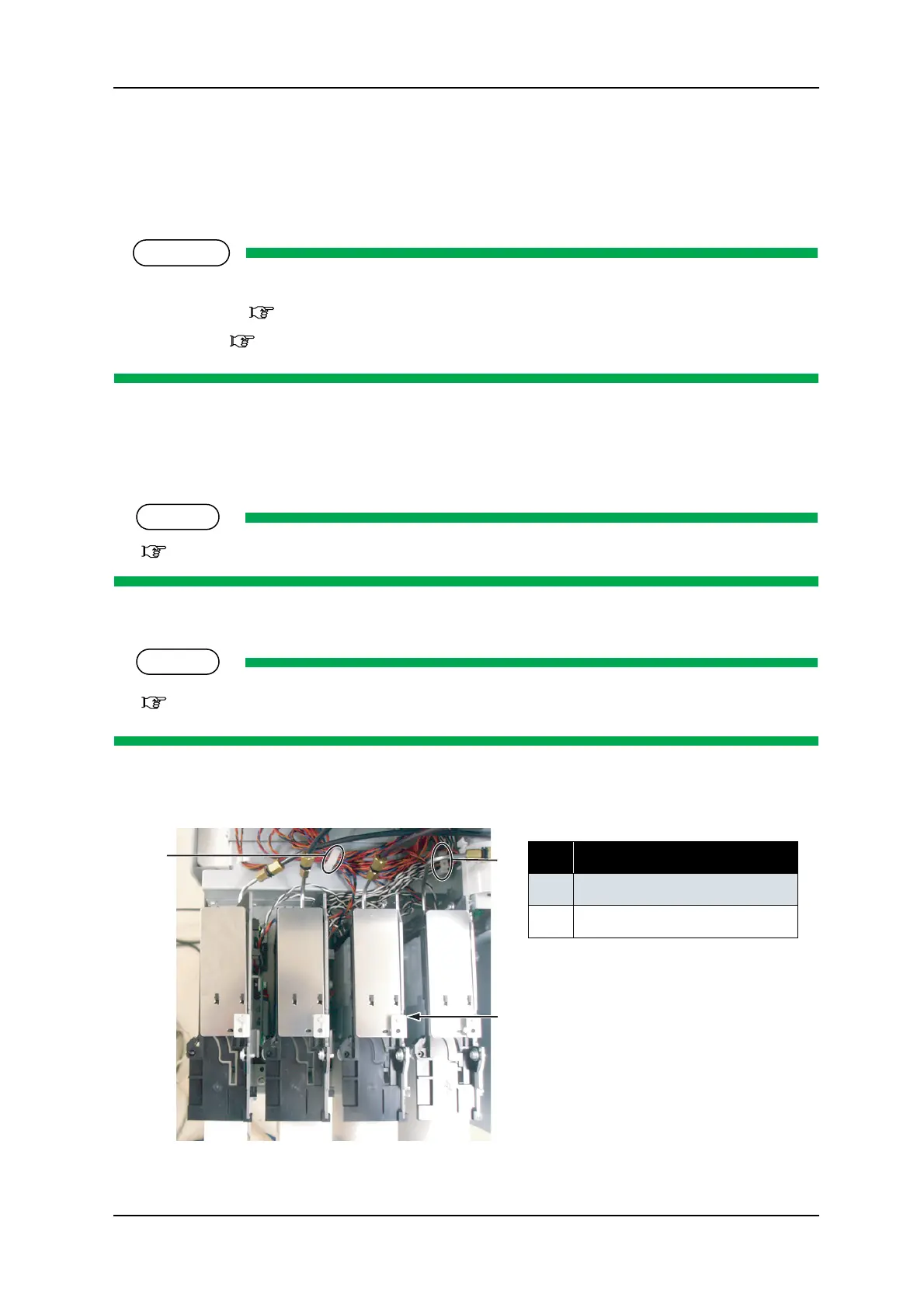
3. Take the removed sensor assembly cable off the clamp (2 points).
No. Part name
1 Clamp
2
I/H assembly
1
1
2




 To Next Page