4 Parts Replacement RJ-901C/RJ-900C Maintenance Manual
4-52
4.7.2 Replacing Pump Cap Assembly
NOTE
Before removing the pump cap assembly, remove the following parts.
• R side cover: "4.2.1 Removing R Side Cover" p.4-6
• Flushing box: "4.7.4 Replacing Flushing Box Assembly" p.4-54
• Maintenance base assembly: "4.7.1 Removing Maintenance Base Assembly" p.4-47
• Ink holder cover: "4.2.4 Removing Ink Holder (I/H) Cover" p.4-11
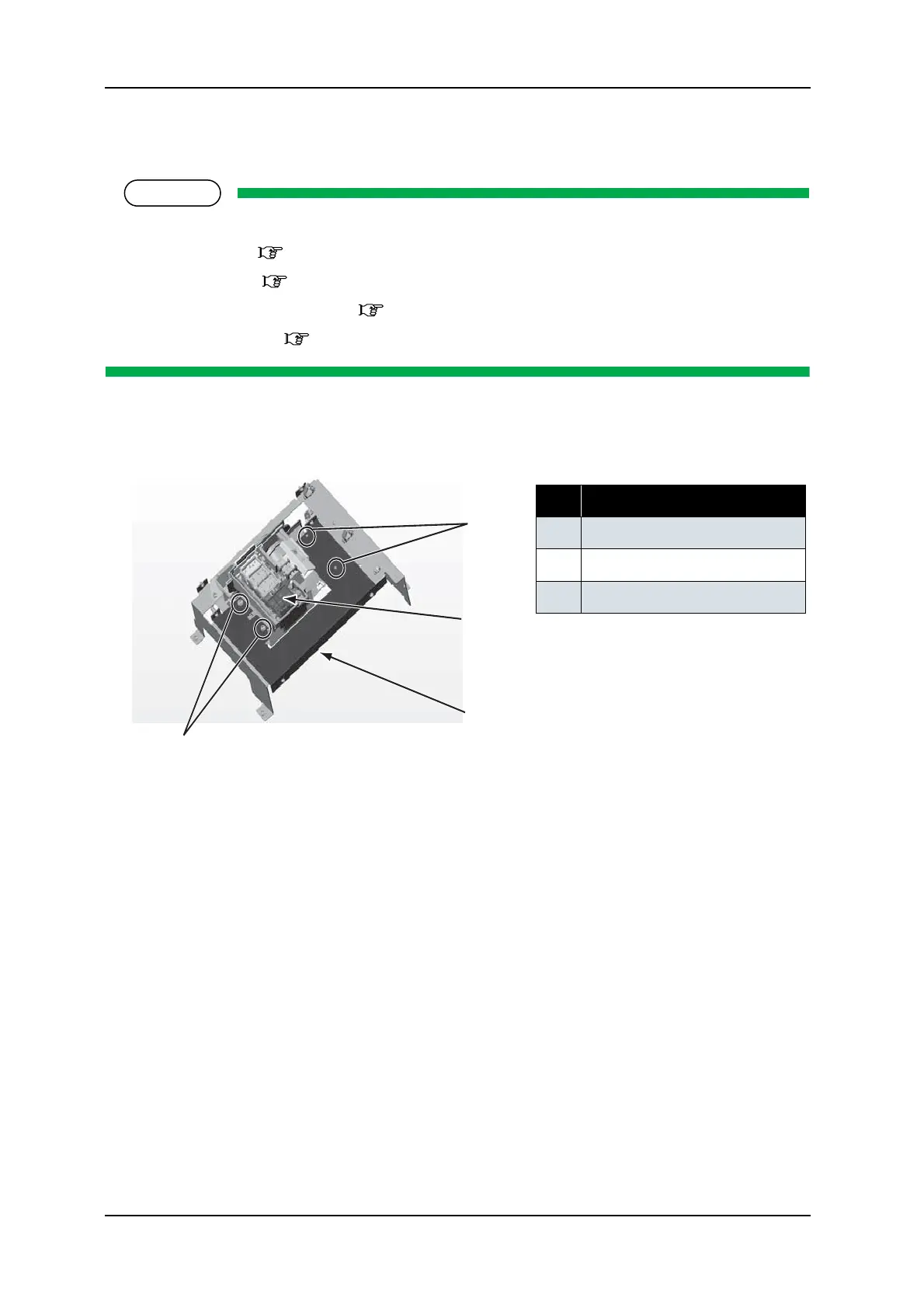
1. Remove the screw retaining the pump cap assembly to the maintenance base 1 (pan-head screw with
spring washer and flat washer M3
× 6: 4pcs).
2. Replace the pump cap assembly
3. To reassemble the unit, reverse the removal procedure.
No. Part name
1 Pump cap assembly screw
2
Maintenance base 1
3 Pump cap assembly
1
1
3
2
back-side㧕










 To Next Page