AP-76943_Rev 1.0 Page 3/19
1 Performing a tubing flush
(1) Cleaning frequency
Once every two days
(2) Cleaning procedures
Use UMS cleaning liquid to perform a tubing flush when working with UMS ink.
Step 1: If the printer is powered ON, make sure that printing or other operations are not in
progress.
Step 2: Display the CR Maintenance menu.
Press the [Menu] key.
“Menu1: Setup>” is displayed.
The operation panel shifts to the Setup menu display.
Press [>].
“Set1: User Type” is displayed.
Press [+] or [–] to select “Set20: CR Maintenance”.
Press [Enter]
“CR Mainte.: Start” is displayed.
The display enters the CR Maintenance menu.
Step 3: Press the [Enter] key.
Maintenance starts.
The print head moves to the left.
“CR Maintenance: End” is displayed.
Step 4: Press the [▼] key.
The pumps start pumping
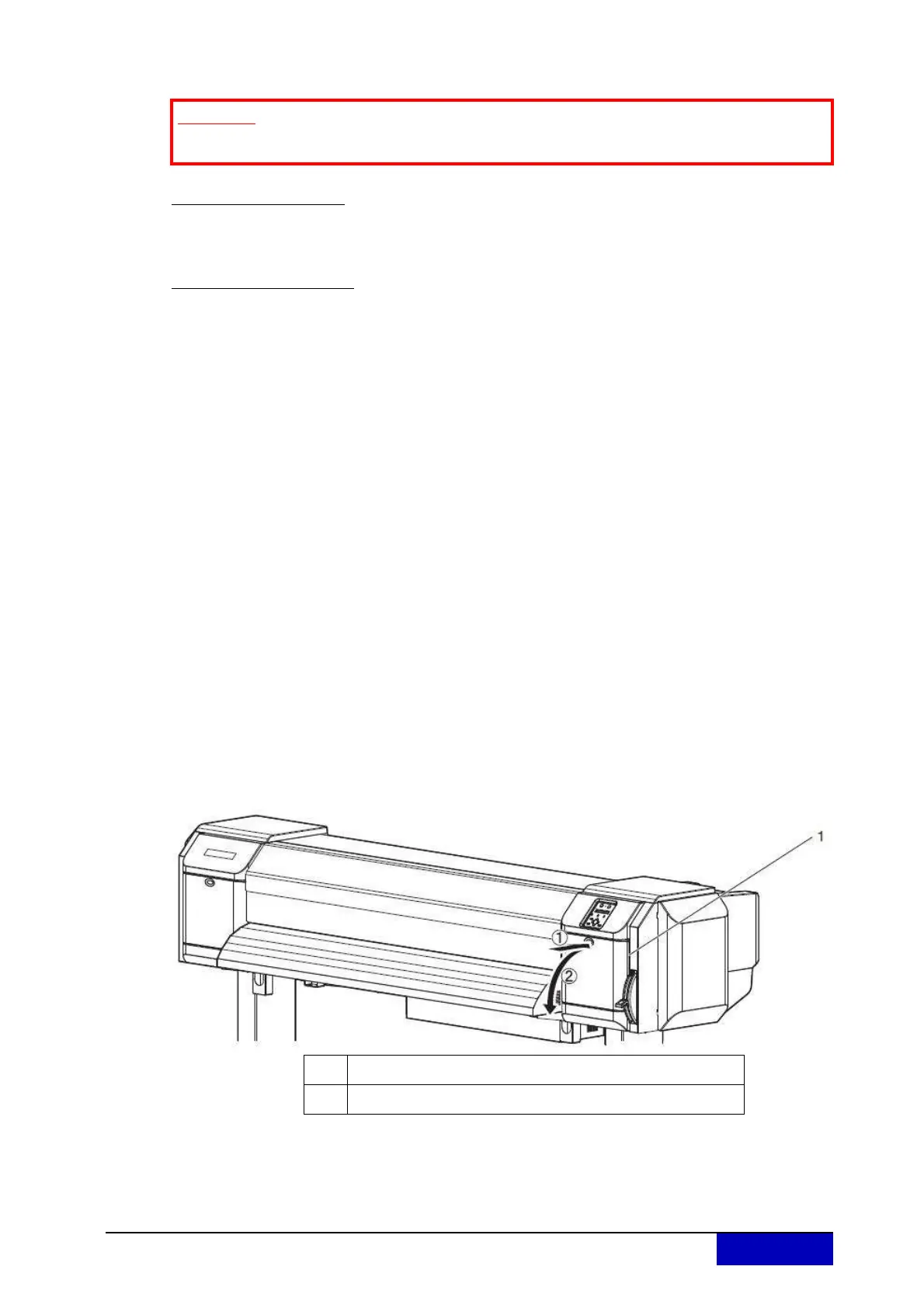
Step 5: Open the maintenance cover at the right side of the printer.
Important
Only needed when working with UMS ink!
No. Name
1 Maintenance cover











 To Next Page