myPOS Smart Technical Specicaon & Warranty (Updated March 2018) | page 10
myPOS Mini - User Manual | page 10
Mobile Top-up
If your customer wants to load an amount within a stored value card, you should
follow these few basic steps:
Step 1: From the home screen, press (F1) from the keyboard in order to enter the
Transacon type menu. Select MOBILE TOPUP by pressing key (2) and conrm with
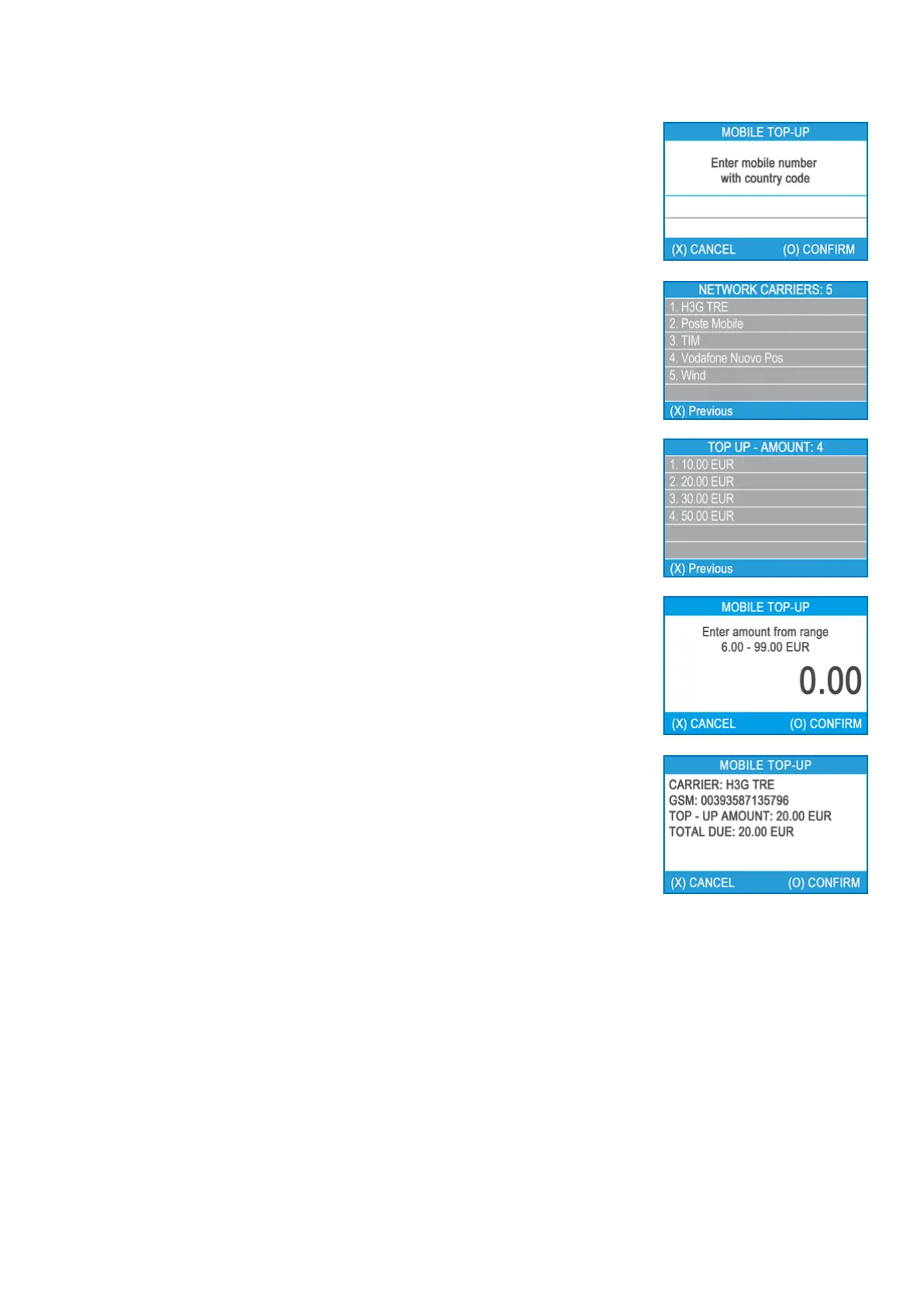
the green key (O). The myPOS Mini terminal will display the MOBILE TOP-UP screen
Step 2: Enter the mobile number with the country code and conrm with the green
key (O).
Step 3: Select your customer’s carrier – service provided by 779+ operators
Step 4: Enter an amount to top-up. Depending on the carrier you should select from
a predened list or enter an amount of your client’s choice within a suggested range
Step 5: Review all entered details and conrm the green key (O).
Step 6: The myPOS Mini device will request an email to send the merchant’s copy of
the receipt for the approved PAYMENT transacon.



 To Next Page