myPOS Smart Technical Specicaon & Warranty (Updated March 2018) | page 7
myPOS Mini - User Manual | page 7
Activation
Once connected to the Internet, your myPOS Mini device needs to be acvated
before you start accepng payments with credit or debit cards through it. Every
myPOS Mini device has a unique serial number which is used by the myPOS to
idenfy on which device a payment transacon is being accepted.
During the acvaon procedure, the myPOS links the serial number of your new
myPOS Mini device with your myPOS account. Once your new myPOS Mini has been
acvated, every transacon accepted through it will be credited to your myPOS
account.
You can link more than one myPOS Mini devices to one e-money account. In this
case, payments accepted through all myPOS terminals, will be credited to one
myPOS account.
Activation code
The acvaon procedure is a one-me process and requires an acvaon code
generated by the myPOS to be entered manually by you on your myPOS Mini device.
Step 1: If you do not have an myPOS account, please register on mypos.com and
follow the instrucons. Once you have been successfully registered, the system will
automacally generate an acvaon code for you. If you have a myPOS account
already, please log in to your account and go to the menu Devices > Acvate your
device and follow the steps.
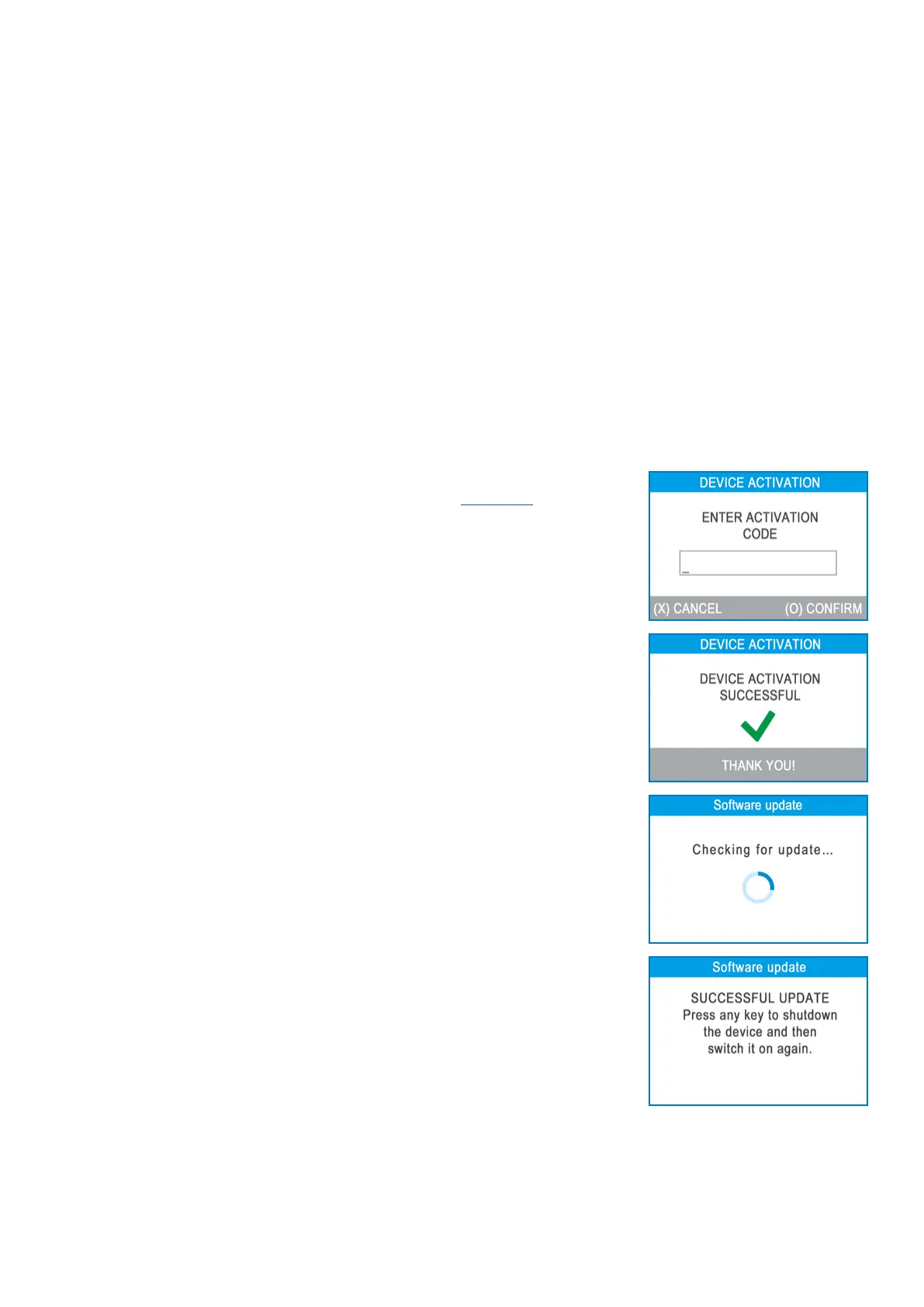
Step 2: Please enter the acvaon code on the myPOS Mini device and press the
green key (O). Your myPOS Mini device must be connected to the Internet in order to
complete the acvaon process.
Step 3: Once your myPOS Mini has been successfully acvated, your myPOS Mini
will display the conrmaon screen and will automacally check for any updates
of the terminal soware. If a new update is found, the myPOS Mini terminal will
automacally download and install it.
Congratulaons!
Your new myPOS Mini is now acvated and ready to be used. You can nd the new
myPOS Mini listed in your myPOS account in the POS terminals menu secon.
Once myPOS Mini device is acvated by you, it is permanently linked to your myPOS
account. Even if the device is stolen or lost, any payment transacon made through
it will be credited to your account. In case your device is lost or stolen, please inform
Customer Support Centre immediately.



 To Next Page