myPOS Smart Technical Specicaon & Warranty (Updated March 2018) | page 5
myPOS Mini - User Manual | page 5
How to connect your myPOS Mini
with Wi-Fi
Make sure the myPOS Mini is in the range of your Wi-Fi network. Switch ON your
myPOS Mini and wait for a few seconds unl it completes the inializaon. If you
see the screen CONNECTION TYPE, please proceed to Step 1 below. If you are in the
Bluetooth Menu please press (<) to return to CONNECTION TYPE screen and proceed
to Step 1 below. Otherwise please press (X) to exit from the current operaon, then
press (F2) to enter SETTINGS MENU 1 and choose Change Connecon type (3).
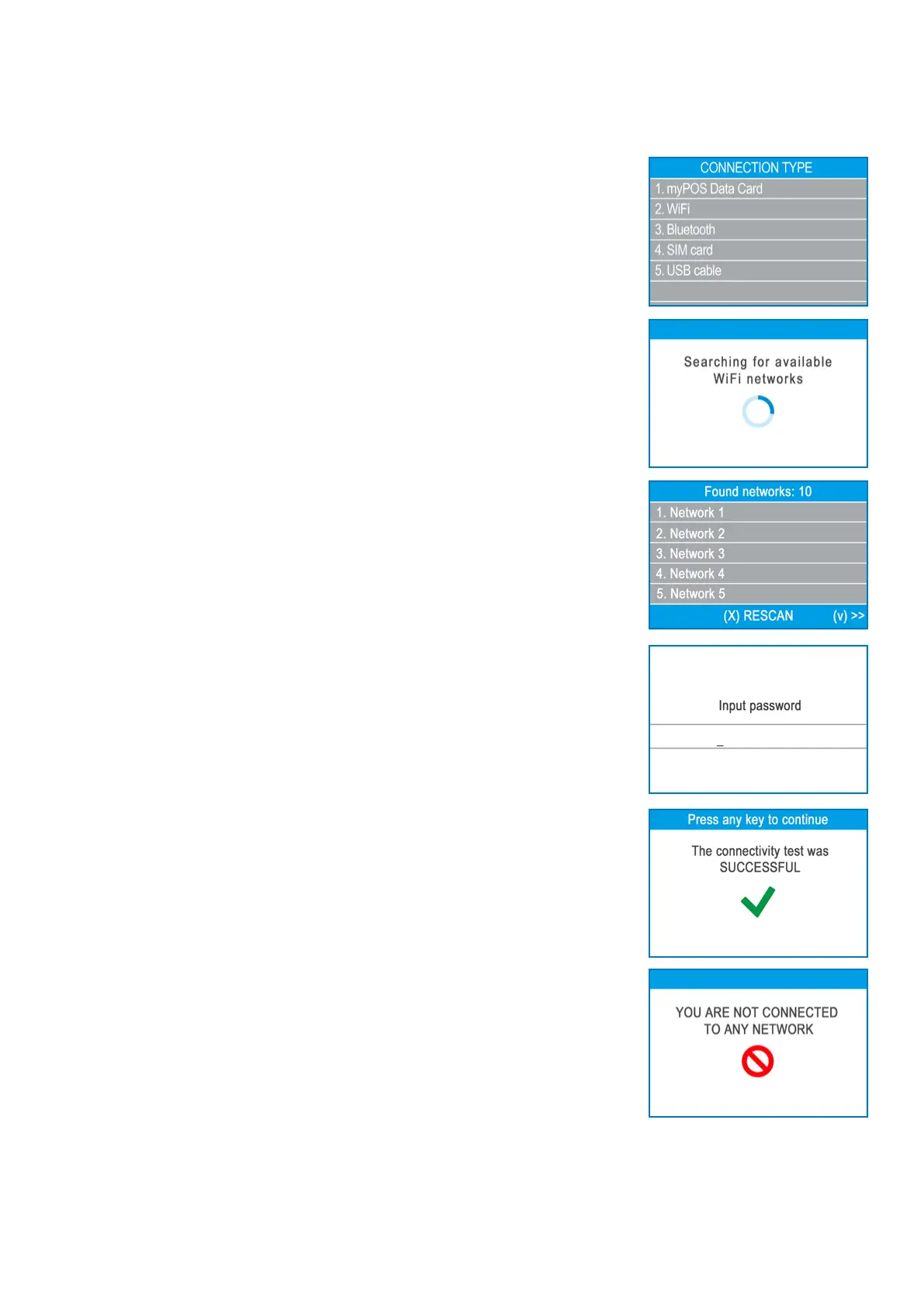
Step1: Select “Wi-Fi” from the CONNECTION TYPE menu by pressing (2) on the
keyboard. The myPOS Mini will scan for available Wi-Fi networks within its range and
will display a list of their names on the screen.
Step2: Find the Wi-Fi network you would like to use and select it by pressing its
number (from 1 to 6) on the keyboard. If there are more than 6 available networks
on the list, you can switch to the next page of the list by pressing (F2). If you cannot
nd your Wi-Fi network on the list, press (X) and myPOS Mini will rescan (search
again) for available Wi-Fi networks. Make sure your myPOS Mini is in the range of
your network.
Step3: If your Wi-Fi network requires a password, myPOS Mini will display the Wi-Fi
Password screen, where you can enter the network password. In case your password
contains digits, press the relevant number key. In case your password contains
leers or other symbols, press the relevant number key and then press F2 as many
mes as necessary unl the correct leer is reached and displayed. If you make a
mistake, press the yellow key (<) to delete the last entry. When you have entered the
password, press the green key (O) in order to complete the operaon.
Once it has connected to your Wi-Fi network, myPOS Mini will perform a test of the
connecon to myPOS system.
If the test is successful, the following myPOS Mini screen will appear:
If the connecon test is unsuccessful, the myPOS Mini screen will display an error
message.



 To Next Page