3. OTHERS
- BEGIN (MAR/1
ST
/SUN/00H)
- END (SEP/1
ST
/MON/00H)
(Set the BEGIN and END time for the specific area except EU and USA)
use the UP and DOWN arrow controls to change the value of month,
week, day and hour.
CAUTION:
-Do not set the start time to 23:00 for DLS.
-DLS can’t be applied, if the date of BEGIN and END is same.
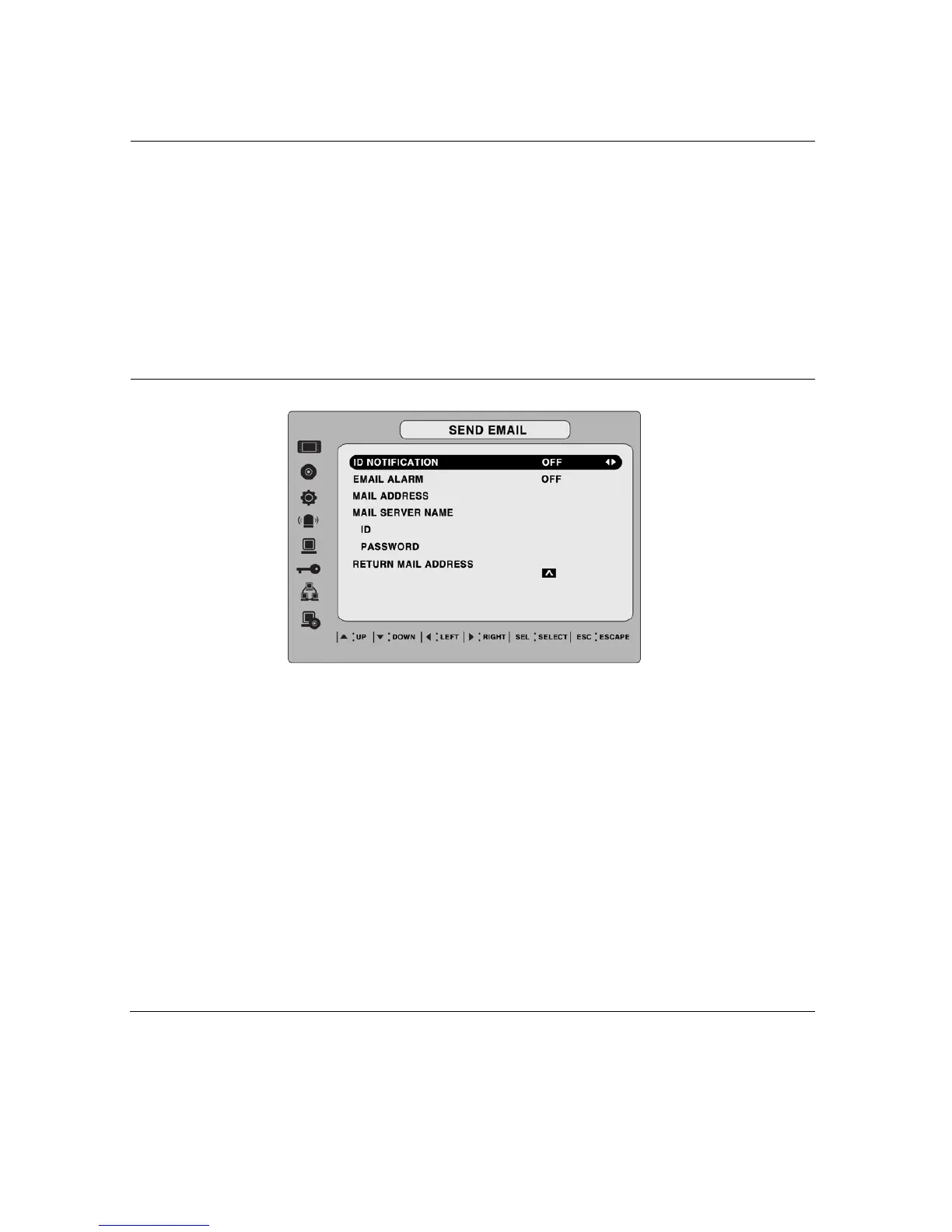
SEND EMAIL
Enable/disable SEND EMAIL function.
IP NOTIFICATION: Enable/disable sending daily e-mail reports on the
status of your DVR.
EVENT ALARM: Enable/disable sending e-mail reports when event
alarm occurs.
MAIL ADDRESS: Enter the appropriate email address to enable sending
daily e-mail reports.
MAIL SERVER NAME: Enter the appropriate email server information to
enable sending daily e-mail reports.
ID: Enter the ID of mail address.
PASSWORD: Enter the password of mail address.
RETURN MAIL ADDRESS: Enter the e-mail address for return email.
When e-mail does not deliver or not work properly, the return email will
be delivered to this e-mail address.
34


 To Next Page