SCXI Quick Start Guide 12 ni.com
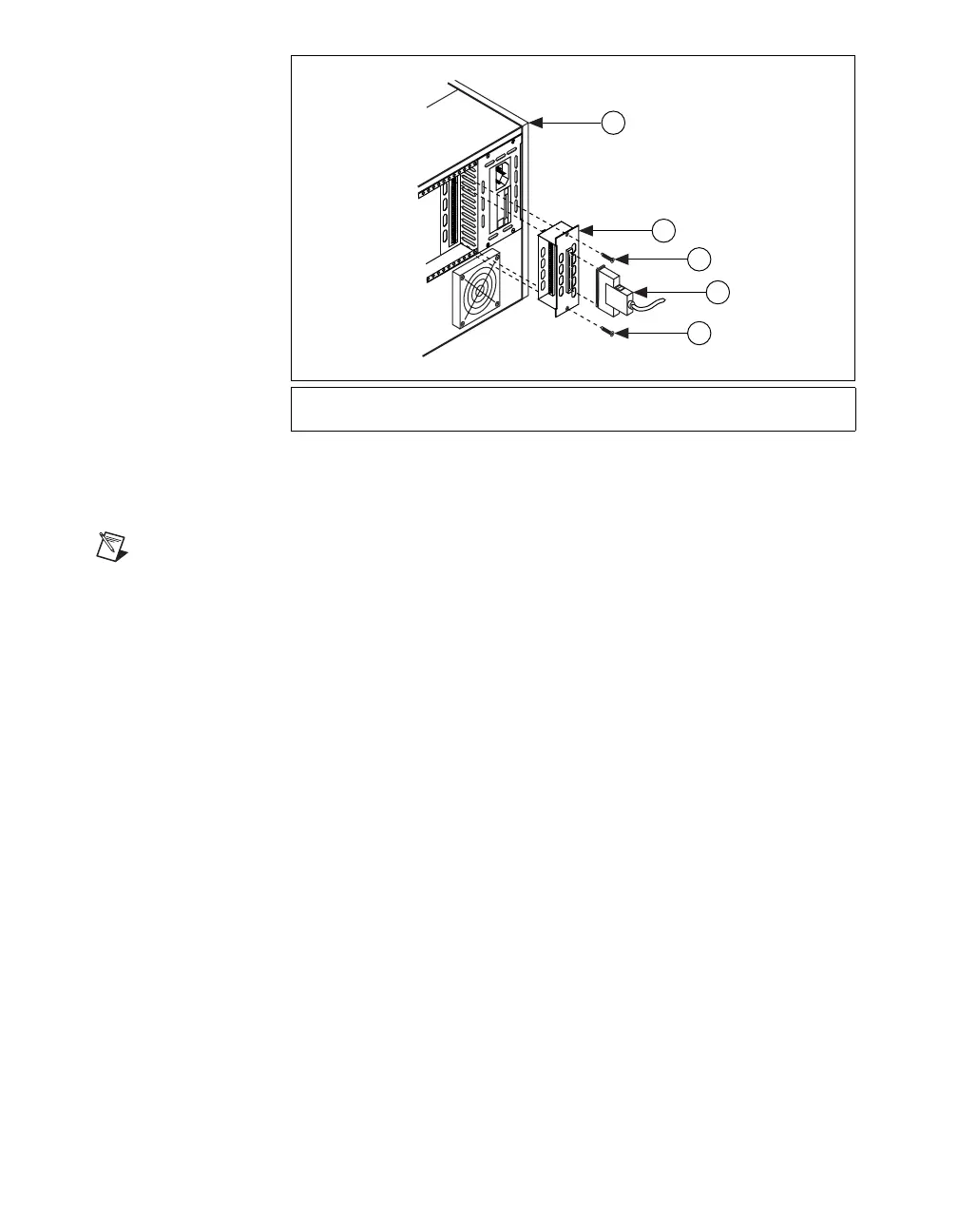
Figure 9. Installing the Cable Adapter
Multichassis System
Note The SCXI-1346 covers the rear connector of two modules. The module to the right
of the one directly connected to the SCXI-1346 cannot have an external cable inserted into
its rear 50-pin connector.
To connect the multichassis system, you must use one SCXI-1346
multichassis adapter for every chassis in the chain except the chassis
furthest from the E Series DAQ device. The last chassis uses the
SCXI-1349 cable adapter.
1. Identify the appropriate SCXI module to connect to the cable adapter.
Refer to step 1 of the Single-Chassis System section to determine the
appropriate module.
2. Insert the 50-pin female connection on the rear of the cable adapter into
the 50-pin male connector on the rear of the appropriate SCXI module.
3. Fasten the adapter to the rear of the SCXI chassis with the screws
provided with the SCXI-1346.
4. Repeat steps 1 through 3 for each SCXI chassis in the system,
excluding the last SCXI chassis in the chain.
1 SCXI Chassis
2 SCXI-1349 Cable Adapter
3 68-Pin Shielded Cable
4Screws
1
3
2
4
4
FU
S
E
PU
L
L


 To Next Page
 Loading...