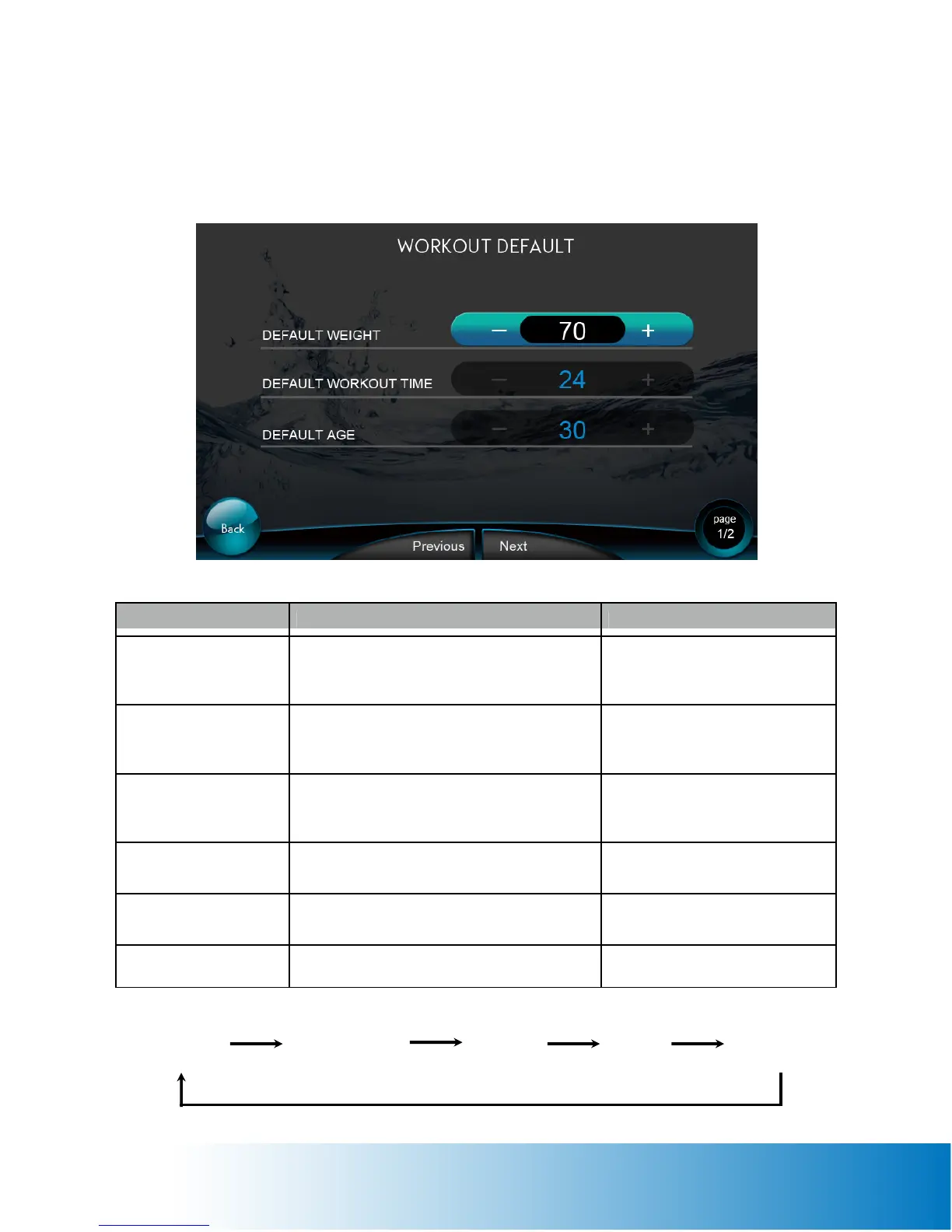
FUNCTION NAME ACTION RESULT
Default Weight
• Tap the + - buttons to adjust value
• Weight Limit: 0 ~ 999
• Default Weight = 80 Kg (176 lbs.)
The machine default weight = the
value inserted
Default Workout Time
• Tap the + - buttons to adjust value
• Workout Time Limit: 2 ~ 99 min
• Default Time = 20 minutes
The machine default workout time
= the value inserted
Default Age
• Tap the + - buttons to adjust value
• Age Limit: 10 ~ 99
• Default Age = 40 years
The machine default age = the
value inserted
Next
Tap to enter the next Workout Default page
(Page 2/2)
Next Workout Default page
shows
Previous
Tap to the Previous Workout Default page
(Page 1/2)
Staying on this page
Back
Back to the SETUP page SETUP page shows
Default
Weight
Default
Workout Time
Default Age
Next
Previous
Workout Default Page (Page 1 of 2)


 To Next Page