FUNCTION NAME
ACTION RESULT
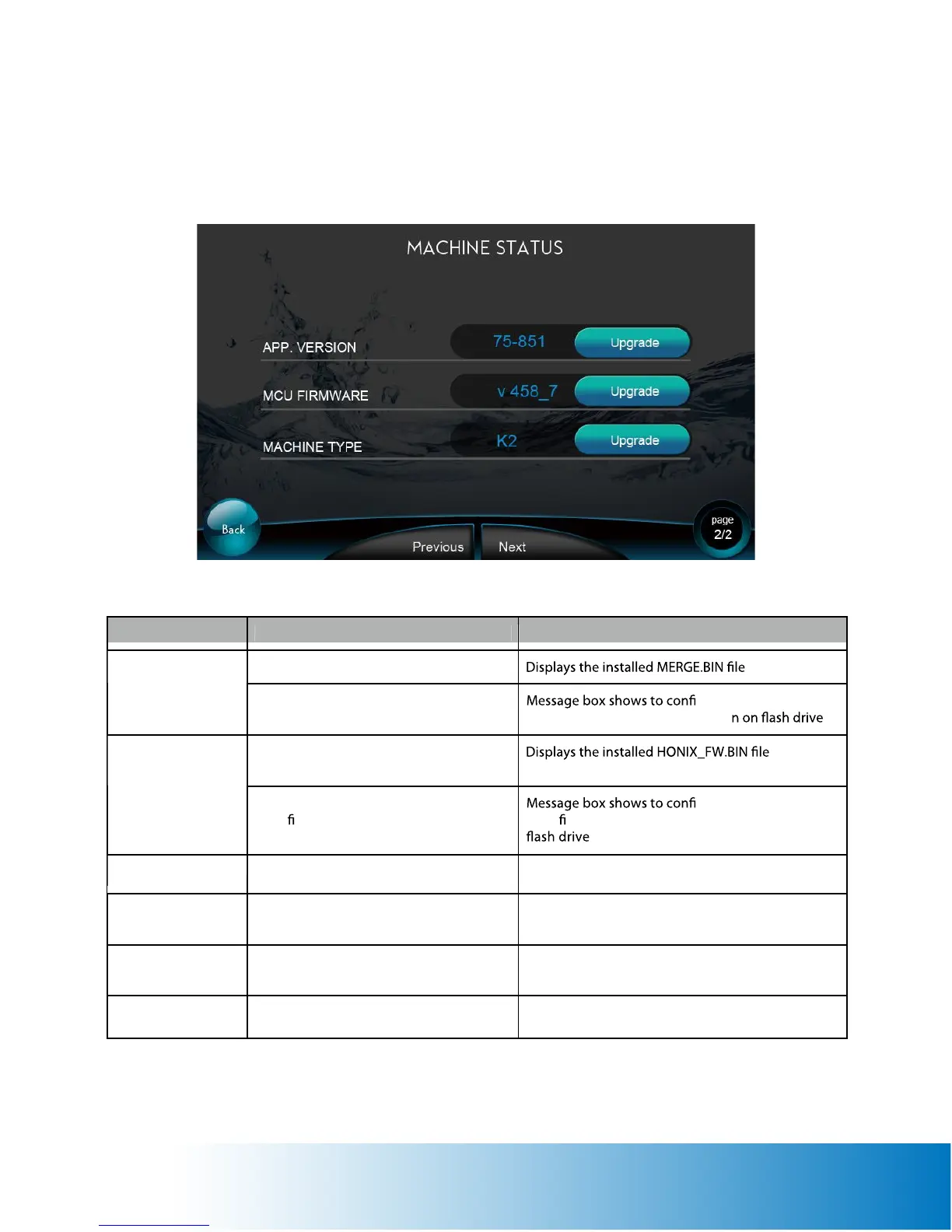
Displays the software version.
Software Version
Tap the Upgrade icon to update the
software.
rm the action. The
software will be updated to versio .
Displays the MCU Firmware Version.
MCU Version
Tap the Upgrade icon to update the
MCU rmware.
ALWAYS UPGRADE MCU VERSION FIRST!
rm the action. The
MCU rmware will be updated to version on
. ALWAYS UPGRADE MCU VERSION FIRST!
Displays the software Machine Type. Displays the Machine Type.
Next
Tap to enter the next Machine Status
page (page 2/2).
Stay on this page.
Previous
Tap to enter the Previous Machine Status
page (page 1/2).
Displays previous Machine Status page.
Back
Tap to enter the Setup Page. Displays setup page.
Machine Status Page (Page 2 of 2)


 To Next Page