18
Installation Guide
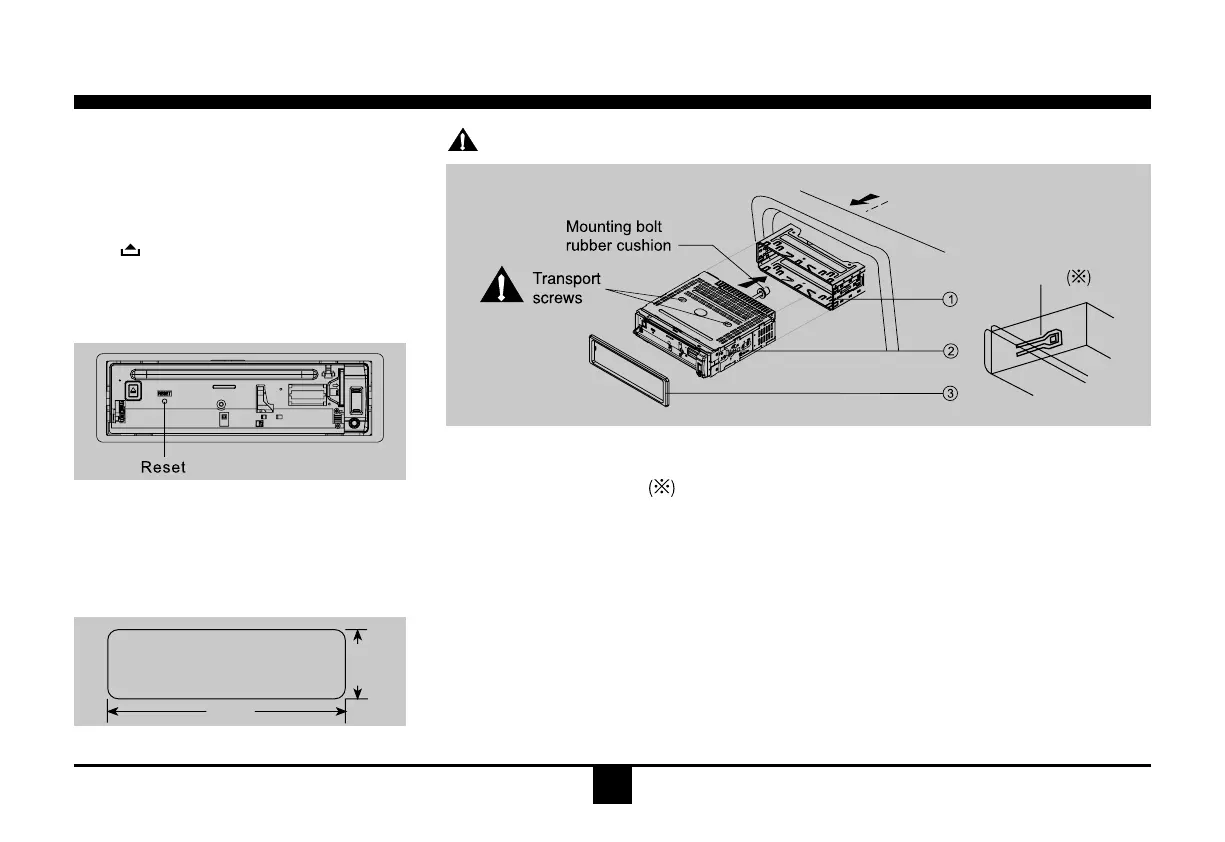
Important:Removethesetwoscrewsbeforeinstallation.Otherwise,theplayerwillnotwork.
Installation Procedures
First complete theelectricalconnections, and
thencheckforcorrectness.
Reset
Press buttonto ipdownthe panel.Then
presstheRESETbuttonwithapointedobject
toresettheunittotheoriginalstatus.
Note:PresstheRESETbutton willerase the
clockandstoredstations.
Installation Opening
Thisunit can be installedin any dashboard
havinganopeningasshownbelow.
Thedashboard should be4.75mm -5.56mm
thickinordertobeabletosupporttheunit.
52mm
183mm
1. Inset mounting collar into the dashboard, and bend the mounting tabs out with a screw-
driver.
Makesurethatlocklever
isushwiththemountingcollar(notprojectingoutward).
2. Secure the rear of the unit.
Afterxingmountingboltandpowerconnector,xtherearoftheunittothecarbodybyrubber
cushion.
3. Insert trim plate.
lock lever


 To Next Page