14
DVD Setup
Press
SETUP
to display setup menu on the
screen.
Use
toselectsetupitems:
SYSTEM - LANGUAGE - VIDEO
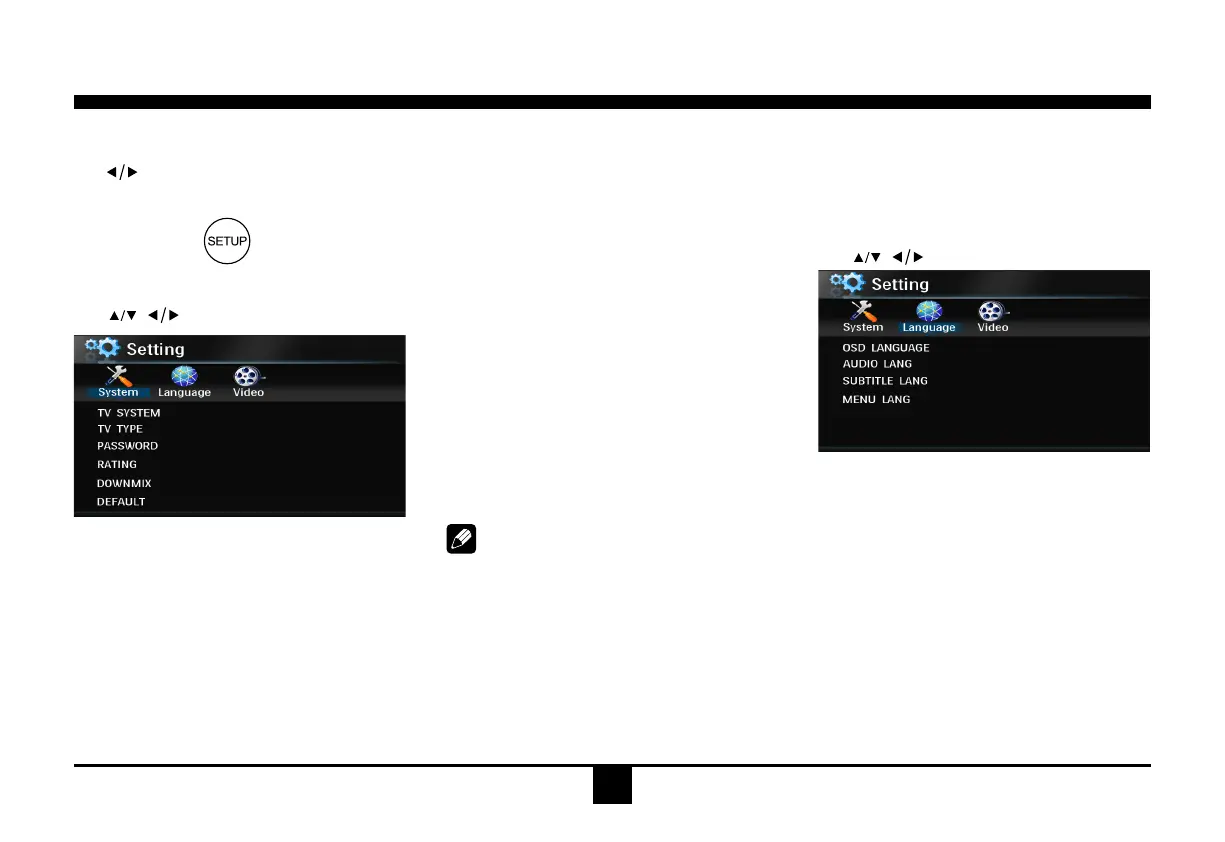
DVD System Setup
Use , toselectand
ENTER
toconrm.
- TV SYSTEM: NTSC/PAL 60/PAL/AUTO
SelecttheTVsysteminthesettingmenu.
- TV TYPE: 4:3PS/4:3LB/16:9
SelectTVtypetowatchwidescreenmovies.
4:3PanScan:For4:3TV,leftandrightedges
willbecut.
4:3LetterBox:For 4:3TV,blackbarswill ap-
pearontopandbottom.
16:9:For16:9widescreenTV.
- PASSWORD
1.Pressnumberbutton"0000"ontheremote
control, then press the ENTER button to
conrm.
2. Press the desired 4-digit password, and
thenpressENTERbuttontoconrm.
3.Recordthepasswordandkeepitinasafe
placeforfuturereference.
If you forget the password, please
enter 0000 to reset a new password.
The password : 0000
- RATING:
1 KID SAFE/2 G/3 PG/4 PG13/5 PG-R/6 R/7
NC-17/8 ADULT
Theratingofthediscisfrom1to8:
(1)withthemostlimitswhenplaying.
(8)withtheleastlimitswhenplaying.
Originalsetting:8
Note:
The rating can be selected only under the
passwordunlocked status,andthelimits can
be worked only under the password locked
status.
- DOWNMIX:
LT(/RT)/STEREO/VSS
Selectcompositeaudiooutputfrom2channel
speakersystem.
- DEFAULT: RESTORE
Ifthisitemisselected, the unit will return to
originalsetting.
DVD Language Setup
Use , toselectand
ENTER
toconrm.
- OSD LANGUAGE:
English
German
Spanish
French
Portuguese
Selectonelanguagethatyouarefamiliarwith
todisplaysystemmenu.
- AUDIO LANG:
Chinese
English
French
Spanish
Portuguese


 To Next Page