4
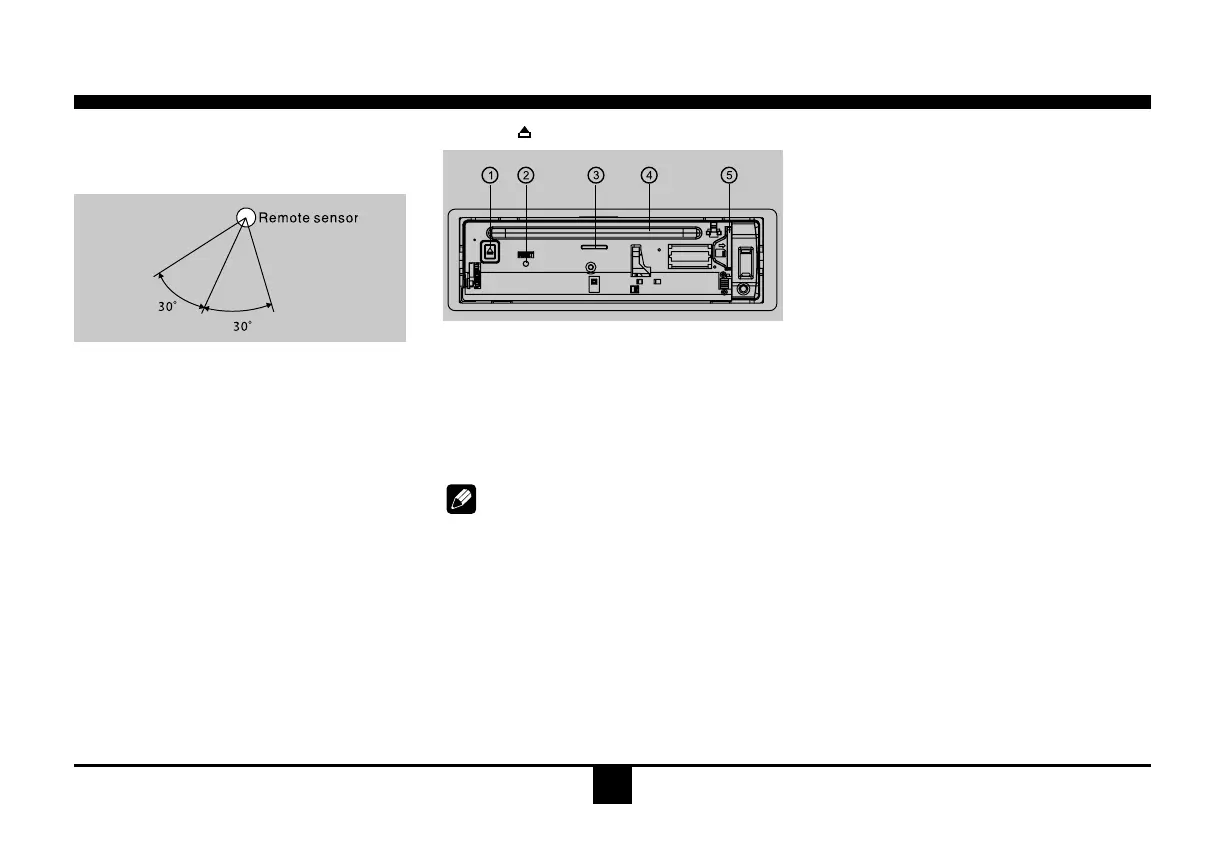
Pressthe buttontoopenthepanel.
1.Whenthereisadiscinserted,shortpressto
ejectthedisc,press andholdmorethan2
secondstoejectthediscforcedly.
When there is not a disc inserted, press
and holdmorethan 2 seconds to resetthe
mechanismcore.
2Resethole
Note:
PressingtheRESETholewillerasetheclock
settingandstoredstations.
3Panelstatusindicator
Lightupwhenyouipthepaneldown;
Twinklewhenyouremovethepanel.
4Discslot,insertthedisc.
5SD/MMCcardslot.
Remote Controls
Remote control operating range
Theremotecontrolcanoperatewithina
distanceof3~5m.
Warning
• Store the battery where children cannot
reach. Ifa childaccidentally swallows the
battery,consultadoctorimmediately.
• Donotrecharge,short,disassembleorheat
thebatteryordisposeitinare.
• Donotleavethebatterywithothermetallic
materials.Otherwise,the battery may start
togiveoffheat,crackorcatchre.
• Whenthrowing awayor saving thebattery,
wrapitintapeandinsulate.
Behind the Panel
General Operation
Switching on and off
1.PressPWRtoturnontheunit.
2. Press SRC once or more to select your
desiredfunction: DISC, USB,CARD,Aux (
Aux-in),Tuner(Radio).
3. Pres PWR morethan2 seconds topower
off.
4. When you switch off the system or car
ignition,the settings,tunerpresetsand the
volume levelwill be retained in the unit's
memory.
Clock Display
Press DISP on the panel or on the remote
controltodisplayclocktime, andpress DISP
againtoexit.
Clock Setting
1.PressDISP morethan2 seconds, minute
displayblinks, then rotate theknob to set
minute.
2.Press theknobonce, hour display blinks,
thenrotatetheknobtosethour.
3.PressDISPagaintoexit.


 To Next Page