2
Panel Controls
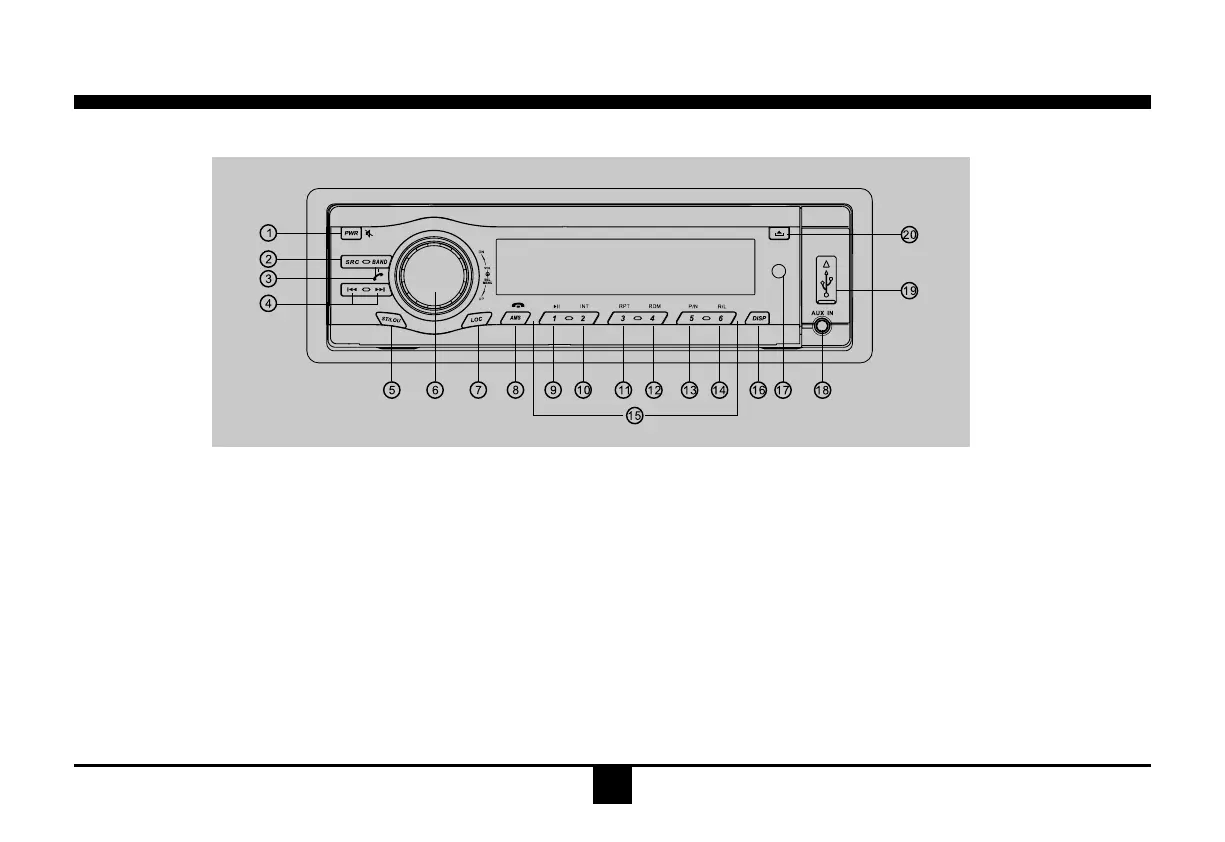
Power on/off: Press PWR to turn on/off the unit.
1.-Poweron/off(pressmorethan2seconds)
-Mute
2.Source switch:Radio,Disc,USB, SD/MMC
Card,Aux-in
3.-Bandswitch:FM-FM2-FM3-MW1-MW2
(Radiomode)
-Dialpickup/Transferthecall(Bluetooth
mode)
4.-Tofastsearchwithinatrack/skiptonext
orprevioustrack
-Radiotune
5.-Loudness
-FMmono/stereo(Radiomode,press
morethan2seconds)
6.-Rotatetheknobtoadjustvolumelevel.
-Shortpresstoselectaudiomenu,and
rotatetheknobtoadjustlevel.
-Longpresstoenterintosettingmenu,
theneachpresschangesthemode.
7.Radiolocal/distant(Radiomode)
8.-Radiostationautopreset
-Hangupthecall(pressmorethan2
seconds,inBluetoothmode)
9.Button1:Play/Pause
10.Button2:Introplay(10sec)
11.Button3:Trackrepeatplay
12.Button4:Trackrandomplay
13.Button5:-VideosystemNTSC\PAL60\
PAL\AUTO
-Folderdown(MP3)
14.Button6:-DVDaudio/VCDaudioL/R/ST
-Folderup(MP3)
15.utton1~6RadioPreset:
Presstolistentoapresetstation,andhold
formorethan2secondstostorestation.
16.-Shortpresstoswitchtoclockdisplay,
pressagaintoexit.
-Longpresstoenterclocksetting.
17.Remotesensor
18.AUXin
19.USBport
20.Panelopen


 To Next Page