7
4. Take out USB Device
PresstheSRC buttontonon-USBmodeand
takeouttheUSBdevicefromtheUSBjack.
Note:
USBfunctions(ashmemorytype)MP3music
play.
1.SD/MMCcardsupport.
2. USBflashmemory 2in 1(SD/MMC) sup-
port.
3.SupportFAT16&FAT32
4.Filename:32byte/dirname:32byte/tag
name:32byte.
5.Tag(id3tagver2.0)
Title/artist/album:32bytesupport.
6.Multicardreadernotsupport.
7.USB1.1support.
Not all kinds of USB devices are compat-
ible with the unit.
USB/SD/MMC/MP3 Mode
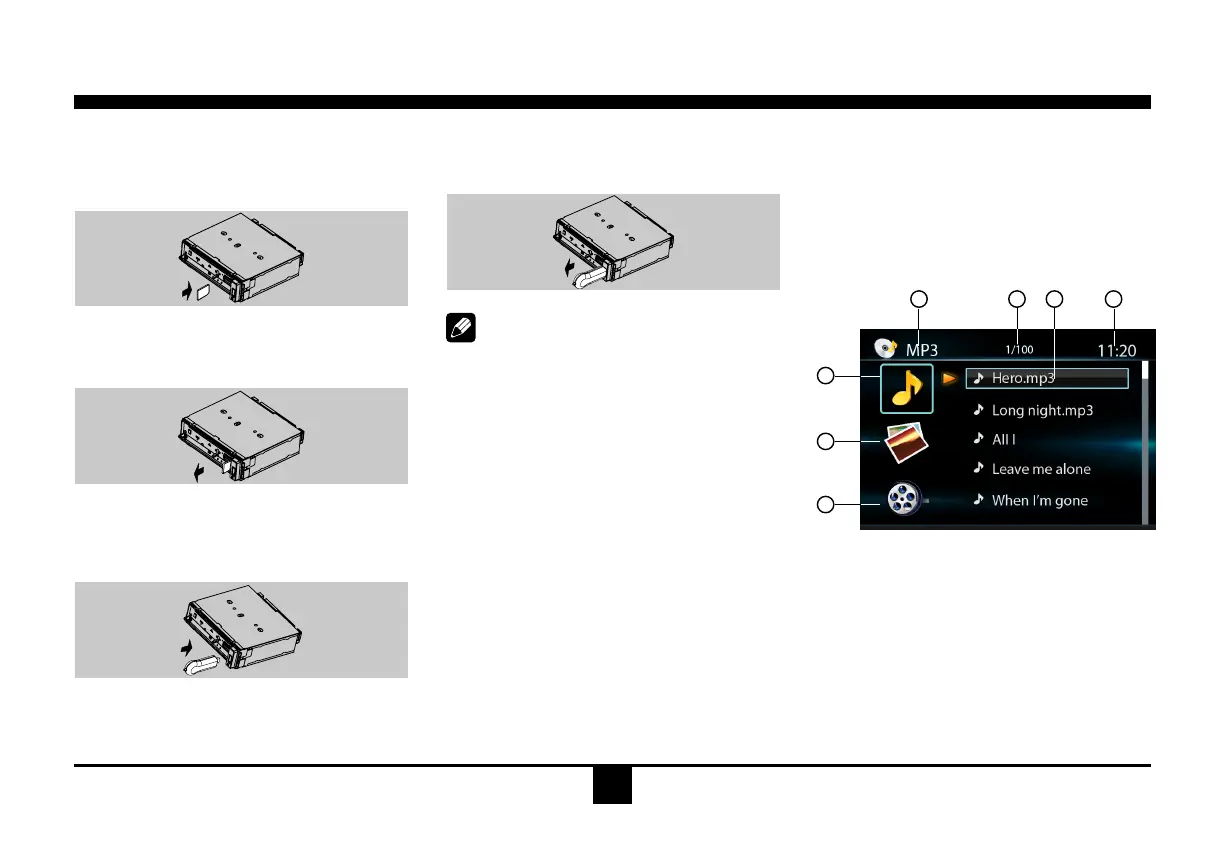
1. Load SD/MMC Card
Openthe paneland insertthe SD/MMCcard
intotheslot.Closethepanel,theunitwillread
theleofthecardautomatically.
2. Take out SD/MMC Card
PushSRC buttontonon-SDmode, pressthe
SD/MMCcardtopopout.
3. Load USB Device
Insert USB device into the USB jack.The
unit will read the file in the USB device
automatically.
Accessing Disc Mode
Ifa disc is already in thediscslotbut is not
playing, press the SRC button on the front
panelorontheremotecontroltoswitchtothe
DISCsource.ToplaylesfromanSDorUSB
that is already inserted, choose the CARD
orUSB source. Thedisc playback screenis
indicatedbelow:
1.SourceIndicator
2.CurrentTrack/TotalTrack
3.NameoftheSongDisplay
4.Time/Clock
5.AudioFolder
6.PictureFolder
7.VideoFolder
2 4
5
6
7
1 3
Disc Mode


 To Next Page