3
Power on/off: Press
to turn on/
off the unit.
Remote Controls
Replacing the lithium battery of
remote control unit.
Whentherangeofoperationofthecard
remote controlbecomes short ornofunction,
replace the lithium battery with a new one.
Make surethebatterypolarityreplacementis
correct.
1.Pulloutthebatteryholderwhilepressingthe
stopper.
2. Insert the button-type lithium batterywith
the(+)markfacingupward.Insertthebattery
holderintotheremotecontrol.
1 2
(CR 2025)
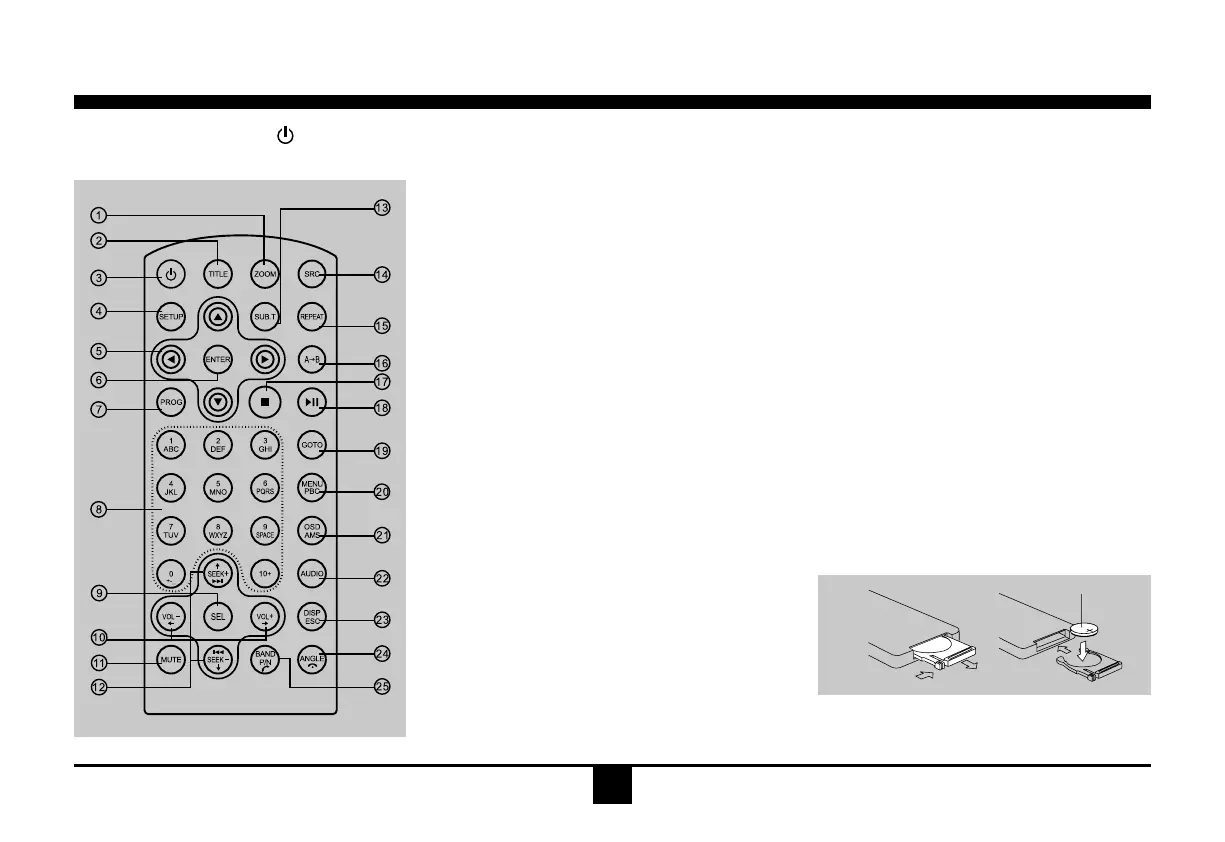
1.Zoom(DVD/VCDonly)
2.Title(DVDonly)
3.Poweron/off
4.Setup
5.Menucursor
6.Enter
7.Program
8.Digitarea
9.-Shortpresstoselectaudiomenu,androtate
theknobtoadjustlevel.
-Longpresstoenterintosettingmenu,then
eachpresschangesthemode.
10.Volume
11.Mute
12.-Radiotune
-Trackskip/seek
13.Subtitle(DVDonly)
14.-Radio
-Disc(whendiscinserted)
-Card(whenSD/MMCinserted)
-USB(whenUSBinserted)
-Aux-in
15.Repeat
16.RepeatA-B
17.Stop/Return
18.Play/Pause
19.Gotosearch
20.-DVDmenu
-PBC(forVCD2.0orup)
21.-OSD:Onscreendisplay
-AMS:Radiopresetscan/Radioautopreset
22.-DVDaudio
-VCDaudioL/R/ST
23.-Shortpresstoswitchtoclockdisplay,
pressagaintoexit.
-Longpresstoenterclocksetting.
-Returntopreviousmenu(Settingmenu)
24.-Angle(DVDonly)
-Terminatecall(inBTmode)
25.-VideosystemNTSC/PAL60/PAL/AUTO
-Radioband(inRadiomode)
-Dial/Receivecall(inBTmode)


 To Next Page